
双向表格条件概率演示
几何画板及绘图内容加载中,请稍等……
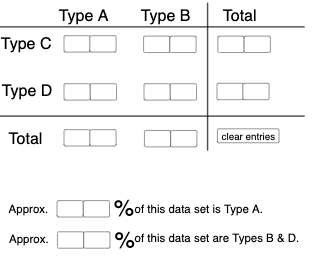
①本范例通过交互式双向表格演示条件概率的计算与可视化;②涉及核心数学概念包括条件概率、概率统计、数据可视化;③构造要点:使用Textfield, Sequence, If, Segment, Translate等GeoGebra命令和对象创建动态表格和图形;④适合高中数学教学,用于帮助学生理解概率统计中的条件概率应用。
GeoGebra 命令及参数
Textfield(a) → InputBox1Textfield(b) → InputBox2Textfield(c) → InputBox3Textfield(d) → InputBox4Textfield(f) → InputBox6Textfield(g) → InputBox7Textfield(h) → InputBox8Textfield(i) → InputBox9Textfield(j) → InputBox10Textfield(k) → InputBox11Textfield(l) → InputBox12Textfield(m) → InputBox13Textfield(n) → InputBox14Textfield(o) → InputBox15Textfield(p) → InputBox16Textfield(q) → InputBox17Sequence(CountIf[x ≟ i, l1], i, 0, 9, 1) → l2, {0, 0, 0, 0, 0, 0, 0, 0, 0, 0}If(c1, "√", "X") → text2If(c2, "√", "X") → text3If(c3, "√", "X") → text4If(c4, "√", "X") → text5Segment((-5, 0), (12, 0)) → rTranslate(r, Vector[(0, 4.35)]) → r'Segment((7.3, -1.65), (7.3, 5.5)) → sIf(Max[l2] ≥ 4, "At least one digit occurs more than 3 times!", "Each digit occurs at most 3 times.") → text1Textfield(a_1) → InputBox5Textfield(a_2) → InputBox18If(c5, "√", "X") → text6Textfield(t) → InputBox19Textfield(u) → InputBox20If(c6, "√", "X") → text11
AI 绘图提示语参考
画一个交互式双向表格来演示条件概率的计算和可视化,表格包含多个输入框用于输入数据,下方有一个水平线段,上方有垂直线段,并根据输入数据在表格中显示对勾或叉号,同时根据条件显示不同的文本提示。
以上提示语为根据原始绘图命令整理而来,仅供参考。