
截角二十面体
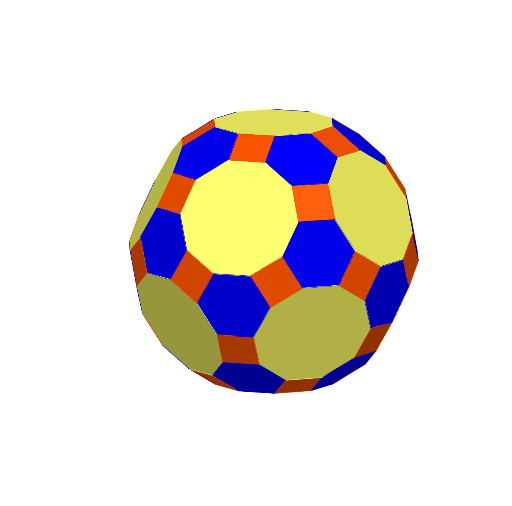
几何画板及绘图内容加载中,请稍等……
所属专题
Archimedean Solids
这个范例演示了截角二十面体的构造。截角二十面体是一种立体几何图形,由正十二面体和正二十面体截角后得到。本例涉及的核心数学概念包括立体几何和几何作图。通过使用GeoGebra命令如Polygon、Rotate、Centroid等,可以构造出截角二十面体。适合高中及以上学生或相关教学使用。
GeoGebra 命令及参数
Polygon(A, B, 10, xOyPlane) → poly1, f, p, C, D, E, F, G, H, I, J, g, h, i, j, k, l, m, nPolygon(A, B, 6, xOyPlane) → poly2, q, N, r, s, t, a, b, K, L, MPolygon(B, C, 4, xOyPlane) → poly3, c, d, e, f_1, O, PRotate(poly2, 142.62°, q) → poly2'Rotate(N, 142.62°, q) → N'Rotate(M, 142.62°, q) → M'Rotate(L, 142.62°, q) → L'Rotate(K, 142.62°, q) → K'Rotate(poly3, 148.28°, c) → poly3'Rotate(O, 148.28°, c) → O'Rotate(P, (148.28 * °°), c) → P'Centroid(poly1) → QOrthogonalLine(Q, poly1) → g_1Rotate(poly2', 72°, g_1) → poly2''Rotate(poly2'', 72°, g_1) → poly2'''Rotate(poly2''', 72°, g_1) → poly4Rotate(poly2', -72°, g_1) → poly2''_{1}Rotate(poly3', 72°, g_1) → poly3''Rotate(poly3', 144°, g_1) → poly3''_{1}Rotate(poly3', -72°, g_1) → poly3''_{2}Rotate(poly3''_{2}, -72°, g_1) → q1Rotate(M', -72°, g_1) → M''Rotate(K', -72°, g_1) → K''Rotate(L', -72°, g_1) → L''Rotate(K'', -72°, g_1) → K'''Rotate(N', -72°, g_1) → N''Midpoint(N'', I) → RMidpoint(K''', H) → SLine(R, S) → h_1Midpoint(R, S) → TOrthogonalLine(T, q1) → i_1Intersect(g_1, i_1) → UPlane(U, R, S) → p_1Mirror(poly1, p_1) → poly1'Mirror(poly3''_{1}, p_1) → q2Mirror(poly3''_{2}, p_1) → q3Rotate(poly1', 72°, g_1) → poly1''Rotate(poly1'', 72°, g_1) → poly1'''Rotate(poly1''', 72°, g_1) → poly5Rotate(poly5, 72°, g_1) → poly5'Rotate(q3, 72°, g_1) → q3'Rotate(q3', 72°, g_1) → q3''Rotate(q3'', 72°, g_1) → q3'''Rotate(L', 72°, g_1) → L''_{1}Rotate(M', 72°, g_1) → M''_{1}Rotate(L''_{1}, 72°, g_1) → VRotate(M''_{1}, 72°, g_1) → WRotate(O', 72°, g_1) → O''Rotate(K', 72°, g_1) → K''_{1}Rotate(K''_{1}, 72°, g_1) → ZRotate(V, 72°, g_1) → V'Rotate(W, 72°, g_1) → W'Centroid(poly1') → A_1OrthogonalLine(A_1, poly1') → j_1Rotate(M'', -72°, j_1) → M'''Rotate(M'', -36°, j_1) → M'''_{1}Rotate(M''', -36°, j_1) → B_1Rotate(B_1, -36°, j_1) → C_1Rotate(C_1, -36°, j_1) → D_1Rotate(D_1, -36°, j_1) → E_1Rotate(E_1, 72°, g_1) → F_1Rotate(F_1, 72°, g_1) → G_1Rotate(M'''_{1}, 72°, g_1) → H_1Rotate(G_1, 72°, g_1) → I_1Rotate(H_1, 72°, g_1) → J_1Rotate(I_1, 72°, g_1) → K_1Rotate(J_1, 72°, g_1) → L_1Rotate(L_1, 72°, g_1) → M_1Rotate(M''', 144°, g_1) → N_1Rotate(M''', -72°, g_1) → O_1Rotate(M''', -144°, g_1) → P_1Rotate(B_1, 72°, g_1) → Q_1Rotate(M''', 144°, g_1) → R_1Rotate(B_1, -72°, g_1) → S_1Rotate(M''', -144°, g_1) → T_1Rotate(C_1, 72°, g_1) → U_1Rotate(C_1, 144°, g_1) → V_1Rotate(C_1, -72°, g_1) → W_1Rotate(C_1, -144°, g_1) → Z_1Rotate(D_1, 72°, g_1) → A_2Rotate(D_1, 144°, g_1) → B_2Rotate(D_1, -72°, g_1) → C_2Rotate(D_1, -144°, g_1) → D_2Rotate(M''', 72°, g_1) → E_2Rotate(M''', 144°, g_1) → F_2Rotate(M''', -72°, g_1) → G_2Rotate(M''', -144°, g_1) → H_2Rotate(q2, 72°, j_1) → q2'Rotate(q2, 144°, j_1) → q2'_{1}Rotate(q2'_{1}, 72°, g_1) → q4Rotate(q2'_{1}, 144°, g_1) → q5Rotate(q2', 72°, g_1) → q2''Rotate(q5, 144°, g_1) → q5'Rotate(q5, 72°, g_1) → q5'_{1}Rotate(q2'', 72°, g_1) → q2'''Rotate(q2''', 72°, g_1) → q6Rotate(q6, 72°, g_1) → q6'Rotate(poly4, 72°, j_1) → poly4'Rotate(poly4', 72°, j_1) → poly4''Rotate(poly4'', 72°, j_1) → poly4'''Rotate(poly4', -72°, g_1) → poly4''_{1}Rotate(poly4''_{1}, -72°, g_1) → poly6Rotate(poly6, -72°, g_1) → poly6'Rotate(poly4'', 72°, g_1) → poly4'''_{1}Rotate(poly4'''_{1}, 72°, g_1) → poly7Rotate(poly7, 72°, g_1) → poly7'Rotate(poly7', 72°, g_1) → poly7''Rotate(Q_1, 72°, g_1) → I_2Rotate(I_2, 72°, g_1) → J_2Centroid(poly7'') → K_2OrthogonalLine(K_2, poly7'') → k_1Rotate(W_1, -60°, k_1) → L_2Rotate(L_2, 72°, g_1) → M_2Rotate(L_2, 144°, g_1) → N_2Rotate(L_2, -72°, g_1) → O_2Rotate(L_2, -144°, g_1) → P_2Rotate(L_2, -60°, k_1) → Q_2Rotate(Q_2, 72°, g_1) → R_2Rotate(Q_2, 144°, g_1) → S_2Rotate(Q_2, -72°, g_1) → T_2Rotate(Q_2, -144°, g_1) → U_2Rotate(Q_2, -60°, k_1) → V_2Rotate(V_2, 72°, g_1) → W_2Rotate(V_2, 144°, g_1) → Z_2Rotate(V_2, -72°, g_1) → A_3Rotate(Q_2, -144°, g_1) → B_3Rotate(V_2, -60°, k_1) → C_3Rotate(C_3, 72°, g_1) → D_3Rotate(C_3, 144°, g_1) → E_3Rotate(C_3, -72°, g_1) → F_3Rotate(C_3, -144°, g_1) → G_3Rotate(E_2, 60°, k_1) → H_3Rotate(H_3, 72°, g_1) → I_3Rotate(H_3, -144°, g_1) → J_3Rotate(H_3, -72°, g_1) → K_3Rotate(H_3, -144°, g_1) → L_3Rotate(H_3, 60°, k_1) → M_3Rotate(M_3, 72°, g_1) → N_3Rotate(M_3, -144°, g_1) → O_3Rotate(M_3, 144°, g_1) → P_3Rotate(M_3, -72°, g_1) → Q_3Midpoint(P_2, V_1) → R_3Midpoint(M_3, B_2) → S_3Plane(R_3, S_3, U) → q_1Mirror(poly1''', q_1) → poly8Mirror(q5, q_1) → q5'_{2}Rotate(poly8, 72°, g_1) → poly8'Rotate(poly8', 72°, g_1) → poly8''Rotate(poly8'', 72°, g_1) → poly8'''Rotate(poly8, -72°, g_1) → poly8'_{1}Rotate(q5'_{2}, 72°, g_1) → q7Rotate(q5'_{2}, -72°, g_1) → q8Rotate(q5'_{2}, -144°, g_1) → q9Rotate(q7, 72°, g_1) → q7'Intersect(g_1, poly8') → T_3Centroid(poly8') → U_3OrthogonalLine(U_3, poly8') → l_1Rotate(T_2, -36°, l_1) → V_3Rotate(V_3, 72°, g_1) → W_3Rotate(V_3, 144°, g_1) → Z_3Rotate(V_3, -72°, g_1) → A_4Rotate(V_3, -144°, g_1) → B_4Rotate(V_3, -36°, l_1) → C_4Rotate(C_4, 72°, g_1) → D_4Rotate(C_4, 144°, g_1) → E_4Rotate(C_4, -72°, g_1) → F_4Rotate(C_4, -144°, g_1) → G_4Rotate(C_4, -36°, l_1) → H_4Rotate(H_4, 72°, g_1) → I_4Rotate(H_4, 144°, g_1) → J_4Rotate(H_4, -72°, g_1) → K_4Rotate(H_4, -144°, g_1) → L_4Rotate(H_4, -36°, l_1) → M_4Rotate(M_4, 72°, g_1) → N_4Rotate(M_4, 144°, g_1) → O_4Rotate(M_4, -72°, g_1) → P_4Rotate(M_4, -144°, g_1) → Q_4Rotate(M_4, -36°, l_1) → R_4Rotate(poly7', -72°, l_1) → poly7''_{1}Rotate(poly7''_{1}, 72°, g_1) → poly9Rotate(poly9, 72°, g_1) → poly9'Rotate(poly7''_{1}, -72°, g_1) → poly10Rotate(poly7''_{1}, -144°, g_1) → poly11Rotate(q7, -72°, l_1) → q7'_{1}Rotate(q7'_{1}, 72°, g_1) → q10Rotate(q7'_{1}, 144°, g_1) → q11Rotate(q7'_{1}, -72°, g_1) → q12Rotate(q11, 72°, g_1) → q11'Centroid(poly10) → S_4OrthogonalLine(S_4, poly10) → m_1Rotate(H_4, 60°, m_1) → T_4Rotate(T_4, 60°, m_1) → U_4Rotate(U_4, 72°, g_1) → V_4Rotate(U_4, -72°, g_1) → W_4Rotate(T_4, -72°, g_1) → Z_4Rotate(W_4, -72°, g_1) → A_5Rotate(Z_4, -72°, g_1) → B_5Rotate(A_5, -72°, g_1) → C_5Rotate(B_5, -72°, g_1) → D_5Rotate(D_5, -72°, g_1) → E_5OrthogonalPlane(U, g_1) → p_2Mirror(poly1, p_2) → poly1'_{1}
AI 绘图提示语参考
在三维空间中绘制一个被截角的二十面体。先在基础圆盘平面上建立一组以同一圆心为中心的多边形轮廓:用一个包含10条边的底部多边形作为主要截断面,用6边与4边多边形分别表示相邻的截断片;再绕中心轴作旋转复制,使各截断片在平面内按相应角度均匀分布。取底部多边形的重心,作过重心的垂线确定轴线;据此继续将不同截断片镜像到同一平面中形成对称侧面。最后用多条边的中点连线确定侧向交线,并构造对应的截断面,得到完整的截角二十面体外观。
以上提示语为根据原始绘图命令整理而来,仅供参考。