
对称性 - 自制范例
几何画板及绘图内容加载中,请稍等……
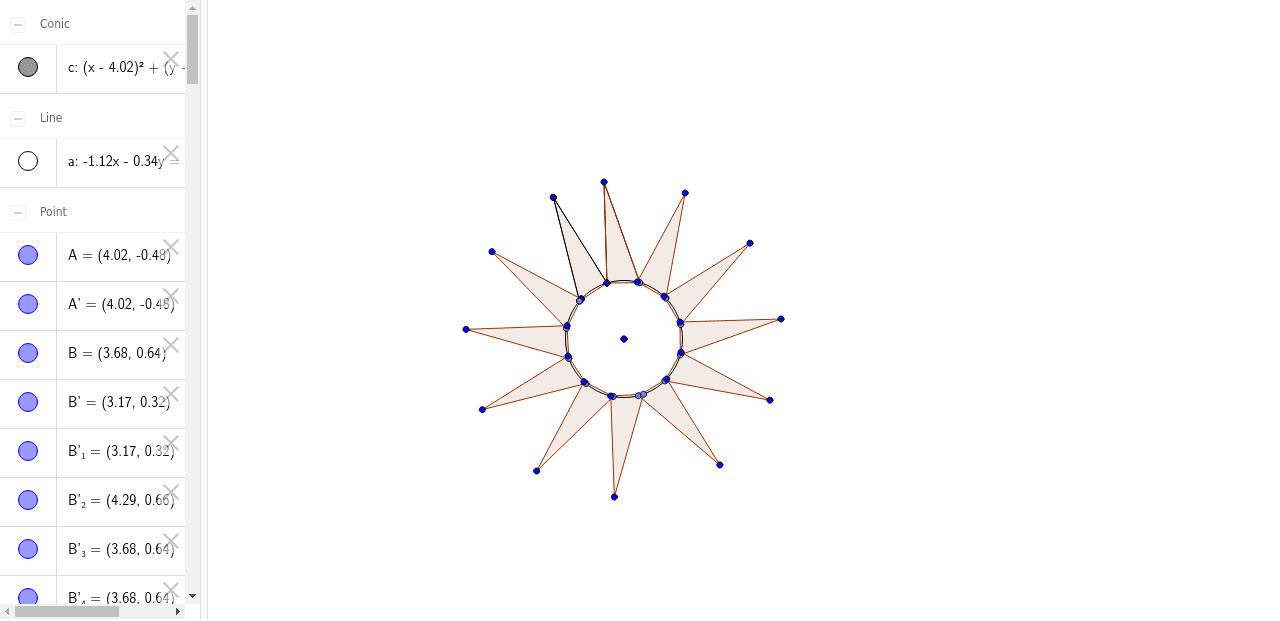
①本范例演示反射与旋转对称性图形的创建过程;②涉及核心数学概念包括对称性、特殊点、全等、期望值、抛物线、不等式;③作图要点:使用 GeoGebra 命令 Circle(圆)、Line(线)、Segment(线段)、Point(点)、Polygon(多边形)、Rotate(旋转)、Mirror(镜像);④适合高中数学教学或学生自主探究对称性原理。
GeoGebra 命令及参数
Circle(A, B) → cLine(A, B) → aSegment(B, C) → bPoint(c) → DSegment(C, D) → dPolygon(D, C, B) → poly1, b_1, d_1, c_1Rotate(B, 30*°, A) → B'Rotate(B, 30*°, A) → B'_1Rotate(D, -30*°, A) → D'Rotate(C, -30*°, A) → C'Rotate(B, -30*°, A) → B'_2Polygon(D', C', B'_2) → poly1', b'_2, d', c'Rotate(D', -30*°, A) → D''Rotate(C', -30*°, A) → C''Rotate(B'_2, -30*°, A) → EPolygon(D'', C'', E) → poly1'', e, d'', c''Rotate(D'', -30*°, A) → D'''Rotate(C'', -30*°, A) → C'''Rotate(E, -30*°, A) → E'Polygon(D''', C''', E') → poly1''', e', d''', c'''Rotate(D''', -30*°, A) → FRotate(C''', -30*°, A) → GRotate(E', -30*°, A) → E''Polygon(F, G, E'') → poly2, e'', f, gRotate(F, -30*°, A) → F'Rotate(G, -30*°, A) → G'Rotate(E'', -30*°, A) → E'''Polygon(F', G', E''') → poly2', e''', f', g'Mirror(D, a) → D'_1Mirror(C, a) → C'_1Mirror(B, a) → B'_3Polygon(D'_1, C'_1, B'_3) → poly1'_1, b'_3, d'_1, c'_1Mirror(D', a) → D''_1Mirror(C', a) → C''_1Mirror(B'_2, a) → HPolygon(D''_1, C''_1, H) → poly1''_1, h, d''_1, c''_1Mirror(D'', a) → D'''_1Mirror(C'', a) → C'''_1Mirror(E, a) → E'_1Polygon(D'''_1, C'''_1, E'_1) → poly1'''_1, e'_1, d'''_1, c'''_1Mirror(D''', a) → IMirror(C''', a) → JMirror(E', a) → E''_1Polygon(I, J, E''_1) → poly3, e''_1, i, jMirror(F, a) → F'_1Mirror(G, a) → G'_1Mirror(E'', a) → E'''_1Polygon(F'_1, G'_1, E'''_1) → poly2'_1, e'''_1, f'_1, g'_1Mirror(F', a) → F''Mirror(G', a) → G''Mirror(E''', a) → KPolygon(F'', G'', K) → poly2'', k, f'', g''Mirror(B, a) → B'_4Mirror(C, a) → C'_2Segment(B'_4, C'_2) → b'Mirror(C, a) → C'_3Mirror(D, a) → D'_2Segment(C'_3, D'_2) → d'_2Mirror(A, a) → A'
AI 绘图提示语参考
画一个对称图形,包含一个圆和一条线段,以线段为对称轴,先构造一个多边形,然后围绕顶点旋转30度并重复,再以对称轴镜像得到对称图形,最终形成多个旋转和镜像的对称图案,展示旋转对称和镜像对称的原理。
以上提示语为根据原始绘图命令整理而来,仅供参考。