
球极平面投影:从球面到平面的保角映射
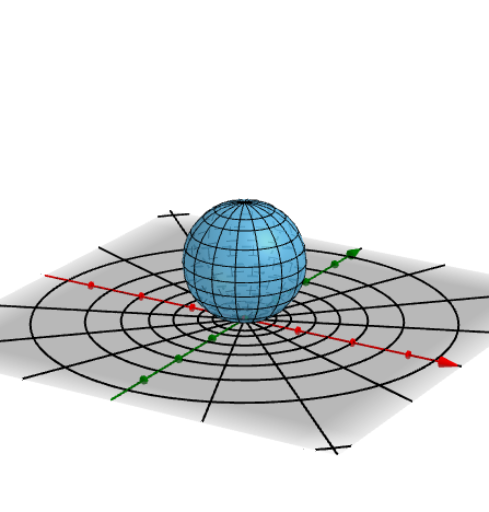
几何画板及绘图内容加载中,请稍等……
该范例演示了球极平面投影(Stereographic projection)这一经典几何变换,将球面上的点(除北极点外)通过从北极点发出的射线映射到赤道平面上,直观展示球面与平面之间的对应关系。核心数学概念包括球面几何、投影变换、保角性(共形映射)以及单位圆与复平面的联系。作图要点:使用GeoGebra的Point、Sphere、Line、Rotate、Intersect等命令构造球体、投影射线与交点,通过PointIn、Circle、Plane、OrthogonalLine、Mirror、Locus、Midpoint等命令生成辅助圆、垂线、镜像点与轨迹,并利用滑块或动态对象(如a、f、g、α等)控制投影参数,观察球面上点与平面点的对应运动。适合高中至大学阶段的几何教学,尤其适用于立体几何、解析几何与复分析入门,帮助学生理解球面与平面之间的拓扑与度量关系。
GeoGebra 命令及参数
Point(zAxis) → ASphere(A, 1) → aLine(A, yAxis) → fLine(A, xAxis) → gRotate(a, α, f) → a'Rotate(a', β, g) → a''Rotate(a'', γ, zAxis) → a'''Intersect(f, a''') → B, CPointIn(a''') → D1PointIn(a''') → D2PointIn(a''') → D3PointIn(a''') → D4PointIn(a''') → D5PointIn(a''') → D6Line(D1, D2) → hCircle(A, 1, h) → d3Plane(A, D1, D4) → bOrthogonalLine(A, b) → iCircle(A, 1 / 4, i) → e1Intersect(h, e1) → D, C1OrthogonalLine(C1, b) → jCircle(C1, 1 / 4, j) → e2Intersect(h, e2) → F, C2OrthogonalLine(C2, b) → kCircle(C2, 1 / 4, k) → e3Intersect(h, e3) → H, C3Mirror(C1, A) → C1'Mirror(C2, A) → C2'Mirror(C3, A) → C3'Intersect(k, a''') → E, GIntersect(j, a''') → I, JOrthogonalLine(C3, b) → lIntersect(l, a''') → K, LCircle(C3, Distance[C3, K], h) → d4Circle(C2, Distance[C2, E], h) → d6Circle(C1, Distance[C1, I], h) → d8Mirror(d4, A) → d5Mirror(d6, A) → d7Mirror(d8, A) → d9Rotate(D3, (-((45 * ° / 2))), h) → E1Rotate(D3, (-(45°)), h) → E2Rotate(D3, (-(45° + (45 * ° / 2))), h) → E3Line(D3, A) → mCircle(D3, D1, D2) → c9Circle(D1, E1, D2) → c2Circle(D1, E2, D2) → c3Circle(D1, E3, D2) → c4Circle(D5, D1, D2) → c5Rotate(D5, (-((45 * ° / 2))), h) → E4Rotate(E4, (-(45°)), h) → E5Rotate(D5, (-(45°)), h) → E6Circle(E4, D1, D2) → c6Circle(E6, D1, D2) → c7Circle(E5, D1, D2) → c8Point(d4) → M1Point(d6) → M2Point(d8) → M3Point(d3) → M4Point(d9) → M5Point(d7) → M6Point(d5) → M7Line(Z, M1) → nIntersect(n, xOyPlane) → TLocus(T, M1) → loc1Line(Z, M2) → i_1Intersect(i_1, xOyPlane) → ULocus(U, M2) → loc2Line(Z, M3) → j_1Intersect(j_1, xOyPlane) → VLocus(V, M3) → loc3Line(Z, M4) → l_1Intersect(l_1, xOyPlane) → WLocus(W, M4) → loc4Line(Z, M5) → m_1Intersect(m_1, xOyPlane) → A_1Locus(A_1, M5) → loc5Line(Z, M6) → n_1Intersect(n_1, xOyPlane) → B_1Locus(B_1, M6) → loc6Line(M7, Z) → p_1Intersect(p_1, xOyPlane) → C_1Locus(C_1, M7) → loc7Point(c2) → F1Point(c3) → F2Point(c4) → F3Point(c5) → F4Point(c6) → F5Point(c9) → F6Point(c7) → F7Point(c8) → F8Line(F6, Z) → a4Line(F1, Z) → a5Line(Z, F2) → a6Line(Z, F3) → a7Line(Z, F4) → a1Line(Z, F5) → b_1Line(Z, F7) → a2Line(Z, F8) → a3Intersect(a4, xOyPlane) → L_1Intersect(a5, xOyPlane) → M_1Intersect(a6, xOyPlane) → N_1Intersect(a7, xOyPlane) → O_1Intersect(a1, xOyPlane) → P_1Intersect(b_1, xOyPlane) → Q_1Intersect(a2, xOyPlane) → R_1Intersect(a3, xOyPlane) → S_1Locus(L_1, F6) → loc8Locus(M_1, F1) → loc9Locus(N_1, F2) → loc10Locus(O_1, F3) → loc11Locus(P_1, F4) → loc12Locus(Q_1, F5) → loc13Locus(R_1, F7) → loc14Locus(S_1, F8) → loc15Midpoint(C3, D1) → MOrthogonalLine(M, b) → tIntersect(t, a''') → N, OCircle(M, Distance[M, N], h) → d1Mirror(d1, A) → d2Point(d1) → M8Point(d2) → M9Line(M8, Z) → f_1Line(Z, M9) → g_1Intersect(f_1, xOyPlane) → PIntersect(g_1, xOyPlane) → QLocus(P, M8) → loc16Locus(Q, M9) → loc17
AI 绘图提示语参考
绘制一个立体几何中的射影变换,将球面上的点通过射线映射到平面。首先画一个单位球体,然后画出与球体相交的两条射线,接着围绕这些射线旋转球体,生成一系列交点和辅助圆。最后通过镜像和旋转操作,生成一系列新的点和圆,展示射影变换的性质。
以上提示语为根据原始绘图命令整理而来,仅供参考。