
逐步演示壳层法求旋转体体积
几何画板及绘图内容加载中,请稍等……
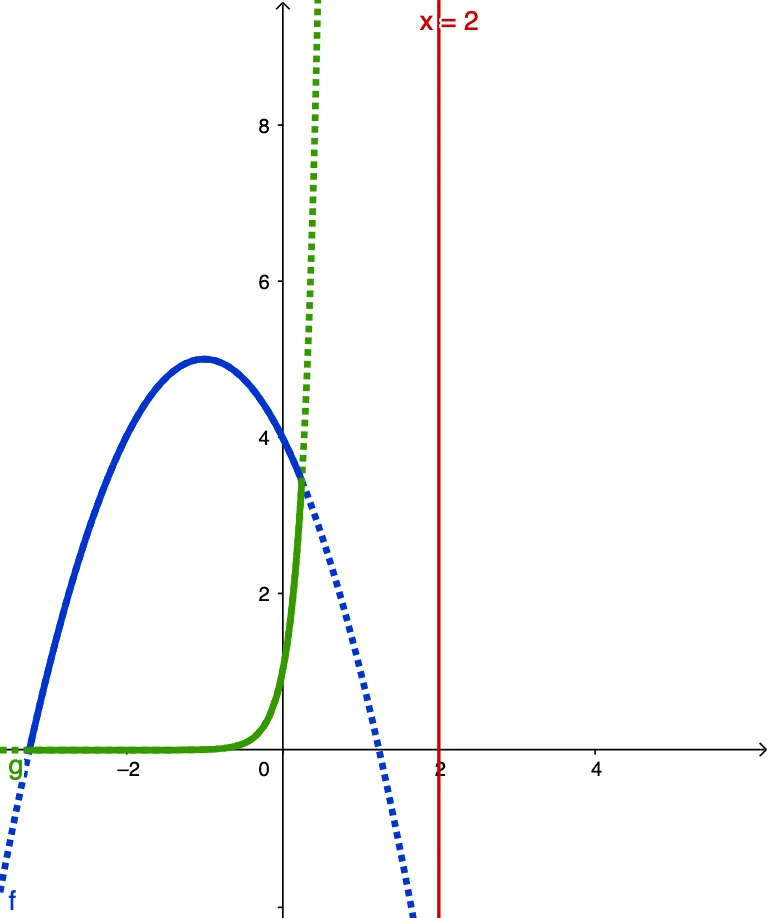
① 本范例通过动态分步动画,直观展示利用壳层法(圆柱壳法)计算旋转体体积的完整过程,包括函数曲线、旋转体切片、壳层厚度与半径的逐步构建。② 核心数学概念是微积分中的体积积分,特别是壳层法公式 V = 2π∫(半径×高度)dx,涉及函数、区间分割、近似求和与极限思想。③ 作图要点:使用 GeoGebra 的 LaTeX 文本显示公式,Point 和 Segment 构造关键点与线段,Mirror 命令生成对称图形;对象包括函数 f、g,左右边界 leftBound/rightBound,滑块 steps 控制分割数,stepMax 和 back/forward 按钮实现逐步演示,list1 存储壳层,A、B、h、r 等表示高度和半径,fcut、gcut 等用于截取函数片段,fshadow、gshadow 绘制阴影,text 系列显示说明文字。④ 适合高中高年级或大学初学微积分的学生,用于理解旋转体体积的几何直观和数值逼近过程,也可作为教师课堂演示工具。
GeoGebra 命令及参数
LaTeX(("\text{step }" * steps)) → text1LaTeX("\text{The general form of the integrand is } 2\pi(radius)(height)\text{.}") → text3Point(xAxis) → ASegment((x(A), g(x(A))), (x(A), f(x(A)))) → hPoint(h) → BSegment(B, (2, y(B))) → rLaTeX("\text{In this case the radius is given by }\textcolor{#FF33CC}{r}=x-\textcolor{#CC0000}{2}\text{.}") → text4LaTeX("\text{The integration limits come from the x-coordinates of the}\cr\text{intersection points of functions }\textcolor{#000099}{f}\text{ and }\textcolor{#339900}{g}.") → text6LaTeX((((((("\text{Use cylindrical shells to calculate the volume swept out when the}\cr\text{region enclosed by the functions }\textcolor{#0033CC}{f=" * f) * "}\text{ and }\textcolor{#339900}{g=e^{") * a) * "x}}\text{ is}\cr\text{revolved around the line }\textcolor{#CC0000}{") * c) * "}.")) → text2LaTeX("\text{The height }\textcolor{#FF6600}{h}\text{ is given by }\textcolor{#0033CC}{f(x)}-\textcolor{#339900}{g(x)}.") → text5LaTeX((((((((("V=2\pi\int_{" * Lintersect) * "}^{") * Rintersect) * "}(x-2)\left[(") * f) * ")-(") * g) * ")\right]dx")) → text7Mirror(fcut, c) → fshadowMirror(gcut, c) → gshadowMirror(h, c) → h'Mirror(r, c) → r'
AI 绘图提示语参考
绘制一个演示圆柱壳法计算旋转体体积的动画图形。展示函数曲线、旋转体和壳厚度与半径的构建过程。使用滑块控制分区数量,通过按钮逐步导航。显示积分公式 V = 2π∫(半径×高度) dx,其中半径为 x-2,高度为 f(x)-g(x),f(x) 和 g(x) 分别是蓝色和绿色的函数。用红色线表示旋转轴,并显示积分区间和阴影部分。
以上提示语为根据原始绘图命令整理而来,仅供参考。