
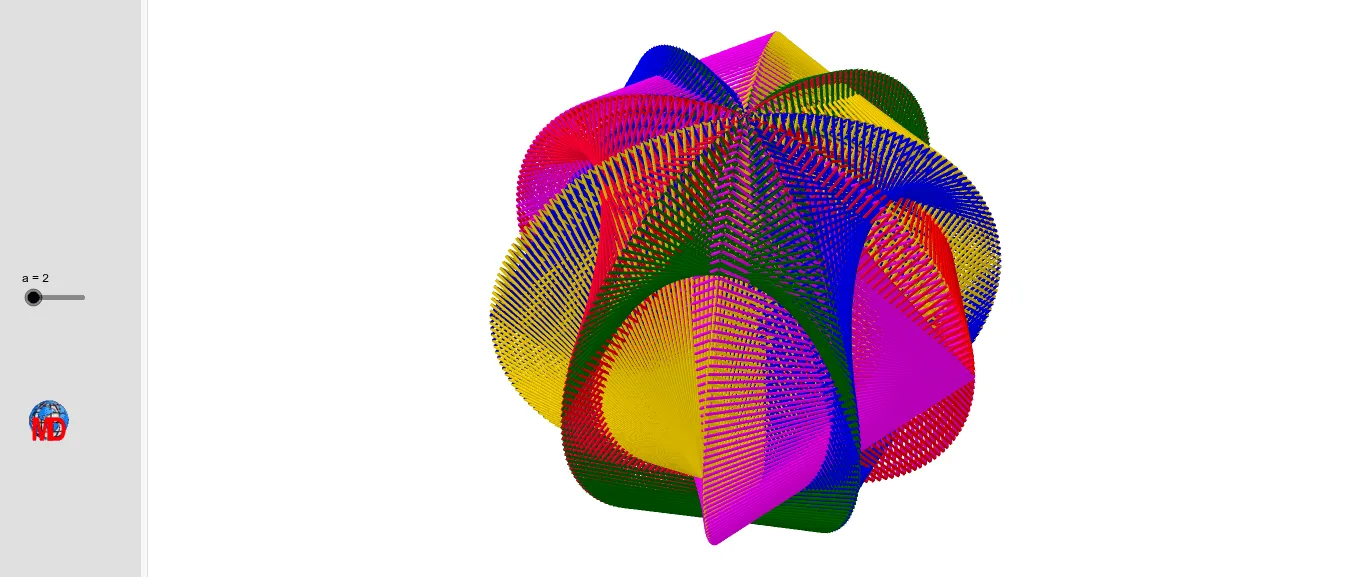
球面丝线图:三维球体上的正弦曲线与旋转对称图案
几何画板及绘图内容加载中,请稍等……
该范例演示了一个在球面上生成的复杂丝线状图案,通过正弦函数与旋转、镜像等变换,在三维空间中构造出具有对称美感的曲线网络。核心数学概念包括球面几何、正弦函数、旋转变换、镜像对称以及参数序列。作图要点:使用GeoGebra的Intersect(求交)、Circle(画圆)、Point(取点)、Rotate(旋转)、Angle(角度)、Sequence(序列)、Mirror(镜像)等命令,并涉及大量对象如球体上的点、辅助圆、旋转轴、角度参数以及多个列表(Liste1至Liste5)来存储生成的曲线点集。该范例适合高中或大学阶段学习三维几何变换、参数曲线与对称性的学生,也可用于数学艺术创作或演示正弦函数在空间中的可视化效果。
GeoGebra 命令及参数
Intersect(xAxis, yAxis) → ACircle((0, 0, 0), 4, Vector[(0, 1, 0)]) → dPoint(xAxis) → BRotate(B, 72°, A) → B'Angle(B, A, B') → αRotate(Circle[(0, 0, 0), 4, Vector[(0, 1, 0)]], α) → eCircle(A, B) → cRotate(B', 72°, A) → B''Angle(B', A, B'') → βRotate(B'', 72°, A) → B'''Angle(B'', A, B''') → γRotate(B''', 72°, A) → CAngle(B''', A, C) → δIntersect(zAxis, d, 1) → DRotate(Circle[(0, 0, 0), 4, Vector[(0, 1, 0)]], (2 * α)) → fRotate(Circle[(0, 0, 0), 4, Vector[(0, 1, 0)]], (3 * α)) → gRotate(Circle[(0, 0, 0), 4, Vector[(0, 1, 0)]], (4 * α)) → hIntersect(d, e, 2) → EPoint(d, n / 360) → FPoint(e, (n - 180) / 360) → GSequence(Segment[Point[e, t / 360], Point[f, (270 - t) / 360]], t, 0, (2 * 180), a) → Liste2Sequence(Segment[Point[f, t / 360], Point[g, (270 - t) / 360]], t, 0, (2 * 180), a) → Liste3Sequence(Segment[Point[g, t / 360], Point[h, (270 - t) / 360]], t, 0, (2 * 180), a) → Liste4Sequence(Segment[Point[h, t / 360], Point[d, (270 - t) / 360]], t, 0, (2 * 180), a) → Liste5Mirror(Liste2, xOyPlane) → Liste2'Mirror(Liste3, xOyPlane) → Liste3'Sequence(Segment[Point[d, t / 360], Point[e, (270 - t) / 360]], t, 0, 360, a) → Liste1Mirror(Liste1, xOyPlane) → Liste1'Mirror(Liste5, xOyPlane) → Liste5'Mirror(Liste4, xOyPlane) → Liste4'Sequence(Point[d, t / 360], t, 0, 180, a) → l1Sequence(Segment[Point[d, t / 360], Point[e, (270 - t) / 360]], t, 0, 360, a) → l2
AI 绘图提示语参考
绘制一个球面上的复杂纤维状图案,使用正弦函数结合旋转和反射,创建3D空间中的对称曲线网络。首先在球面上创建点A和B,然后围绕A点旋转B点,生成一系列角度参数,接着利用这些参数和旋转操作创建多个圆和弧线,最后通过镜像操作生成对称图形。
以上提示语为根据原始绘图命令整理而来,仅供参考。