
带分数舍入到最近整数:数轴落点取整探究
几何画板及绘图内容加载中,请稍等……
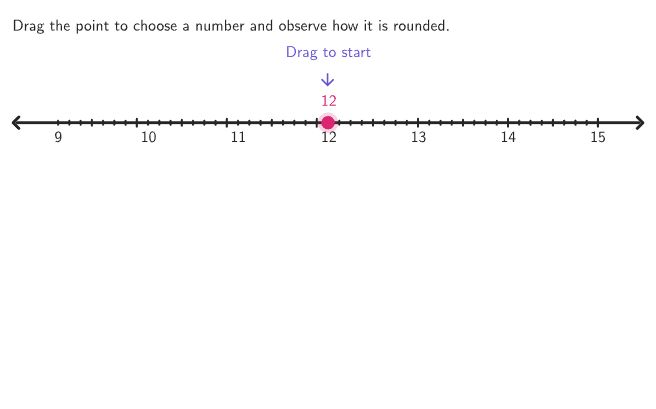
本范例通过在数轴上“投球落点”的交互过程,展示带分数如何被舍入到最近的整数(并观察不同落点对应的取整结果)。核心数学概念包括:数的表示(带分数)、舍入规则(四舍五入到最近整数)、以及分数到整数的比较与判断(上取整/下取整)。作图与交互要点:利用构造摘要中的 RandomUniform 生成随机试次与刻度位置,Take 与 Sequence 组织随机分割与数值序列;通过 If 判定是否需要向上或向下取整,并计算 answerValue/rounding结果;使用 PixelsToPoint、PointToPixels 将像素坐标与数轴坐标对应;用 Point、Segment、PolyLine、Translate、circlePixels 与 Text 生成投球路径、落点与显示文本;借助 Intersect、Element、Min、Join、Flatten 等完成路径/标记的几何关系;对象层面包含 vLine2、allUnitPositions、allTickPositions、allTicksInOrder、studentLatex、PStudentA/PStudentB/PAnswer 等用于呈现题目与学生输入、以及动画控制(如 animateControl、showsolution、CurrentStart/CurrentEnd)。适合小学到初中衔接阶段(如 GR.4-5),用于数感、分数与小数的舍入训练,或课堂探究活动与形成性测评。
GeoGebra 命令及参数
RandomUniform(0, 0.99, 200) → allRandomSeeds, {0.5668871785313813, 0.7878350905067724, 0.9311749321675805, 0.0175552890019373, 0.4235791510343603, 0.8810211530632253, 0.44479989238133766, 0.005494241368659121, 0.9855997677245458, 0.3441860723946548, 0.32692100739060653, 0.42073650918539374, 0.6188569982433251, 0.6461909875519973, 0.9676818893133057, 0.7710544011563278, 0.8544238819166017, 0.8266241070769975, 0.04037384907933877, 0.5391275648258061, 0.45971422694806535, 0.7348953497211972, 0.4891168903272315, 0.5480423668055799, 0.8848932037277466, 0.5200330522841385, 0.8880052256528849, 0.7696593869090032, 0.31310273708971254, 0.5069286396871207, 0.9335932073188407, 0.8351642212084114, 0.6386579183637495, 0.1352726298898554, 0.83989235140512, 0.59808279823722, 0.8138840817618966, 0.3463610267805037, 0.1282832017362658, 0.8544477533351373, 0.13271603396304194, 0.9803245656560545, 0.8339144133581957, 0.9226430954029441, 0.037568712346347614, 0.9121433414529065, 0.40527054732863177, 0.026734509685807338, 0.6553153151198451, 0.3490575742060954, 0.7446334337191258, 0.6418092487154681, 0.8684724680195457, 0.6446709854631356, 0.5541453903519571, 0.9780034678279456, 0.5888931671979778, 0.12616610475118817, 0.17510197981386535, 0.10148727141089212, 0.7234067713361823, 0.7206112687629955, 0.7669598250618354, 0.055706497409587025, 0.10392179798588214, 0.30433758975654157, 0.17733942569310665, 0.4846474754380056, 0.3885204114895964, 0.16579902775419475, 0.9650358404716982, 0.10179499586068998, 0.12502560337554813, 0.8372025883703903, 0.27471955019897426, 0.35379557083490376, 0.6644094285874771, 0.7135051767461653, 0.8646177800263095, 0.28661765026572616, 0.02823817000054731, 0.8491228544694973, 0.2570109470285234, 0.7042168170396051, 0.31211291415831927, 0.6528827743718506, 0.4858616250668642, 0.22536863148370598, 0.7557659226526792, 0.31037177277678124, 0.6263132454893933, 0.43342336755140093, 0.13011138137234385, 0.7198956624753389, 0.05715328388276045, 0.4062663268960118, 0.4821256397627214, 0.6237619789984971, 0.7696304625859507, 0.0197342154402179, 0.4199453062862046, 0.7805336617663351, 0.4942479685681018, 0.017142028499418187, 0.9030232261924495, 0.8162747918384896, 0.121324551515946, 0.7604175344452105, 0.13557070750135886, 0.9536198759523614, 0.9312230553841659, 0.43461836555345473, 0.8858405314350066, 0.13674617694797572, 0.8961905188485416, 0.037325155083231434, 0.31906924015215304, 0.27801409601975324, 0.9177364002047752, 0.11755706814921295, 0.008097860633408687, 0.2881638927965987, 0.33139593205326884, 0.15544863858502886, 0.812829678989576, 0.1365172736644327, 0.29458232034393506, 0.5539559910541718, 0.10775891488173604, 0.7706305754035851, 0.22302669859992916, 0.03732694624243841, 0.2758184066221511, 0.0962818890399786, 0.89703766428324, 0.5879746965332273, 0.1467457713384284, 0.8585473455300753, 0.41048117856329636, 0.6837351301040444, 0.869055435004406, 0.8030325253533166, 0.6229898634271944, 0.26126879841526895, 0.726530794513803, 0.2030727469039789, 0.5294552716883392, 0.11858391720930554, 0.4129140114228028, 0.10390177789461688, 0.3503392620106768, 0.900312137447168, 0.19217265407279976, 0.1984115621980557, 0.9417602384307504, 0.3134597386918916, 0.6063601379155485, 0.5011857436470489, 0.8756680544751102, 0.30888708609349386, 0.14866407074647797, 0.5779883669650946, 0.9277155492529916, 0.32473503906185325, 0.7457498119657, 0.7468241821826066, 0.953667706001302, 0.9824222077213942, 0.8409576764532649, 0.8040603608748161, 0.39435907489624566, 0.6136782325955016, 0.08830092961819246, 0.07490976363937456, 0.8343173994216834, 0.008357251157739118, 0.7565381486769427, 0.22182416680665318, 0.7102167717630666, 0.2074936068353299, 0.5728569138766492, 0.2570311478109328, 0.10230542108028912, 0.8442149047119832, 0.2069069093133991, 0.10657148381854802, 0.5248738579599038, 0.28672009018829275, 0.8680595922405125, 0.8127547158273835, 0.6506858002048873, 0.2925593422843709, 0.9718472161097647, 0.08994796737470599, 0.49908993655335254, 0.31191922050515086, 0.6855482165886332, 0.775049425543932, 0.12826240202651681, 0.26952094877256405}Take(allRandomSeeds, randIndex, randIndex + numRandoms - 1) → currentRandomSeedsIf(countQuestion ≟ 0, 10, Element[{7, 8, 9, 10}, 1 + floor((currentRandomSeeds(2) * 4))]) → randomDivisionsPixelsToPoint((xMin, yMin), (xMax, yMax), (PXwidth, PXheight), (784, 150)) → AnchorRightPixelsToPoint((xMin, yMin), (xMax, yMax), (PXwidth, PXheight), (16, 150)) → AnchorLeftSequence(AnchorLeft + ((A * unitIncrement) + unitIncrement / 2, 0), A, 0, 6) → allUnitPositionsPolyLine(Flatten[Zip[{A + (0.75 * vLine2), A + (unitIncrement / 2, 0) + (0.45 * vLine2), A + (unitIncrement, 0) + (0.75 * vLine2)}, A, Take[allUnitPositions, 1, 6]]]) → zigZagFlatten(Append[Zip[Sequence[B + ((A * tickIncrement), 0), A, 0, randomDivisions - 1], B, Take[allUnitPositions, 1, 6]], allUnitPositions(-1)]) → allTicksInOrderJoin({Take[allTicksInOrder, IndexOf[allUnitPositions(4), allTicksInOrder]], Take[allTicksInOrder, 1, IndexOf[allUnitPositions(4), allTicksInOrder] - 1]}) → allTickPositionsPoint(allTickPositions) → PStudentATranslate(ClosestPoint[allUnitPositions, PStudentA + (0.00001, 0)], vLine2) → PAnswerIf(countQuestion ≟ 1, Element[{2, 6}, 1 + floor((currentRandomSeeds(4) * 2))], 2 + floor((currentRandomSeeds(4) * 4))) → startIndexPoint(Zip[A + vLine2, A, allUnitPositions]) → PStudentBIf(showsolution, PStart, PStudentA) → CurrentStartMin(Max[0, animateControl - 1 - bumpNeeded], 1) → animateStage3Min(animateControl, 1) → animateStage1Sequence(i, i, minX, maxX, labelIncrement) → displayXCorner(5) → layoutAppSizePointToPixels(Corner[1], Corner[3], Corner[5], PStudentA) → OnboardingPointElement({1, 2, 3, 4, 5, 6}, 1 + floor((currentRandomSeeds(1) * 6))) → randomUnitsIf(bumpNeeded, Min[Max[animateControl - 1, 0], 1], 0) → animateStage2PolyLine(pathPointsCorrect) → ballPathIntersect(Line[(0, currentHeight), xAxis], ballPath) → PDrop_{1}, PDrop_{2}, PDrop_{3}Intersect(Line[(0, currentHeight), xAxis], ballPath) → PDrop, PDrop_{4}, PDrop_{5}Segment(BumpStart, BumpEnd) → bumperSegment(Translate[AnchorLeft, vLine2], Translate[AnchorRight, vLine2]) → numberLine2Segment(AnchorLeft, AnchorRight) → numberLine1Sequence(If[IsInteger[A], tickHeight, If[IsInteger[A + 0.5], (0.75 * tickHeight), (0.5 * tickHeight)]], A, 0, 7, 1 / randomDivisions) → tickSizeZip(Segment[A + (0, B / 2), A - (0, B / 2)], A, allTickPositions, B, tickSize) → ticks1circlePixels(PStudentA, 7 + (7 * pulsing), Corner[1], Corner[3], Corner[5]) → pulsingCircleZip(Text[("" * A), B, true, true, 0, -1], A, displayX, B, allUnitPositions) → digits1Zip(Text[("" * A), B + vLine2, true, true, 0, -1], A, displayX, B, allUnitPositions) → digits2PolyLine(Append[RemoveUndefined[Zip[If[y(A) > y(PDrop), A], A, pathPointsCorrect]], PDrop]) → currentPathZip(Segment[A + (0, (tickHeight) / 2), A - (0, (tickHeight) / 2)], A, Translate[allUnitPositions, vLine2]) → ticks2Text(studentLatex, PStudentA + (0, 0.4), false, true, 0, 1) → lblStudentZip(Circle[A + (0.75 * vLine2), (10 * windowWidth / PXwidth)], A, allUnitPositions) → holesText("\text{Drag to start}", PStart + (0, (65 * windowHeight / PXheight)), true, true, 0, 1) → onboardingText
AI 绘图提示语参考
请绘制一个数轴,上面标有整数和分数刻度。数轴上有一个球从上方沿折线路径落下,球落到数轴上的位置即为四舍五入的整数点。落点处标记对应的四舍五入值。同时,画出学生起始点和答案点,展示球落点与答案点的对应关系。构造顺序:先绘制数轴和刻度,再绘制球的路径,然后模拟球落下并标记落点,最后添加起始点和答案点。
以上提示语为根据原始绘图命令整理而来,仅供参考。