
二次函数图像变换示例
几何画板及绘图内容加载中,请稍等……
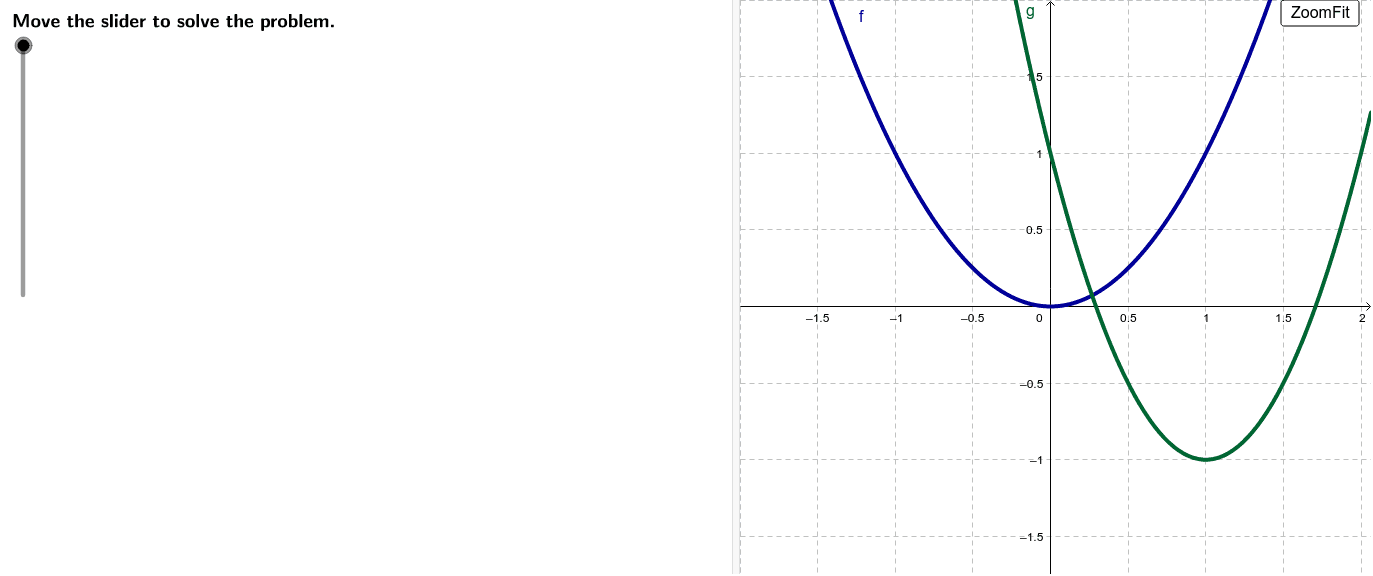
①本范例演示了父函数f(x)=x²及其派生函数g(x)和h(x)的图像变换关系;②涉及核心数学概念包括二次函数图像、平移变换、缩放变换;③构造要点使用了GeoGebra命令/对象:LaTeX, Max, If, Extremum, stepMax, stepper, steps, counter, text0, OriginalA, Randomize, ZoomFit, OriginalB, a, h, k, f, g, scale, base, xmin, xmax, ymax, ymin, text10, text11, text13, text14, text16, text19, text20, text22, text23, text15, text27, shiftLR, shiftUD, A, B, text5, text3, text2, text4, text7;④适合高中数学教学,用于理解函数图像变换规律。
GeoGebra 命令及参数
LaTeX(steps) → counterLaTeX("\text{Move the slider to solve the problem.}") → text0Max({abs(h), abs(k), abs(g(0))}) → baseLaTeX("\textcolor{#006633}{y=a(x-h)^2+k}") → text10LaTeX((((((("\text{Substitute }\textcolor{#006633}{(" * h) * ",") * k) * ")}\text{ for }\textcolor{#006633}{(h,k)}\text{ and }\textcolor{#006633}{(0,") * g(0)) * ")}\text{ for }\textcolor{#006633}{(x,y)}.")) → text11LaTeX("\text{Simplify.}") → text13LaTeX((((((("\textcolor{#006633}{" * g(0)) * "=") * Simplify[(0 - h)^(2)]) * "a+(") * k) * ")}")) → text14LaTeX((("\textcolor{#006633}{a=" * a) * "}")) → text16LaTeX("\textcolor{#006633}{y=a(x-h)^2+k}") → text19LaTeX((((((("\text{Let }\textcolor{#006633}{y=g(x)}\text{, }\textcolor{#006633}{a=" * a) * "}\text{, and }\textcolor{#006633}{(h,k)=(") * h) * ",") * k) * ")}.")) → text20LaTeX("\text{Simplify.}") → text22LaTeX((("\textcolor{#006633}{g(x)=" * g) * "}")) → text23LaTeX((((("\text{Subtract }\textcolor{#006633}{" * k) * "}\text{ from both sides and divide by }\textcolor{#006633}{") * ((-h))^(2)) * "}.")) → text15LaTeX((("\textcolor{#006633}{g(x)=" * g) * "}")) → text27If(h > 0, "right", "left") → shiftLRIf(k > 0, "up", "down") → shiftUDExtremum(g) → ALaTeX((((("\text{It can be seen from the graph that the vertex of }\textcolor{#006633}{g(x)}\text{ is }\textcolor{#006633}{(" * h) * ", ") * k) * ")}.")) → text5LaTeX("\text{Recall that the vertex of the graph of the quadratic function is also known}\cr\text{as the maximum or minimum point of the function and is represented by the }\cr\text{coordinate }\textcolor{#006633}{(h, k)}\text{. The point }\textcolor{#006633}{(x, y)}\text{ represents some point on the graph}\cr\text{of the function.}") → text3LaTeX("\text{Replace }\textcolor{#006633}{f(x)}\text{ in the equation of the vertex form with }\textcolor{#006633}{y}\text{: }\textcolor{#006633}{y=a(x–h)^2 +k}.") → text2LaTeX("\text{To determine the equation of }\textcolor{#006633}{g(x)}\text{, first identify the vertex of the graph of }\textcolor{#006633}{g(x)}.") → text4LaTeX((("\text{It can be seen from the graph that an additional point on the graph of }\cr\textcolor{#006633}{g(x)}\text{ is }\textcolor{#006633}{(0, " * g(0)) * ")}.")) → text7LaTeX("\text{Next, identify an additional point on the graph of }\textcolor{#006633}{g(x)}.") → text6LaTeX((((((("\text{Use the vertex }\textcolor{#006633}{(" * h) * ", ") * k) * ")}\text{ and the additional point }\textcolor{#006633}{(0, ") * g(0)) * ")}\text{ to find the value of }\textcolor{#006633}{a}\cr\text{in the standard form of the equation.}")) → text8LaTeX("\text{Standard form of a quadratic equation}") → text9LaTeX("\text{Standard form of a quadratic equation}") → text18LaTeX((("\text{The equation of the transformed function }\textcolor{#006633}{g(x)}\text{ in vertex form is }\cr\textcolor{#006633}{g(x)=" * g) * "}.")) → text24LaTeX("\text{Describe the transformation(s) of the parent function that resulted }\cr\text{in the function }\textcolor{#006633}{g(x)}.") → text25LaTeX("\text{To describe the transformation(s) of the parent function }\textcolor{#000099}{f(x) = x^2}\text{, }\cr\text{start inside the parentheses and work outward.}") → text26LaTeX((((("\text{Then, }\textcolor{#006633}{" * a) * "}\text{ was multiplied by the “new” squared term, }\textcolor{#006633}{(") * Simplify[x - h]) * ")^2}.")) → text29If(h ≠ 0, LaTeX[(((("\text{Finally, }\textcolor{#006633}{" * k) * "}\text{ was added to the new squared term with its new }\cr\text{coefficient to give the final result, }\textcolor{#006633}{g(x) = ") * g) * "}.")], LaTeX["\text{No addition was made so the vertex is still on the x-axis.}"]) → text30LaTeX((((((("\textcolor{#006633}{(" * g(0)) * ")=a \left[(0)-(") * h) * ")\right]^2+(") * k) * ")}")) → text12LaTeX("\text{Use the value of }\textcolor{#006633}{a}\text{ and the coordinate of the vertex to write the equation of }\cr\text{the transformed function }\textcolor{#006633}{g(x)}.") → text17LaTeX((((((("\textcolor{#006633}{\left[g(x)\right]=(" * a) * ")\left[x-(") * h) * ")\right]^2+(") * k) * ")}")) → text21If(h ≠ 0, LaTeX[(((((("\text{The value }\textcolor{#006633}{" * h) * "}\text{ was subtracted from }\textcolor{#000099}{x}\text{ to} \text{ shift the vertex ") * shiftLR) * ", which }\cr\text{gives }\textcolor{#006633}{") * Simplify[x - h]) * "}\text{ in place of }\textcolor{#000099}{x}.")], LaTeX["\text{ No change was made in }\textcolor{#000099}{x}\text{ so the function is still centered on the y-axis.}"]) → text28LaTeX("\text{Use the vertex form of a quadratic function, }\textcolor{#006633}{f(x) = a(x – h)^2 + k}\text{, }\cr\text{to determine the equation of the transformed function }\textcolor{#006633}{g(x)}.") → text1LaTeX("\text{Select the Original Problem A button to return to the graph of g(x).}\cr\text{Select the Original Problem B button to explore the graph of h(x).}\cr\text{(Note: Due to functionality, this applet refers to both g(x) and h(x) as g(x).)}\cr\text{Select the New Random Problem button to randomly generate a}\cr\text{similar practice problem.}") → RandomizationText
AI 绘图提示语参考
绘制一个二次函数的变换示例,包括原函数f(x)=x²及其变换后的函数g(x)和h(x)。首先画出f(x)的图像,然后通过平移和缩放变换得到g(x),并标注其顶点。接着,通过变换得到h(x),并观察其与g(x)的关系。最后,随机生成一个新的问题,探索变换规则。
以上提示语为根据原始绘图命令整理而来,仅供参考。