
QR4-01-P2a-CYU1 Translations
几何画板及绘图内容加载中,请稍等……
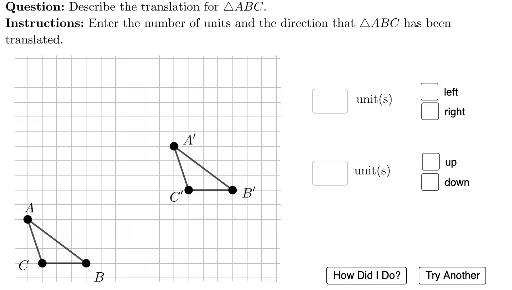
① This interactive example demonstrates the translation of a triangle in the coordinate plane, where students must determine the direction and magnitude of the shift. ② Core mathematical concepts include geometric translation, vectors, coordinate changes, and horizontal/vertical direction recognition. ③ Construction uses GeoGebra commands such as Translate, If, Random, Textfield, and InputBox to generate random problems and provide feedback; objects include triangle vertices, sides, translated images, checkboxes for direction, and feedback text elements. ④ Suitable for middle or high school students learning geometric transformations, useful for classroom practice or self-assessment to reinforce understanding of translation direction and distance.
GeoGebra 命令及参数
If(Random[0, 1] ≟ 0, -1, 1) → hTransDirIf(Random[0, 1] ≟ 0, -1, 1) → vTransDirRandom(7, 10) → htransRandom(5, 9) → vtransTextfield(usertext1) → InputBox1Textfield(usertext2) → InputBox2Segment(A, B) → ABSegment(B, C) → BCSegment(C, A) → CATranslate(A, ((htrans * hTransDir), (vtrans * vTransDir))) → A'Translate(B, ((htrans * hTransDir), (vtrans * vTransDir))) → B'Translate(C, ((htrans * hTransDir), (vtrans * vTransDir))) → C'Segment(A', B') → AB'Segment(B', C') → BC'Segment(C', A') → CA'LaTeX(If[hTransDir < 0, "left", "right"]) → hTransWordSegment(A, A + ((htrans * hTransDir), 0)) → AhorizSegment(A + ((htrans * hTransDir), 0), A + ((htrans * hTransDir), (vtrans * vTransDir))) → AvertSegment(B, B + ((htrans * hTransDir), 0)) → BhorizSegment(C, C + ((htrans * hTransDir), 0)) → ChorizSegment(C + ((htrans * hTransDir), 0), C + ((htrans * hTransDir), (vtrans * vTransDir))) → CvertSegment(B + ((htrans * hTransDir), 0), B + ((htrans * hTransDir), (vtrans * vTransDir))) → BvertLaTeX(If[vTransDir < 0, "down", "up"]) → vTransWordLaTeX((((("\text{\textbf{Question: }" * MainInstruc) * "\\\textbf{Instructions: }") * SpecInstruc) * "}")) → allInstrucUnicodeToLetter(10007) → xmarkUnicodeToLetter(10003) → cmark
AI 绘图提示语参考
在坐标平面上随机生成一个三角形,并按随机水平和垂直方向及随机距离将其平移,显示原三角形与平移后三角形,并用线段分别标出水平和垂直位移分量,旁边标注“左/右”“上/下”文字,提供两个输入框供学习者填写平移方向与距离,正确时显示勾号,错误时显示叉号。
以上提示语为根据原始绘图命令整理而来,仅供参考。