
变换性质探究
几何画板及绘图内容加载中,请稍等……
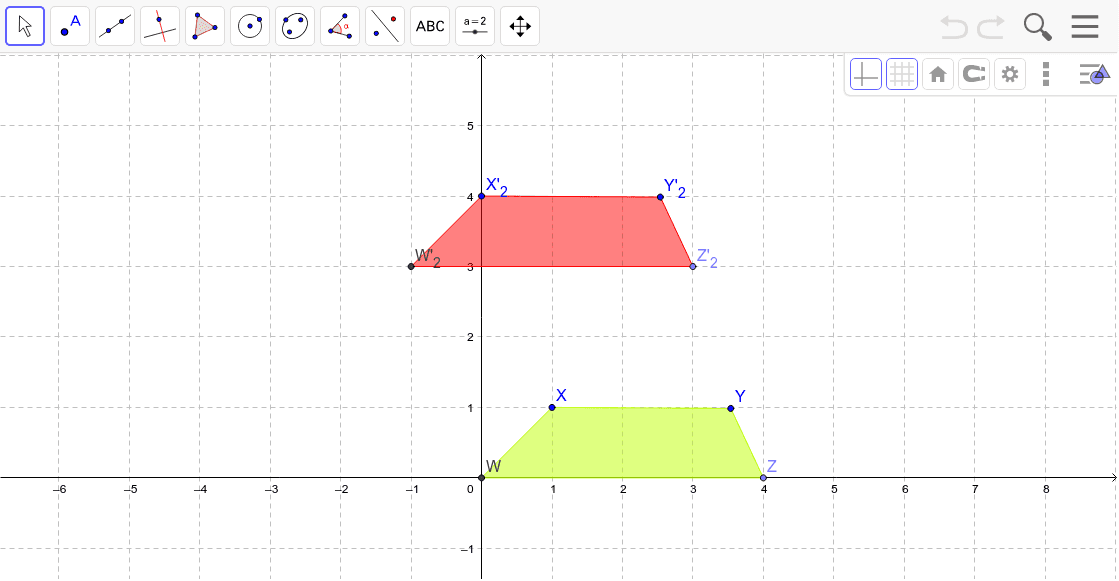
本范例演示了几何变换的基本性质,包括平移、旋转和镜像等操作对图形的影响。涉及的核心数学概念有变换、连续性、交点等。作图要点包括使用Intersect、Point、Polygon、Line、Mirror、Rotate、Translate、Vector等GeoGebra命令和对象来构建和操作图形。适合高中阶段学习几何变换的学生使用。
GeoGebra 命令及参数
Intersect(xAxis, yAxis) → WPoint(xAxis) → ZPolygon(W, Z, Y, X) → poly1, a, b, c, dPoint(xAxis) → APoint(yAxis) → BLine(A, B) → eMirror(W, e) → W'Mirror(Z, e) → Z'Mirror(Y, e) → Y'Mirror(X, e) → X'Rotate(W, 90*°, C) → W'_1Rotate(Z, 90*°, C) → Z'_1Rotate(Y, 90*°, C) → Y'_1Rotate(X, 90*°, C) → X'_1Translate(W, Vector[(0.006112532585182552, 0.026544382522800267)]) → W'_4Vector(X, D) → uTranslate(W, u) → W'_2Translate(Z, u) → Z'_2Translate(Y, u) → Y'_2Translate(X, u) → X'_2Polygon(W'_2, Z'_2, Y'_2, X'_2) → poly1', w'_3, z'_2, y'_2, x'_2
AI 绘图提示语参考
画一个包含原点和坐标轴的图形,以原点为中心绘制一个四边形,然后通过该四边形的顶点沿坐标轴方向进行平移和旋转,展示平移和旋转的几何变换效果,最后将变换后的顶点连接成新的四边形,突出几何变换的连续性和交点特性。
以上提示语为根据原始绘图命令整理而来,仅供参考。