
风筝的性质
几何画板及绘图内容加载中,请稍等……
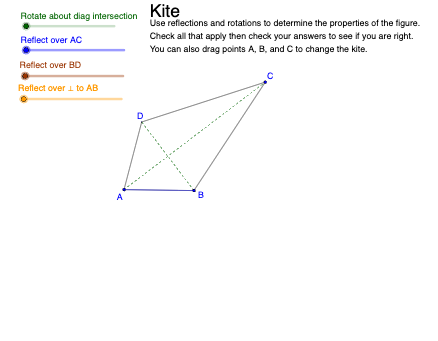
①本范例演示风筝图形的几何性质;②涉及核心数学概念包括多边形、等腰三角形、三角函数等;③作图要点:使用Segment、Mirror、Polygon、OrthogonalLine、Intersect、Point、Circle、Rotate、Midpoint等GeoGebra命令和对象构建风筝及其相关元素;④适合初中及以上学生学习和理解多边形性质及几何作图。
GeoGebra 命令及参数
Segment(A, C) → aMirror(B, a) → DPolygon(A, B, C, D) → poly1, a_1, b_1, c, dOrthogonalLine(D, a_1) → f_1Intersect(f_1, a_1) → QPoint(Segment[Q, B]) → KCircle(A, ((2 * ReflectPerp) * Segment[A, K])) → sOrthogonalLine(K, a_1) → rIntersect(r, c) → RMirror(A, r) → A'_2Intersect(s, Line[A, A'_2]) → M, NMirror(D, r) → D'_1Circle(D, (ReflectPerp * Segment[D, D'_1])) → tIntersect(t, Line[D, D'_1]) → O, PSegment(B, D) → bIntersect(a, b) → ECircle(B, (Distance[B, D] * ReflectAC / 10)) → eIntersect(e, b) → F, JPolygon(A, F, C) → poly2, f, p, qMirror(C, Line[B, D]) → C'Mirror(A, Line[B, D]) → A'Circle(C, (Distance[C, C'] * ReflectBD / 10)) → gIntersect(g, Line[A, C], 1) → GCircle(A, (Distance[A, A'] * ReflectBD / 10)) → hIntersect(h, Segment[A, A']) → H, IPolygon(B, H, D, G) → poly3, k, l, m, nRotate(A, α, E) → A'_1Rotate(B, α, E) → B'Rotate(C, α, E) → C'_1Rotate(D, α, E) → D'Polygon(A'_1, B', C'_1, D') → poly1', a'_1, b', c'_1, d'Segment(A'_1, C'_1) → iSegment(B', D') → jMidpoint(D, D'_1) → LPolygon(R, K, N, P) → q1, g_1, h_1, c_1, d_1Polygon(A, J, C) → t1, c_2, a_2, j_2