
不规则图形周长计算练习(P4第二题)
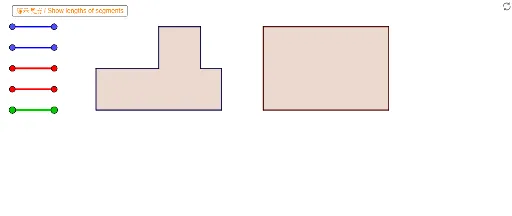
几何画板及绘图内容加载中,请稍等……
所属专题
P4 4M1 Perimeter 周界
① 本范例通过GeoGebra展示一个由多个不规则多边形组合而成的图形,用于练习计算其周长,属于小学四年级(P4)的几何测量问题。② 核心数学概念是周长的定义与计算,涉及对不规则图形边界的识别、线段长度的累加,以及多边形边与边之间的衔接关系。③ 作图要点:从构造摘要可见,使用了GeoGebra的“线段(Segment)”和“多边形(Polygon)”命令,创建了多个多边形对象(如VPoly1Ma至VPoly1Ff)以及大量辅助线段(如Blue01a、Red01a等),这些对象通过不同颜色(蓝、红)区分图形的不同部分,便于学生观察和测量。④ 适合小学中高年级(约9-10岁)学生作为周长概念的巩固练习,也可用于教师课堂演示或学生自主探究,通过拖动顶点或测量线段长度来验证周长计算。
GeoGebra 命令及参数
Segment(Blue01a, Blue01b) → Blue01Segment(Blue02a, Blue02b) → Blue02Segment(Blue03a, Blue03b) → Blue03Segment(Blue04a, Blue04b) → Blue04Segment(Red01a, Red01b) → Red01Segment(Red02a, Red02b) → Red02Segment(Red03a, Red03b) → Red03Segment(Red04a, Red04b) → Red04Segment(Blue05a, Blue05b) → Blue05Segment(Red05a, Red05b) → Red05Segment(Blue06a, Blue06b) → Blue06Segment(Red06a, Red06b) → Red06Segment(Blue07a, Blue07b) → Blue07Segment(Blue08a, Blue08b) → Blue08Segment(Blue09a, Blue09b) → Blue09Segment(Blue10a, Blue10b) → Blue10Segment(Blue11a, Blue11b) → Blue11Segment(Blue12a, Blue12b) → Blue12Segment(Red07a, Red07b) → Red07Segment(Red08a, Red08b) → Red08Segment(Red09a, Red09b) → Red09Segment(Red10a, Red10b) → Red10Segment(Red11a, Red11b) → Red11Segment(Red12a, Red12b) → Red12Segment(Green01a, Green01b) → Green01Segment(Green02a, Green02b) → Green02Segment(Green03a, Green03b) → Green03Segment(Green04a, Green04b) → Green04Segment(Green05a, Green05b) → Green05Segment(Green06a, Green06b) → Green06Segment(Green07a, Green07b) → Green07Segment(Green08a, Green08b) → Green08Segment(Green09a, Green09b) → Green09Segment(Green10a, Green10b) → Green10Segment(Green11a, Green11b) → Green11Segment(Green12a, Green12b) → Green12Segment(Green13a, Green13b) → Green13Segment(Green14a, Green14b) → Green14Polygon(VPoly2Fa, VPoly2Fb, VPoly2Fc, VPoly2Fd) → Poly2F, SPoly2Fa, SPoly2Fb, SPoly2Fc, SPoly2FdPolygon(VPoly2Ma, VPoly2Mb, VPoly2Mc, VPoly2Md) → Poly2M, SPoly2Ma, SPoly2Mb, SPoly2Mc, SPoly2MdPolygon(VPoly1Fa, VPoly1Fb, VPoly1Fc, VPoly1Fd, VPoly1Fe, VPoly1Ff, VPoly1Fg, VPoly1Fh) → Poly1F, SPoly1Fa, SPoly1Fb, SPoly1Fc, SPoly1Fd, SPoly1Fe, SPoly1Ff, SPoly1Fg, SPoly1FhPolygon(VPoly1Ma, VPoly1Mb, VPoly1Mc, VPoly1Md, VPoly1Me, VPoly1Mf, VPoly1Mg, VPoly1Mh) → Poly1M, SPoly1Ma, SPoly1Mb, SPoly1Mc, SPoly1Md, SPoly1Me, SPoly1Mf, SPoly1Mg, SPoly1MhSegment(A, B) → L8Segment(C, D) → L1Segment(E, F) → L2Segment(G, H) → L4Segment(I, J) → L5Segment(K, L) → L6Segment(M, N) → L3Segment(O, P) → L7Segment(Q, R) → fSegment(S, T) → R2Segment(U, V) → R3Segment(W, Z) → R4