
停车场的楼层
几何画板及绘图内容加载中,请稍等……
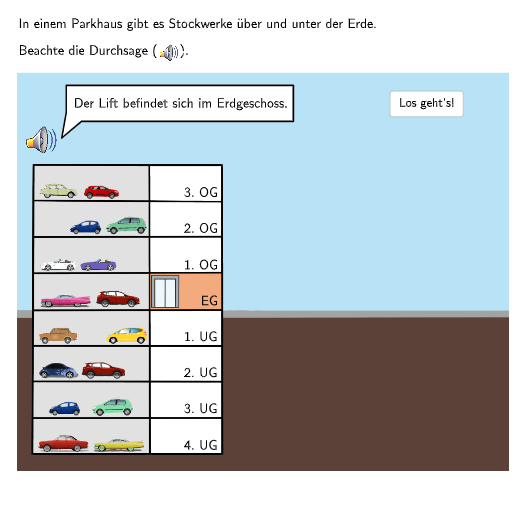
本范例通过数轴展示停车场的楼层概念,涉及整数的比较与排序。使用GeoGebra命令如If, Rotate, SelectedIndex等进行楼层的动态展示。适合小学5-6年级学生学习整数在实际情境中的应用。
GeoGebra 命令及参数
If(step ≤ 6, Fa, Fb) → FRotate(F + (0.8, 0), 40°, F) → F1SelectedIndex(DropDown7) → input7SelectedIndex(DropDown8) → input8SelectedIndex(DropDown6) → input6SelectedIndex(DropDown5) → input5SelectedIndex(DropDown4) → input4SelectedIndex(DropDown3) → input3Sequence(P0 + (0, (m * heightstock)), m, 0, 7) → liftpoints1Point(liftpoints1) → AIndexOf(A, liftpoints1) → stock1originalSequence(Q1 + (0, (m * heightstock)), m, 0, 7) → liftpoints2Point(liftpoints2) → CIndexOf(C, liftpoints2) → stock2originalPoint(Line[Fb, xAxis]) → GRotate(G + (0.8, 0), (180 + 40)°, G) → G1Point(Line[F1 + (0, sizebubble), xAxis]) → F3Textfield(input1) → Eingabefeld1Textfield(input2) → Eingabefeld2Point(Line[P1, xAxis]) → P2Point(Line[A, xAxis]) → BPolygon(A, A + (widthlift, 0), A + (widthlift, (-heightlift)), A + (0, (-heightlift))) → d1, f, g, h, iPoint(Line[C, xAxis]) → DPolygon(C, C + (widthlift, 0), C + (widthlift, (-heightlift)), C + (0, (-heightlift))) → d2, c, j, k, lPoint(Line[E, xAxis]) → IRotate(F + (0.8, 0), (2 * 40°), F) → F2Rotate(G + (0.8, 0), (180 + (2 * 40))°, G) → G2Point(Line[G1 + (0, (-sizebubble) - 0.5), xAxis]) → JIf(step > 1, (9.9009, 0.64103), (8.3, 0.64103)) → F4Join({Sequence[Text[(("\textsf\normalsize{" * ReplaceAll["" + (m) + ((". OG" * "")), "-", ""]) * "}"), (x(P0) + 1.6, ((-heightstock) * m) + y(P0) - 3.45), true, true, -0, 1], m, 1, 3], Sequence[Text[(("\textsf\normalsize{" * ReplaceAll["" + (m) + ((". UG" * "")), "-", ""]) * "}"), (x(P0) + 1.6, ((-heightstock) * m) + y(P0) - 3.45), true, true, -0, 1], m, -4, -1], Sequence[Text["\textsf\normalsize{EG}", (x(P0) + 1.86, ((-heightstock) * m) + y(P0) - 3.45), true, true, -0, 1], m, 0, 0]}) → lifttext1Join({Sequence[Text[((("\textsf\normalsize{" * "+") * m) * "}"), (x(Q0) + 0.4, ((-heightstock) * m) + y(Q0) - 3.45), true, true, -0, 1], m, 1, 3], Sequence[Text[((("\textsf\normalsize{" * "--") * abs(m)) * "}"), (x(Q0) + 0.4, ((-heightstock) * m) + y(Q0) - 3.45), true, true, -0, 1], m, -4, -1], Sequence[Text["\textsf\normalsize{0}", (x(Q0) + 0.54, ((-heightstock) * m) + y(Q0) - 3.45), true, true, -0, 1], m, 0, 0]}) → lifttext2
AI 绘图提示语参考
画一张坐标平面上的水平数轴,并在其上用旋转后的标记表示车库地板层级:从数轴上取两段基准点,分别以同一半宽度向右偏移、再围绕各自点旋转形成斜向的两组参照线。再在数轴上方选择多层对应的竖向位置,沿同一间距生成从下往上的一串竖直标注点,并用矩形地板块的轮廓在每层位置处绘出“平台”形状。加入可切换输入框用于选择不同楼层/整数步长,并在数轴附近用文字标出每层的整数或其负号形式,以及在两侧标注“EG”和“0”等文字。
以上提示语为根据原始绘图命令整理而来,仅供参考。