
六棱柱展开图(Net of Hexagonal Prism)
几何画板及绘图内容加载中,请稍等……
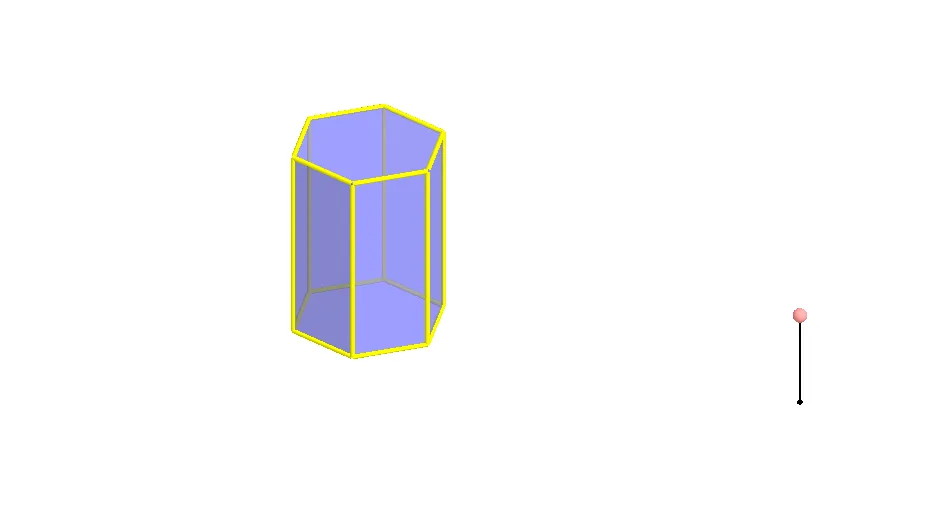
① 本范例演示了正六棱柱的展开图(net)的构造与动态展示,通过折叠与展开操作直观呈现三维立体与其二维平面展开之间的对应关系。② 核心数学概念包括立体几何中的棱柱结构、展开图(表面展开)、多边形面、棱与顶点的对应,以及空间变换(旋转、镜像)在几何作图中的应用。③ 作图要点:使用GeoGebra命令Polygon、Prism、Segment、Point、Rotate、Mirror等,构建了六棱柱的底面多边形poly1、六个侧面(如faceBCHG、faceCDIH等)以及各条棱(edgeBG、edgeCH等),并通过旋转和镜像操作生成展开后的平面图形,涉及对象包括A、B、C、D、E、F、G、H、I、J、K、L、M等点与面。④ 适合中学几何教学(初中至高中),用于帮助学生理解棱柱的展开图、表面积计算以及空间想象能力的培养,也可作为动态几何课件供教师课堂演示或学生自主探索。
GeoGebra 命令及参数
Polygon(A, B, 6, xOyPlane) → poly1, a, F, b, c, d, e, f, C, D, EPrism(poly1, A + (0, 0, 4)) → g, G, faceEFKJ, face2, face3, edge1, edgeBG, edgeCH, edgeDI, edgeEJ, edgeFK, edge2, H, edgeGH, edgeHI, edgeIJ, edgeJK, edge3, I, J, K, face1, faceBCHG, faceCDIH, faceDEJISegment(M, M + (0, 0, 2)) → hPoint(h) → NRotate(Polygon[E, D, I, J], (90° * t), Segment[D, E]) → poly2Rotate(Polygon[G, H, I, J, K, L], (90° * t), Segment[I, J]) → poly3Rotate(poly3, (90° * t), Segment[D, E]) → poly3'Rotate(Polygon[C, D, I, H], (60° * t), Segment[D, I]) → poly4Rotate(poly4, (90° * t), Segment[D, E]) → poly4'Mirror(poly4, OrthogonalPlane[Midpoint[D, E], Segment[D, E]]) → poly4'_1Rotate(poly4'_1, (90° * t), Segment[D, E]) → poly5Rotate(C, (60° * t), Segment[D, I]) → C'Mirror(Polygon[D, E, J, I], OrthogonalPlane[Midpoint[D, C'], Segment[D, C']]) → poly6Mirror(poly6, OrthogonalPlane[Midpoint[D, E], Segment[D, E]]) → poly6'Rotate(poly6, (90° * t), Segment[D, E]) → poly6'_1Rotate(poly6', (90° * t), Segment[D, E]) → poly6''Mirror(E, OrthogonalPlane[Midpoint[D, C'], Segment[D, C']]) → E'Mirror(poly4, OrthogonalPlane[Midpoint[E', C'], Segment[E', C']]) → poly4'_2Rotate(poly4'_2, (90° * t), Segment[D, E]) → poly7Rotate(poly3, (90° * t), Segment[D, E]) → poly3'_1Polygon(A, B, 6, xOyPlane) → poly8, i, R, j, k, l, m, n, O, P, QRotate(poly6', (90° * t), Segment[D, E]) → poly6''_1Rotate(poly4'_1, (90° * t), Segment[D, E]) → poly9Rotate(Polygon[E, D, I, J], (90° * t), Segment[D, E]) → poly10Rotate(poly4, (90° * t), Segment[D, E]) → poly4'_3Rotate(poly6, (90° * t), Segment[D, E]) → poly6'_2Rotate(poly4'_2, (90° * t), Segment[D, E]) → poly11
AI 绘图提示语参考
画一个正六棱柱的展开图,展示其三维立体图形与二维展开面的对应关系。首先绘制底面为正六边形的棱柱,然后通过旋转和镜像操作,将棱柱的侧面和顶面展开成一个平面图形,包含多个六边形和矩形,清晰展示各个面的位置和连接方式,帮助理解棱柱的表面展开和空间几何关系。
以上提示语为根据原始绘图命令整理而来,仅供参考。