
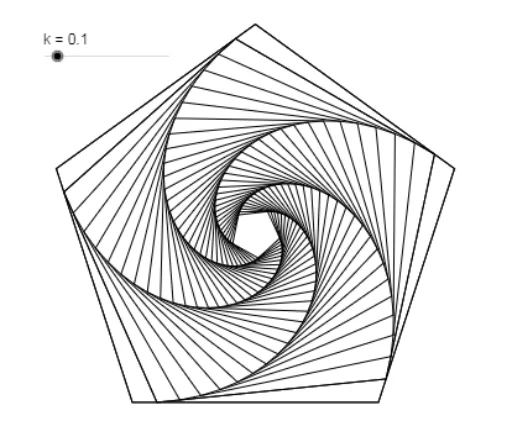
嵌套五边形
几何画板及绘图内容加载中,请稍等……
所属专题
Flip & turn
该范例展示了嵌套五边形的构造。涉及的核心数学概念包括多边形和几何作图。通过使用GeoGebra命令如Intersect、Point、Polygon、Circle等,可以构造出一系列嵌套的五边形。适合初中及以上学生学习几何作图和五边形的性质。
GeoGebra 命令及参数
Intersect(xAxis, yAxis) → APoint(xAxis) → BPolygon(A, B, 5) → poly1, a, b, c, d, e, C, D, ECircle(A, (a * k)) → fCircle(B, (a * k)) → gIntersect(f, a, 1) → FIntersect(g, b, 1) → GPolygon(F, G, 5) → poly2, h, i, j, l, m, H, I, Jnext(poly2, k) → poly3next(poly3, k) → poly4next(poly4, k) → poly5next(poly5, k) → poly6next(poly6, k) → poly7next(poly7, k) → poly8next(poly8, k) → poly9next(poly9, k) → poly10next(poly10, k) → poly11next(poly11, k) → poly12next(poly12, k) → poly13next(poly13, k) → poly14next(poly14, k) → poly15next(poly15, k) → poly16next(poly16, k) → poly17next(poly17, k) → poly18next(poly18, k) → poly19next(poly19, k) → poly20next(poly20, k) → poly21next(poly21, k) → poly22next(poly22, k) → poly23next(poly23, k) → poly24next(poly24, k) → poly25next(poly25, k) → poly26next(poly26, k) → poly27next(poly27, k) → poly28next(poly28, k) → poly29next(poly29, k) → poly30next(poly30, k) → poly31next(poly31, k) → poly32next(poly32, k) → poly33
AI 绘图提示语参考
画一系列嵌套的五边形,从坐标原点开始,每个五边形与前一个五边形外接圆相切,并按比例缩小,共绘制25个嵌套的五边形,展示出由大到小的几何级数效果。
以上提示语为根据原始绘图命令整理而来,仅供参考。