
乘以十的幂的数位移动演示
几何画板及绘图内容加载中,请稍等……
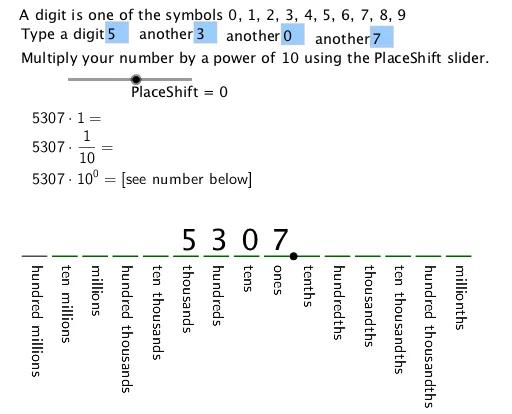
①本范例演示了乘以十的幂如何使数字的各位在数位上向左或向右移动;②涉及的核心数学概念为乘法、数位、十进制系统;③作图要点——从下方『构造摘要』提炼用到了Text、Segment、Translate、Textfield、Sequence、If等GeoGebra命令/对象;④适合初中数学教学,用于帮助学生理解数位运算和十进制系统的性质。
GeoGebra 命令及参数
Text(RotateText["ones", 270°], (-1, -0.5), true, true) → text2Text(RotateText["tens", 270°], (-2, -0.5), true, true) → text3Text(RotateText["hundreds", 270°], (-3, -0.5), true, true) → text1Text(RotateText["thousands", 270°], (-4, -0.5), true, true) → text4Text(RotateText["ten thousands", 270°], (-5, -0.5), true, true) → text5Segment(B, C) → gText(RotateText["tenths", 270°], (0, -0.5), true, true) → text6Text(RotateText["hundredths", 270°], (1, -0.5), true, true) → text7Text(RotateText["thousandths", 270°], (2, -0.5), true, true) → text8Text(RotateText["ten thousandths", 270°], (3, -0.5), true, true) → text9Translate(A, v) → A'Translate(A', v) → A''Translate(A'', v) → A'''Text(RotateText["hundred thousands", 270°], (-6, -0.5), true, true) → text22Text(RotateText["millions", 270°], (-7, -0.5), true, true) → text23Text(RotateText["ten millions", 270°], (-8, -0.5), true, true) → text24Text(RotateText["hundred millions", 270°], (-9, -0.5), true, true) → text25Text(RotateText["hundred thousandths", 270°], (4, -0.5), true, true) → text26Text(RotateText["millionths", 270°], (5, -0.5), true, true) → text27Text(RotateText["ten millionths", 270°], (6, -0.5), true, true) → text28Textfield(d1) → InputBox1Textfield(d2) → InputBox2Textfield(d3) → InputBox3Textfield(d4) → InputBox4Sequence(Segment[Translate[B, (i, 0)], Translate[C, (i, 0)]], i, 1, 14) → L_1If(PlaceShift < 0, FractionText[10^(PlaceShift)], 10^(PlaceShift)) → text32
AI 绘图提示语参考
绘制一个数位表,水平方向排列从十亿位到千万分位的数位标签,每个标签竖直旋转90度显示,分别标注在对应的整数位和小数位下方。在数位表上方放置一个可拖动的数字输入框,用于输入一个数。在数位表下方绘制一条水平线段,表示数字移动的基准线。用箭头或平移示意数字乘以10的幂时,数字的每一位向左或向右移动相应位数,并在旁边显示乘数(如10的幂次)的分数或整数形式。整体布局清晰,适合教学演示。
以上提示语为根据原始绘图命令整理而来,仅供参考。