
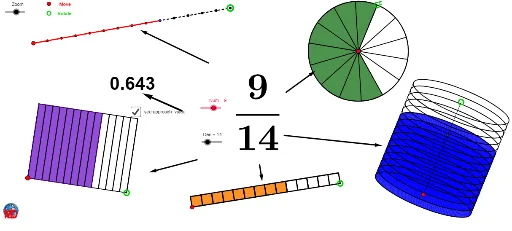
同一分数的多种几何视图演示
几何画板及绘图内容加载中,请稍等……
所属专题
The Fractions book
① 本范例演示如何用几何图形从不同角度直观展示同一个分数的大小与结构。② 涉及核心数学概念:分数的几何表示、比例关系、坐标几何中的线段与圆、数列与向量的应用。③ 作图要点:使用 Circle、Point、Segment、Intersect、OrthogonalLine、Ellipse、Sequence、CurveCartesian、Line、Polygon、Element、CircleSector、Take、Vector 等命令,构建分数的圆形扇区、线段划分、向量位移及动态序列,实现多视图切换。④ 适用于初中分数教学、高中解析几何与向量入门,也可作为 GeoGebra 几何作图与动画演示的教学素材。
GeoGebra 命令及参数
Circle(D, Zoom) → d_1Circle(D, (0.25 * Zoom)) → tCircle(D, (2 * Zoom)) → pPoint(p) → MSegment(D, M) → lIntersect(t, l) → Q,OrthogonalLine(D, l) → nIntersect(d_1, n) → N, OEllipse(N, O, Q) → bCircle(C, (2 * Zoom)) → qCircle(J, (3 * Zoom)) → kCircle(B, (4 * Zoom)) → fCircle(A, Zoom) → ePoint(e) → EPoint(f) → FSequence(Rotate[E, i, A], i, 0, 6.283185307179586, (2 * π / Den)) → liste1Sequence(Translate[B, Vector[(i * Vector[B, F])]], i, 0, 1, 1 / Den) → liste2Point(k) → KCurveCartesian(x(D) + (Zoom * cos(i)), y(D) + ((0.25 * Zoom) * sin(i)), i, 0, 6.28319) → b_1Sequence(Translate[J, Vector[(i * Vector[J, K])]], i, 0, 1, 1 / Den) → liste3Segment(B, F) → cCircle(A, E) → dSequence(Translate[b, Vector[(i * Vector[D, M])]], i, 0, 1, 1 / Den) → liste5Point(q) → GSegment(J, K) → jSequence(Polygon[Element[liste3, i], Element[liste3, i + 1], 4], i, 1, Length[liste3]) → liste3bSegment(C, G) → gOrthogonalLine(C, g) → hCircle(C, (1.5 * Zoom)) → sIntersect(s, h) → H, LLine(L, g) → iLine(G, h) → mIntersect(i, m) → IPolygon(C, G, I, L) → poly1, c_1, g_1, i_1, l_1Sequence(Translate[C, Vector[(i * Vector[C, G])]], i, 0, 1, 1 / Den) → liste4Sequence(Translate[L, Vector[(i * Vector[C, G])]], i, 0, 1, 1 / Den) → liste6Sequence(Segment[A, Element[liste1, i]], i, 1, Length[liste1]) → liste7Sequence(Segment[Element[liste4, i], Element[liste6, i]], i, 1, Length[liste6]) → liste8Element(liste1, Num + 1) → AACircleSector(A, E, AA) → e_1Element(liste2, Num + 1) → BBSegment(B, BB) → a_1Take(liste5, 1, Num + 1) → liste9Element(liste4, Num + 1) → CCElement(liste6, Num + 1) → LLPolygon(C, CC, LL, L) → poly2, c_2, cc, ll, l_2Take(liste3b, 1, Num) → liste10Line(M, n) → f_1Intersect(b, n) → P, RLine(R, l) → h_1Line(P, h_1) → j_1Intersect(f_1, h_1) → SIntersect(f_1, j_1) → TSegment(S, R) → k_1Segment(T, P) → m_1Vector(V, W) → uVector(Z, A_1) → vVector(B_1, C_1) → wVector(D_1, E_1) → zVector(F_1, G_1) → rCircle(D, pp) → p_1Intersect(p_1, l) → J_1,Sequence(Translate[b, Vector[(i * Vector[D, J_1])]], i, 0, 1, 0.01) → liste11Vector(K_1, L_1) → u_1
AI 绘图提示语参考
画一个分数的多种几何视图。首先绘制三个同心圆和一个外接圆,再画出一条线段和两个交点。基于这些点,创建一个椭圆和多个圆形。接着,利用旋转和向量平移生成动态序列,展示分数的不同几何表示。最后,结合这些元素,通过分割、连接和动态变换,呈现分数的坐标几何和向量关系。
以上提示语为根据原始绘图命令整理而来,仅供参考。