
筝形面积 by hope0019
几何画板及绘图内容加载中,请稍等……
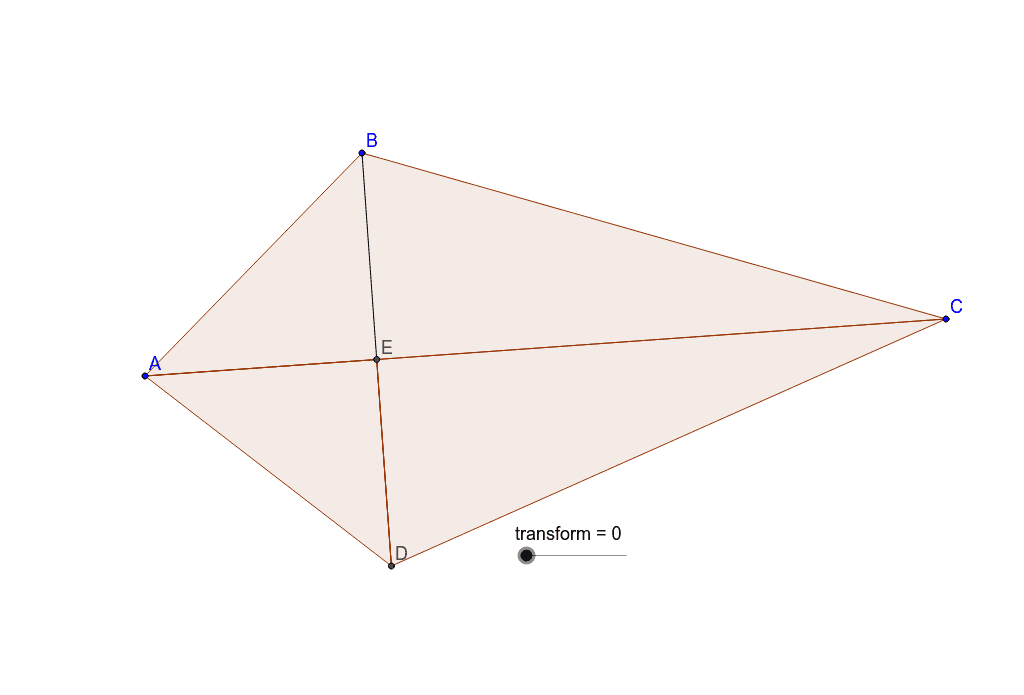
这个范例演示了如何通过几何作图计算筝形的面积。涉及的核心数学概念包括筝形的性质和三角函数。通过使用GeoGebra命令如Circle, Intersect, Polygon, Segment等,可以构造筝形并计算其面积。适合初中及以上学生学习几何和三角函数。
GeoGebra 命令及参数
Circle(A, B) → cCircle(C, B) → dIntersect(c, d, 2) → DPolygon(A, B, C) → poly1, c_1, a, bSegment(B, D) → eIntersect(b, e) → EPolygon(A, E, D) → poly2, d_1, a_1, e_1Polygon(E, D, C) → poly3, c_2, e_2, d_2OrthogonalLine(A, b) → fOrthogonalLine(B, e) → gIntersect(f, g) → FMidpoint(c_1) → GMidpoint(e_1) → HCircle(H, D) → hCircle(G, A) → kRotate(D, transform°, H) → D'Rotate(A, (-(transform°)), G) → A'Rotate(E, transform°, G) → E'OrthogonalLine(D', e_1) → iOrthogonalLine(A', c_1) → jSegment(F, E) → lOrthogonalLine(E', l) → mIntersect(m, l) → IIntersect(j, c_1) → JPolygon(I, D', J) → poly4, j_1, i_1, d'Intersect(i, e_1) → KPolygon(J, I, K) → poly5, k_1, j_2, i_2OrthogonalLine(C, g) → nIntersect(g, n) → LMidpoint(E, L) → MMidpoint(D, C) → NCircle(N, C) → pCircle(M, C) → qSegment(D, C) → rRotate(D, (-(transform°)), N) → D'_1Rotate(C, transform°, M) → C'Rotate(E, (-(transform°)), M) → E'_1Segment(E, L) → sOrthogonalLine(E'_1, s) → tOrthogonalLine(D'_1, r) → b_1OrthogonalLine(C', a) → f_1Intersect(t, s) → OIntersect(f_1, a) → PIntersect(b_1, r) → QPolygon(P, O, Q) → poly6, q_1, p_1, o
AI 绘图提示语参考
绘制一个菱形ABCD,连接对角线AC和BD,构造它们的交点E。以E为圆心,分别以A、B、C、D为圆周上的点画圆,构造这些圆的交点F、G、H、I。连接对角线AC和BD的中点J和K,构造以J、K为圆心,以AC和BD为直径的圆,构造它们的交点L和M。连接点A、B、C、D、E、F、G、H、I、J、K、L、M,构造多边形并计算其面积。
以上提示语为根据原始绘图命令整理而来,仅供参考。