
四边形周长计算
几何画板及绘图内容加载中,请稍等……
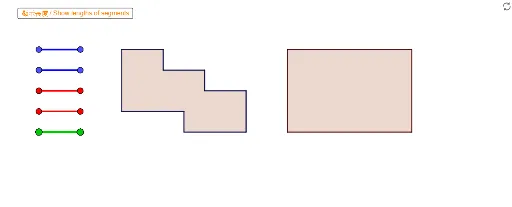
本范例演示如何计算不规则四边形的周长。涉及的核心数学概念包括几何作图和向量。通过使用GeoGebra命令如Segment和Polygon,可以直观地展示四边形的构造过程。适合小学四年级学生学习几何图形的周长计算。
GeoGebra 命令及参数
Segment(Blue01a, Blue01b) → Blue01Segment(Blue02a, Blue02b) → Blue02Segment(Blue03a, Blue03b) → Blue03Segment(Blue04a, Blue04b) → Blue04Segment(Red01a, Red01b) → Red01Segment(Red02a, Red02b) → Red02Segment(Red03a, Red03b) → Red03Segment(Red04a, Red04b) → Red04Segment(Blue05a, Blue05b) → Blue05Segment(Red05a, Red05b) → Red05Segment(Blue06a, Blue06b) → Blue06Segment(Red06a, Red06b) → Red06Segment(Blue07a, Blue07b) → Blue07Segment(Blue08a, Blue08b) → Blue08Segment(Blue09a, Blue09b) → Blue09Segment(Blue10a, Blue10b) → Blue10Segment(Blue11a, Blue11b) → Blue11Segment(Blue12a, Blue12b) → Blue12Segment(Red07a, Red07b) → Red07Segment(Red08a, Red08b) → Red08Segment(Red09a, Red09b) → Red09Segment(Red10a, Red10b) → Red10Segment(Red11a, Red11b) → Red11Segment(Red12a, Red12b) → Red12Segment(Green01a, Green01b) → Green01Segment(Green02a, Green02b) → Green02Segment(Green03a, Green03b) → Green03Segment(Green04a, Green04b) → Green04Segment(Green05a, Green05b) → Green05Segment(Green06a, Green06b) → Green06Segment(Green07a, Green07b) → Green07Segment(Green08a, Green08b) → Green08Segment(Green09a, Green09b) → Green09Segment(Green10a, Green10b) → Green10Segment(Green11a, Green11b) → Green11Segment(Green12a, Green12b) → Green12Segment(Green13a, Green13b) → Green13Segment(Green14a, Green14b) → Green14Polygon(VPoly2Fa, VPoly2Fb, VPoly2Fc, VPoly2Fd) → Poly2F, SPoly2Fa, SPoly2Fb, SPoly2Fc, SPoly2FdPolygon(VPoly2Ma, VPoly2Mb, VPoly2Mc, VPoly2Md) → Poly2M, SPoly2Ma, SPoly2Mb, SPoly2Mc, SPoly2MdPolygon(VPoly1Fa, VPoly1Fb, VPoly1Fc, VPoly1Fd, VPoly1Fe, VPoly1Ff, VPoly1Fg, VPoly1Fh, VPoly1Fi, VPoly1Fj) → Poly1F, SPoly1Fa, SPoly1Fj, SPoly1Fb, SPoly1Fc, SPoly1Fd, SPoly1Fe, SPoly1Ff, SPoly1Fg, SPoly1Fh, SPoly1FiPolygon(VPoly1Ma, VPoly1Mb, VPoly1Mc, VPoly1Md, VPoly1Me, VPoly1Mf, VPoly1Mg, VPoly1Mh, VPoly1Mi, VPoly1Mj) → Poly1M, SPoly1Ma, SPoly1Mj, SPoly1Mb, SPoly1Mc, SPoly1Md, SPoly1Me, SPoly1Mf, SPoly1Mg, SPoly1Mh, SPoly1MiSegment(A, B) → R1Segment(C, D) → R2Segment(E, F) → R3Segment(G, H) → R4Segment(I, J) → L1Segment(K, L) → L2Segment(M, N) → L3Segment(O, P) → L4Segment(Q, R) → L5Segment(S, T) → L6Segment(U, V) → L7Segment(W, Z) → L8Segment(A_1, B_1) → L9Segment(C_1, D_1) → L10
AI 绘图提示语参考
画一个不规则四边形,用蓝色、红色和绿色的线段分别构成四条边,展示如何通过连接点来形成多边形,并标注出每条边和每个顶点,以便计算周长,适合学习几何构造和向量概念。
以上提示语为根据原始绘图命令整理而来,仅供参考。