
隐式曲线交点扫描法演示
几何画板及绘图内容加载中,请稍等……
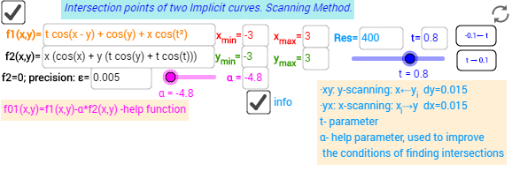
①本范例演示了如何通过扫描法寻找两条隐式曲线的交点;②涉及的核心数学概念包括隐式曲线、交点计算、扫描法原理;③作图要点提炼自构造摘要,使用了Textfield, RemoveUndefined, Zip, TableText, ImplicitCurve, Polygon等GeoGebra命令与对象;④适合高中及以上数学学习者,用于理解隐式曲线交点求解方法及编程思想。
GeoGebra 命令及参数
Textfield(Nn) → InputBox4Textfield(e) → InputBox5Textfield(x_{min}) → InputBox6Textfield(x_{max}) → InputBox7Textfield(y_{min}) → InputBox8Textfield(y_{max}) → InputBox9RemoveUndefined(Join[Sequence[Zip[a + (0, y_{min} + (dy2 * (s0 - 1))), a, {Roots[f01(x, y_{min} + (dy2 * (s0 - 1))), x_{min}, x_{max}]}], s0, 1, Nn + 1]]) → RootsxyRemoveUndefined(Join[Sequence[Zip[a + (0, x_{min} + (dx2 * (s0 - 1))), a, {Roots[f01(x_{min} + (dx2 * (s0 - 1)), x), y_{min}, y_{max}]}], s0, 1, Nn + 1]]) → RootsyxRemoveUndefined(KeepIf[abs(f2(x(A), y(A))) ≤ e, A, Rootsxy]) → listxy_0RemoveUndefined(KeepIf[abs(f2(y(A), x(A))) ≤ e, A, Rootsyx]) → listyx_0Zip((x(a), y(a)), a, listxy_0) → listxya_0Zip((y(a), x(a)), a, listyx_0) → listyxa_0TableText({Join[{{"Roots_{yx}"}, listyxa_0}]}, "vr") → text34TableText({Join[{{"Roots_{xy}"}, listxya_0}]}, "vr") → text23Textfield(α) → InputBox2ImplicitCurve(f1(x, y)) → aImplicitCurve(f2(x, y)) → bImplicitCurve(f01(x, y)) → cPolygon((x_{min}, y_{min}), (x_{max}, y_{min}), (x_{max}, y_{max}), (x_{min}, y_{max})) → poly1, f, g, h, iTextfield(f1) → InputBox1Textfield(f2) → InputBox3RemoveUndefined(Zip[(x(a), y(a)), a, Join[{listxya_0, listyxa_0}]]) → listxyres0Textfield(t) → InputBox10
AI 绘图提示语参考
绘制两个隐式曲线的交点,使用扫描法查找。首先设置参数范围和误差阈值,然后通过扫描法在指定范围内寻找交点,并将满足条件的交点连接起来。最后,绘制两条隐式曲线和参数范围构成的矩形,标注所有交点及其坐标。
以上提示语为根据原始绘图命令整理而来,仅供参考。