
帕斯卡三角形交互式演示
几何画板及绘图内容加载中,请稍等……
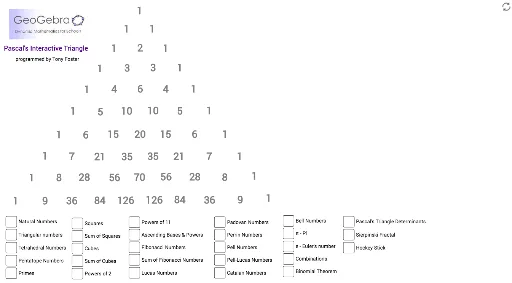
①本范例演示了帕斯卡三角形的构建与性质,通过交互式操作展示其数字规律与对称性;②涉及核心数学概念包括数列、组合数学、二项式定理、几何变换;③作图要点运用了Polygon(多边形)、Segment(线段)、Point(点)、Rotate(旋转)、Intersect(交点)等GeoGebra命令与对象;④适合高中及以上数学学习者,用于理解组合数学与几何作图的结合应用。
GeoGebra 命令及参数
Polygon(A, B, 3) → poly1, n, f_1, h_1, CPolygon(A_1, B_1, 3) → poly1_1, n_1, f_2, h_2, C_1Polygon(A_2, B_2, 3) → poly1_2, n_2, f_3, h_4, C_2Polygon(A_3, B_3, 3) → poly1_3, n_3, f_4, h_5, C_3Segment(H, I) → g_1Segment(H_1, I_1) → g_2Segment(H_2, I_2) → g_3Segment(H_3, I_3) → g_4Segment(H_4, I_4) → g_5Segment(H_5, I_5) → g_6Segment(H_6, I_6) → g_7Segment(H_7, I_7) → g_8Segment(L, M) → j_1Point(j_1) → NSegment(N, O) → k_1Segment(M, P) → l_1Segment(Q, R) → i_1Segment(S, T) → m_1Segment(W, Z) → p_1Segment(D_1, E_1) → q_1Segment(J_1, K_1) → r_1Segment(L_1, M_1) → s_1Segment(P_1, Q_1) → t_1Segment(P_2, Q_2) → t_2Segment(P_3, Q_3) → t_3Segment(P_4, Q_4) → t_4Segment(P_5, Q_5) → t_5Segment(P_6, Q_6) → t_6Segment(M_2, N_2) → a_1Segment(M_3, N_3) → a_2Segment(M_4, N_4) → a_3Segment(T_2, U_2) → e_1Segment(T_3, U_3) → e_2Segment(T_4, U_4) → e_3Segment(V_2, W_2) → c_1Polygon(Z_2, D_3, 4) → poly2, i_2, j_2, k_2, l_2, E_3, F_3Segment(C_4, D_4) → b_1Segment(D_4, E_4) → d_1Segment(F_4, G_4) → m_2Segment(G_4, J_4) → p_2Point(Circle[K_4, 1.8503665963061509]) → L_4Point(Circle[K_5, 1.8503665963061509]) → L_5Point(Circle[K_6, 1.8503665963061509]) → L_6Point(Circle[R_4, 2.557437046452202]) → S_4Point(Circle[W_4, Segment[R_4, S_4]]) → Z_4Rotate(Z_4 + (Segment[S_4, V_4], 0), Angle[V_4 - S_4] + Angle[Z_4 - W_4] - Angle[S_4 - R_4], Z_4) → A_5Point(Circle[R_5, 2.557437046452202]) → S_5Polygon(R_5, S_5, V_5) → poly4_1, v_1, r_2, s_2Point(Circle[W_5, Segment[R_5, S_5]]) → Z_5Rotate(Z_5 + (Segment[S_5, V_5], 0), Angle[V_5 - S_5] + Angle[Z_5 - W_5] - Angle[S_5 - R_5], Z_5) → A_6Segment(B_5, C_5) → q_2Segment(B_5, D_5) → b_2Point(Circle[E_5, 1.6189147873363703]) → F_5Point(Circle[F_5, 1.9564697237334108]) → J_5Point(Circle[N_5, 1.8399017340850627]) → T_5Polygon(N_5, T_5, U_5) → poly5, u_5, n_5, t_7Point(Circle[J_5, 2.1812936747652714]) → B_6Point(q_2) → D_6Point(Circle[D_6, 2.1766130533787167]) → F_6Point(Circle[E_6, 2.218805743574816]) → J_6Point(Circle[N_6, 2.076966620956787]) → R_6Point(Circle[R_6, 2.096296584038995]) → T_6Polygon(R_6, T_6, U_6) → poly11, u_6, r_3, t_8Point(Circle[V_6, 2.149589058189039]) → W_6Polygon(V_6, W_6, Z_6) → poly12, z_6, v_6, w_6Point(Circle[A_7, 2.1077280446071045]) → B_7Polygon(A_7, B_7, C_7) → poly6, c_7, a_7, b_7Intersect(n_5, t_7) → D_7Point(Circle[F_7, 2.10664200664006]) → G_7Polygon(F_7, G_7, J_7) → poly10, j_7, f_8, g_{11}Point(q_2) → E_7Point(Circle[E_7, 2.284619007065576]) → L_7Polygon(E_7, L_7, M_7) → poly7, m_7, e_7, l_7Point(Circle[P_7, 2.090488994709375]) → Q_7Point(Circle[N_7, 1.9992802498775035]) → O_7Polygon(N_7, O_7, S_7) → poly8, s_7, n_7, o_7Point(Circle[K_7, 2.02232664935158]) → T_7Polygon(K_7, T_7, U_7) → poly9, u_7, k_7, t_9Point(Circle[V_7, 2.1250291678347835]) → W_7Polygon(V_7, W_7, Z_7) → poly13, z_7, v_7, w_7Intersect(z_7, v_7) → A_8Intersect(a_7, b_7) → B_8Segment(A_8, B_8) → c_2Point(Circle[C_8, 1.9329341587930147]) → D_8Point(Circle[F_8, 1.8274213340827847]) → G_8Polygon(F_8, G_8, H_8) → poly4, h_8, f_6, g_{10}Point(Circle[I_8, 1.8438621070570156]) → J_8Polygon(I_8, J_8, K_8) → poly14, k_8, i_8, j_8
AI 绘图提示语参考
绘制一个展示帕斯卡三角形构造和性质的交互式图形,包含多个三角形和线段,通过旋转和相交操作构建出帕斯卡三角的几何形态,并突出其数字规律和对称性,适合高中及以上数学学习。
以上提示语为根据原始绘图命令整理而来,仅供参考。