
半球体积计算
几何画板及绘图内容加载中,请稍等……
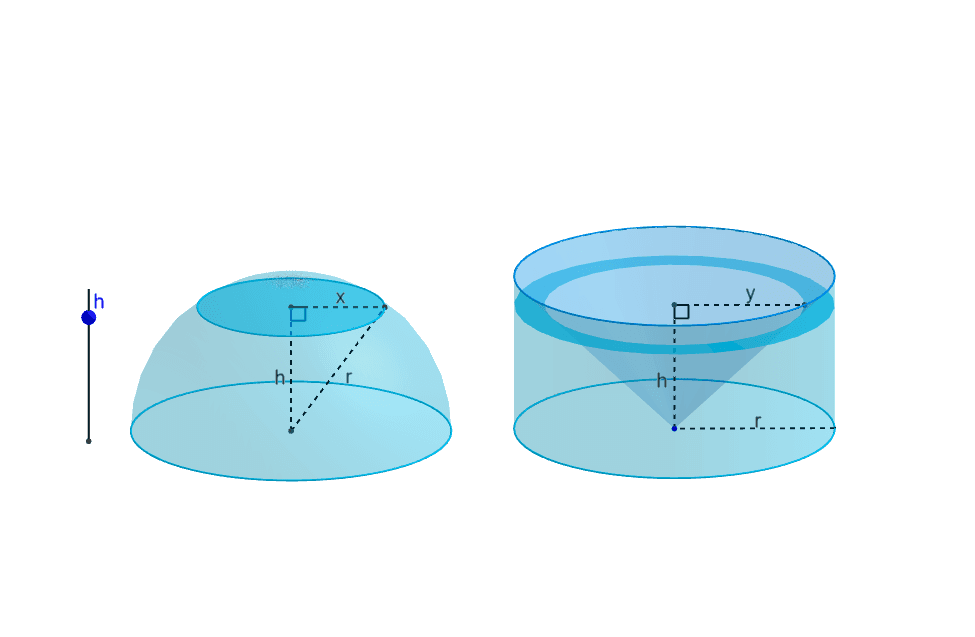
①本范例演示了如何通过 GeoGebra 绘制半球并计算其体积;②涉及的核心数学概念包括立体几何、体积计算公式、三维图形构造;③作图要点——从下方『构造摘要』提炼用到了 Circle(圆)、Point(点)、Sphere(球体)、Cylinder(圆柱)、Cone(圆锥)、Segment(线段)、OrthogonalPlane(正交平面)、IntersectPath(路径相交)、Intersect(相交)、Rotate(旋转)、Polygon(多边形)、Sequence(序列)、Angle(角度)、Surface(曲面)等 GeoGebra 命令/对象;④适合高中阶段学习立体几何的学生,可用于理解半球体积公式的推导过程和三维图形的构建方法。
GeoGebra 命令及参数
Circle(A, 1) → cCircle(B, 1) → dPoint(c) → CSphere(A, C) → aCylinder(B, D, 1) → b, e, f, gCone(D, B, 1) → h, k, iSegment(E, E + (0, 0, 1)) → jPoint(j) → FOrthogonalPlane(F, j) → lIntersectPath(l, a) → pIntersectPath(l, h) → qIntersectPath(l, b) → rPoint(q) → HIntersect(Ray[G, H], r) → I,Rotate(H, α, G) → H'Rotate(I, α, G) → I'Polygon(H, H', I', I) → poly1, h_1, h', i', i_1Sequence(Rotate[poly1, (k * α), G], k, 0, n) → list1Intersect(Ray[J, J + (1, 0, 0)], p) → K,Segment(A, J) → sSegment(J, K) → tSegment(K, A) → a_1Intersect(Ray[G, G + (1, 0, 0)], q) → L, MSegment(B, G) → b_1Segment(G, L) → c_1Circle(s, C) → d_1Angle(A, J, K) → βAngle(B, G, L) → γCircle(B, 1, Segment[B, B + (0, 0, 1)]) → e_1Surface((sqrt(1 - h^(2)) * cos(θ)) + x(A), (sqrt(1 - h^(2)) * sin(θ)) + y(A), h, θ, 0, 6.28319, h, 0, 1) → oPoint(e) → NSegment(B, N) → m