
网格构造
几何画板及绘图内容加载中,请稍等……
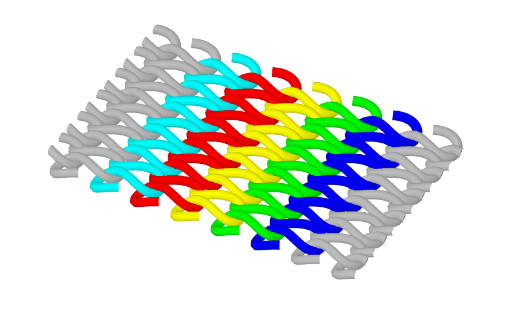
该范例展示了网格的构造过程。它涉及相似三角形、数列和旋转等核心数学概念。通过使用CurveCartesian和Sequence命令,可以构造出一系列的点和曲线。适合用于高中数学教学,帮助学生理解网格的生成原理。
GeoGebra 命令及参数
CurveCartesian(t - (a * sin((type * t))), (b * sin(t)), (h * cos((type * t))), t, ((-n) * π), (n * π)) → c3CurveCartesian(t - (a * sin((type * t))), (b * sin(t)) + d, (h * cos((type * t))), t, ((-n) * π), (n * π)) → c2CurveCartesian(t - (a * sin((type * t))), (b * sin(t)) + (2 * d), (h * cos((type * t))), t, ((-n) * π), (n * π)) → c1CurveCartesian(t - (a * sin((type * t))), (b * sin(t)) - d, (h * cos((type * t))), t, ((-n) * π), (n * π)) → c4CurveCartesian(t - (a * sin((type * t))), (b * sin(t)) - (2 * d), (h * cos((type * t))), t, ((-n) * π), (n * π)) → c5Sequence(CurveCartesian[t - (a * sin((type * t))), (b * sin(t)) + (i * d), (h * cos((type * t))), t, ((-n) * π), (n * π)], i, 3, 6) → liste1Sequence(CurveCartesian[t - (a * sin((type * t))), (b * sin(t)) - (i * d), (h * cos((type * t))), t, ((-n) * π), (n * π)], i, 3, 6) → liste2
AI 绘图提示语参考
绘制一个网格结构,包含一系列正弦曲线,这些曲线通过调整垂直偏移量形成层叠效果。首先画出中心线,然后向上和向下分别绘制多条曲线,每条曲线的偏移量依次增加或减少固定的距离。使用旋转和相似三角形的概念,展示网格的生成过程。整体呈现对称的波浪状图案,适合用于数学教育中解释网格构造原理。
以上提示语为根据原始绘图命令整理而来,仅供参考。