
绘制二次函数图像 by cemccourseware
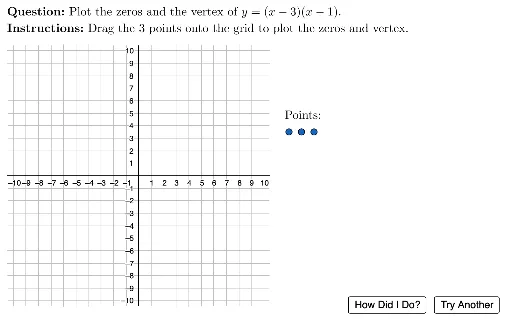
几何画板及绘图内容加载中,请稍等……
①本范例演示如何绘制二次函数图像,并展示其关键特征如顶点、对称轴和开口方向;②涉及的核心数学概念包括二次函数、顶点式、对称轴、开口方向、函数图像变换;③作图要点提炼自构造摘要,使用了Sequence, Flatten, Point, UnicodeToLetter, LaTeX, Element, Random, Vertex, ActiveLbl等GeoGebra命令和对象;④适合高中阶段学生学习二次函数图像的绘制与性质分析,也可用于函数图像变换的教学演示。
GeoGebra 命令及参数
Sequence((i, 3.5), i, 12, 15, 1) → PointSpaceFlatten(Sequence[Sequence[(i, j), i, -10, 10, 1], j, -10, 10, 1]) → GridSpacePoint(Union[GridSpace, {Element[PointSpace, 3]}]) → P3Point(Union[GridSpace, {Element[PointSpace, 2]}]) → P2Point(Union[GridSpace, {Element[PointSpace, 1]}]) → P1UnicodeToLetter(10007) → xmarkUnicodeToLetter(10003) → cmarkLaTeX("\text{Points:}") → txtPointLblElement(pValues, Random[1, 4]) → pValElement(tValues, Random[1, 6]) → tValRandom(1, 2) → kValVertex(hintFunc) → vPt, , ,LaTeX(If[pVal ≟ 1, "", If[pVal ≟ -1, "-", ("" * pVal)]]) → txtEqnP1LaTeX(If[sVal ≟ 0, ("" * factor1), (("(" * factor1) * ")")]) → txtEqnP2LaTeX(If[tVal ≟ 0, ("" * factor2), (("(" * factor2) * ")")]) → txtEqnP3LaTeX(chkUserInput) → fbCorrectLaTeX("\text{Plot all three points before \\checking your work.}") → fbNotDoneLaTeX("\text{The three points you should plot are the \\two zeros and the vertex. Please try again.}") → fbTryAgainActiveLbl(activePoint, GridSpace) → pointLabelLaTeX((((((((((((("\text{The zeros are \(" * sVal) * "\) and \( ") * tVal) * "\).}\\ \text{The axis of symmetry is \(x= ") * x(vPt)) * "\).}\\ \text{The \(x\)-coordinate of the vertex is \( ") * x(vPt)) * "\).}\\ \text{Find the \(y\)-coordinate of the vertex by}\\\text{substituting \(x=") * x(vPt)) * "\) into the equation}\\ ") * txtEqn) * ".")) → fbFinalLaTeX((((("\text{\textbf{Question: }" * MainInstruc) * "\\\textbf{Instructions: }") * SpecInstruc) * "}")) → allInstruc
AI 绘图提示语参考
绘制一个二次函数的图像,在坐标网格中显示其抛物线。图中需要标出三个关键点:两个零点(与x轴的交点)和顶点。网格由均匀分布的点阵构成,其中三个点被突出标记为可移动的点。抛物线应通过这三个点,并显示对称轴(一条竖直虚线穿过顶点)。图中还包含文字标签,说明零点的位置、对称轴方程以及顶点的x坐标,并提示用户先绘制三个点再检查答案。整体布局包含坐标轴、网格点和抛物线,用于练习二次函数的图像特征。
以上提示语为根据原始绘图命令整理而来,仅供参考。