
分数比较的几何可视化演示:通过扇形与线段直观对比分数大小
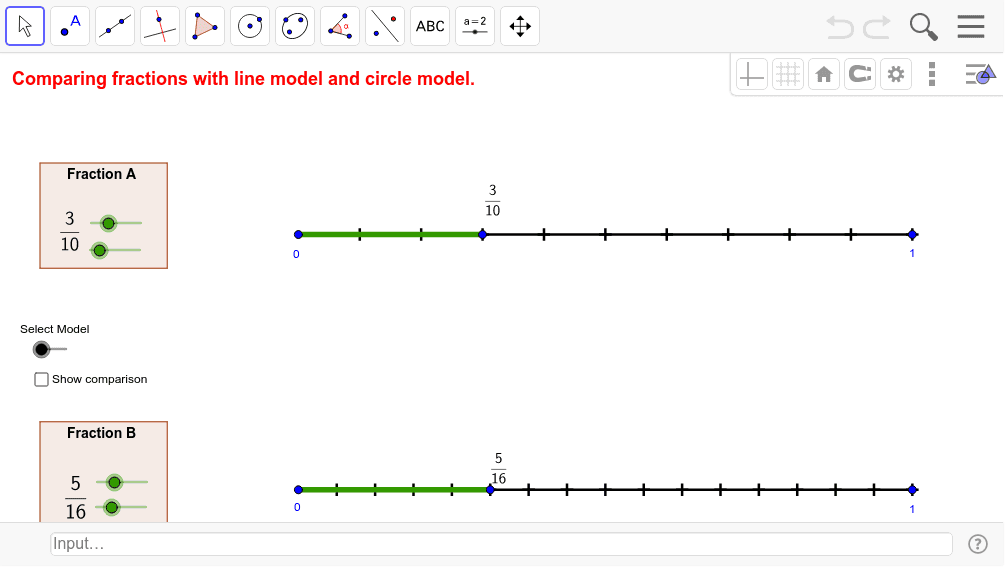
几何画板及绘图内容加载中,请稍等……
本范例通过几何图形直观演示分数大小的比较方法。核心数学概念涉及分数的意义、不等式关系及几何面积表示。作图要点利用 GeoGebra 的 Segment 命令绘制基准线段,使用 Circle 和 CircleSector 命令构建表示分母与分子的扇形区域,并通过 Rotate 命令调整角度以匹配分数值,Polygon 用于辅助显示。适合初中及以上学生理解抽象分数概念,辅助教学或自学。
GeoGebra 命令及参数
Segment(A, A + (unitsize1, 0)) → line1Segment(B, B + (unitsize2, 0)) → line2Sequence((x(A) + i * unitsize1 / denominator1, y(A)), i, 1, denominator1) → numdots1Sequence((x(B) + i * unitsize2 / denominator2, y(B)), i, 1, denominator2) → numdots2Segment(E, (x(E), y(E) - (y(A) - y(B)))) → showcomparison_1Segment(A, E) → showfrac1_1Segment(B, F) → showfrac2_1Circle(G, unitradius) → cPoint(c) → HSegment(G, H) → aRotate(G, 360 * ° / denominator1, G) → G'Sequence(Segment[Rotate[G, i * 360 * ° / denominator1, G], Rotate[H, i * 360 * ° / denominator1, G]], i, 1, denominator1) → denominatorwedges1Circle(I, unitradius) → dPoint(d) → JSegment(I, J) → bSequence(Segment[Rotate[I, i * 360 * ° / denominator2, I], Rotate[J, i * 360 * ° / denominator2, I]], i, 1, denominator2) → denominatorwedges2Rotate(H, numerator1 * 360 * ° / denominator1, G) → H'Rotate(J, numerator2 * 360 * ° / denominator2, I) → J'CircleSector(G, H, H') → numeratorwedge1CircleSector(I, J, J') → numeratorwedge2Polygon(K, (x(K), y(K) - boxheight), (x(K) + boxwidth, y(K) - boxheight), (x(K) + boxwidth, y(K))) → poly1, e, f, g, hPolygon(L, (x(L), y(L) - boxheight), (x(L) + boxwidth, y(L) - boxheight), (x(L) + boxwidth, y(L))) → poly2, l, i, j, k
AI 绘图提示语参考
画一个几何图形来比较分数,使用扇形和线段。首先画出两条基线,然后在基线上标记出代表分子和分母的点。用圆和扇形表示分母,每个分母分成对应数量的扇形。接着用另一种颜色的圆和扇形表示另一个分数。旋转扇形,使其中一个扇形覆盖对应分子的一部分。最后,用多边形作为背景,使图形更清晰。
以上提示语为根据原始绘图命令整理而来,仅供参考。