
函数的平移变换 by cemccourseware
几何画板及绘图内容加载中,请稍等……
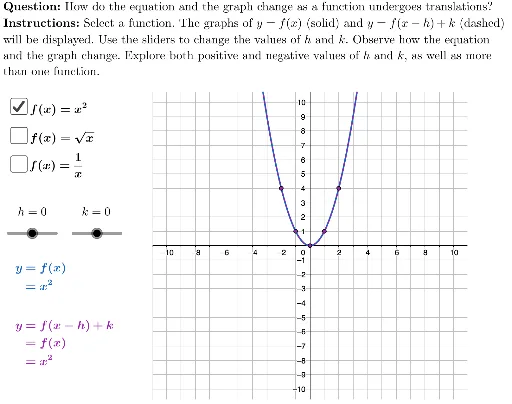
本范例演示了函数平移变换的过程。涉及的核心数学概念包括函数、二次函数、平移变换等。通过使用GeoGebra命令如Polygon、If、LaTeX等,可以动态展示函数图像的平移效果。适合高中数学教学和学习使用。
GeoGebra 命令及参数
Polygon({(-11, -10.75), (-11, 10.75), (11, 10.75), (11, -10.75)}) → viewBoxIf(showQuadratic, x^(2), If[showSquareRoot, sqrt(x), 1 / x]) → preImageFunctionLaTeX("f(x)=x^2") → quadraticBoxLabelIf(showQuadratic, If[h ≟ 0, x^(2) + k, (x - h)^(2) + k], If[showSquareRoot, sqrt(x - h) + k, 1 / (x - h) + k]) → imageFunctionLaTeX("f(x)=\sqrt{x}") → squareRootBoxLabelLaTeX("f(x)=\frac{1}{x}") → reciprocalBoxLabelAsymptote(preImageFunction) → asymptotePreImageAsymptote(imageFunction) → asymptoteImageIf(showQuadratic, {-2, -1, 0, 1, 2}, If[showReciprocal, {-2, -1, -0.5, 0.5, 1, 2}, {0, 1, 4}]) → xValuesZip((A, preImageFunction(A)), A, xValues) → preImagePointsLaTeX((((("\text{" * QUESTION) * "\\") * INSTRUCTIONS) * "}")) → TEXTLaTeX(("\vphantom{-1}k=" * k)) → kLabelLaTeX(("\vphantom{-1}h=" * h)) → hLabelZip((A, imageFunction(A)), A, Zip[B + h, B, xValues]) → imagePoints