
分数扩展因子练习
几何画板及绘图内容加载中,请稍等……
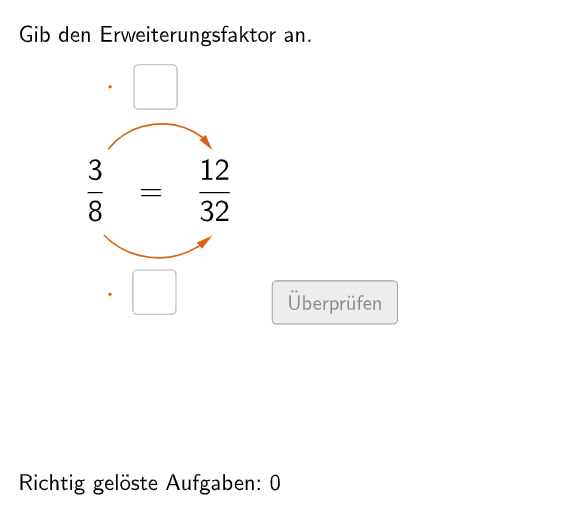
这是一个交互式分数扩展练习程序。程序随机生成一道分数扩展题目,要求学生输入正确的扩展因子。通过文本框输入答案,系统即时验证正确性,并记录正确次数和尝试次数。涉及的核心数学概念是分数的扩展(分子分母同乘一个非零整数),这是分数运算的基础技能。程序使用GeoGebra的Textfield命令创建输入框,If和Element命令实现答案验证逻辑,利用Polygon和CircleArc命令绘制分数可视化图形帮助理解。适合5-6年级学生课堂练习或课后巩固。
GeoGebra 命令及参数
Join({{8}, Shuffle[Sequence[Random[2, 10], i, 1, 100]]}) → randomNosForYElement(randomNosForY, Mod[questionCount, 100]) → numYJoin({{3}, Shuffle[Sequence[Random[1, numY - 1], i, 1, 100]]}) → randomNosForXElement(randomNosForX, Mod[questionCount, 100]) → numXJoin({{4}, Shuffle[Sequence[Random[2, 10], i, 1, 100]]}) → randomNosForZElement(randomNosForZ, Mod[questionCount, 100]) → numZIf(questionCount ≟ 1, aInput ≟ 4, aInput ≟ numZ) → correct1If(questionCount ≟ 1, bInput ≟ 4, bInput ≟ numZ) → correct2Textfield(aInput) → InputBox1Textfield(bInput) → InputBox2Polygon(PtopLeftCornerFeedback, PtopRightCornerFeedback, PbottomRightCornerFeedback, PbottomLeftCornerFeedback) → rectangleCorrect, ptopleftcornerfeedback, ptoprightcornerfeedback, pbottomrightcornerfeedback, pbottomleftcornerfeedbackDefined((aInput * bInput)) → fixedCircleArc(C, D, E) → cCircleArc(F, G, H) → dPoint(c) → IVector(I, J) → uPoint(d) → KVector(K, L) → vPolygon(PtopLeftCornerFeedback_{1}, PtopRightCornerFeedback_{1}, PbottomRightCornerFeedback_{1}, PbottomLeftCornerFeedback_{1}) → rectangleCorrect_{1}, ptopleftcornerfeedback_{1}, ptoprightcornerfeedback_{1}, pbottomrightcornerfeedback_{1}, pbottomleftcornerfeedback_{1}CircleArc(M, N, O) → eCircleArc(P, Q, R) → fPoint(e) → SVector(S, T) → wPoint(f) → UVector(U, V) → a
AI 绘图提示语参考
创建一个交互式几何练习,随机生成分数扩展问题,用文本框让学生输入扩展因子,实时验证答案并显示正确尝试次数。核心是分数扩展概念,通过多边形和圆弧可视化分数,设计给5-6年级学生练习分数运算。
以上提示语为根据原始绘图命令整理而来,仅供参考。