
多边形外角和的探索
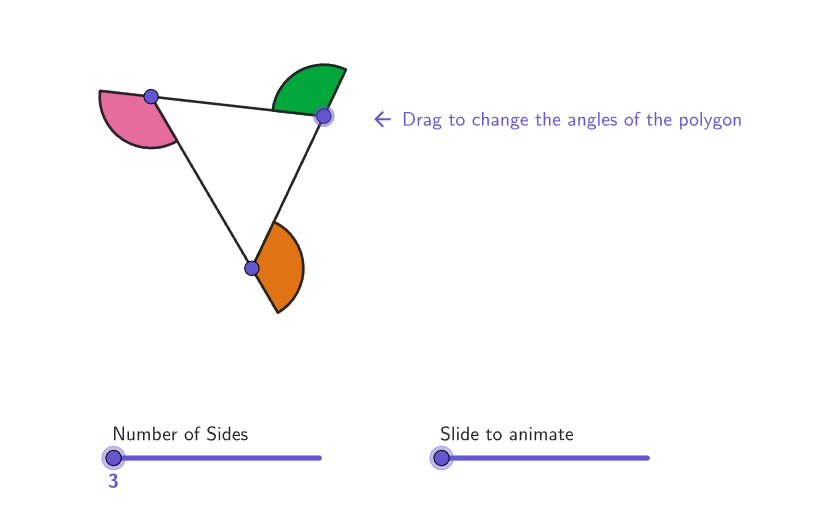
几何画板及绘图内容加载中,请稍等……
本范例通过动态演示多边形的外角,帮助学生理解多边形外角和的性质。核心数学概念包括多边形的外角和定理。使用了Polygon, DynamicCoordinates, PointToPixels等GeoGebra命令。适合初中6-8年级学生学习多边形内角和外角的相关问题。
GeoGebra 命令及参数
Polygon({(left, bottom), (left, top), (right, top), (right, bottom)}) → viewboxDynamicCoordinates(A71, If[D71, x(A71), x(C71)], If[D71, y(A71), y(C71)]) → B71PointToPixels(Corner[1], Corner[3], Corner[5], B71) → StartPointPixelsDynamicCoordinates(A31, If[D31, x(A31), x(C31)], If[D31, y(A31), y(C31)]) → B31DynamicCoordinates(A32, If[D32, x(A32), x(C32)], If[D32, y(A32), y(C32)]) → B32DynamicCoordinates(A33, If[D33, x(A33), x(C33)], If[D33, y(A33), y(C33)]) → B33DynamicCoordinates(A29, If[D29, x(A29), x(C29)], If[D29, y(A29), y(C29)]) → B29DynamicCoordinates(A30, If[D30, x(A30), x(C30)], If[D30, y(A30), y(C30)]) → B30DynamicCoordinates(A34, If[D34, x(A34), x(C34)], If[D34, y(A34), y(C34)]) → B34DynamicCoordinates(A35, If[D35, x(A35), x(C35)], If[D35, y(A35), y(C35)]) → B35DynamicCoordinates(A36, If[D36, x(A36), x(C36)], If[D36, y(A36), y(C36)]) → B36DynamicCoordinates(A39, If[D39, x(A39), x(C39)], If[D39, y(A39), y(C39)]) → B39DynamicCoordinates(A40, If[D40, x(A40), x(C40)], If[D40, y(A40), y(C40)]) → B40DynamicCoordinates(A41, If[D41, x(A41), x(C41)], If[D41, y(A41), y(C41)]) → B41DynamicCoordinates(A42, If[D42, x(A42), x(C42)], If[D42, y(A42), y(C42)]) → B42DynamicCoordinates(A43, If[D43, x(A43), x(C43)], If[D43, y(A43), y(C43)]) → B43DynamicCoordinates(A44, If[D44, x(A44), x(C44)], If[D44, y(A44), y(C44)]) → B44DynamicCoordinates(A45, If[D45, x(A45), x(C45)], If[D45, y(A45), y(C45)]) → B45DynamicCoordinates(A49, If[D49, x(A49), x(C49)], If[D49, y(A49), y(C49)]) → B49DynamicCoordinates(A50, If[D50, x(A50), x(C50)], If[D50, y(A50), y(C50)]) → B50DynamicCoordinates(A51, If[D51, x(A51), x(C51)], If[D51, y(A51), y(C51)]) → B51DynamicCoordinates(A52, If[D52, x(A52), x(C52)], If[D52, y(A52), y(C52)]) → B52DynamicCoordinates(A53, If[D53, x(A53), x(C53)], If[D53, y(A53), y(C53)]) → B53DynamicCoordinates(A57, If[D57, x(A57), x(C57)], If[D57, y(A57), y(C57)]) → B57DynamicCoordinates(A58, If[D58, x(A58), x(C58)], If[D58, y(A58), y(C58)]) → B58DynamicCoordinates(A59, If[D59, x(A59), x(C59)], If[D59, y(A59), y(C59)]) → B59DynamicCoordinates(A60, If[D60, x(A60), x(C60)], If[D60, y(A60), y(C60)]) → B60DynamicCoordinates(A61, If[D61, x(A61), x(C61)], If[D61, y(A61), y(C61)]) → B61DynamicCoordinates(A64, If[D64, x(A64), x(C64)], If[D64, y(A64), y(C64)]) → B64DynamicCoordinates(A65, If[D65, x(A65), x(C65)], If[D65, y(A65), y(C65)]) → B65DynamicCoordinates(A66, If[D66, x(A66), x(C66)], If[D66, y(A66), y(C66)]) → B66DynamicCoordinates(A67, If[D67, x(A67), x(C67)], If[D67, y(A67), y(C67)]) → B67DynamicCoordinates(A54, If[D54, x(A54), x(C54)], If[D54, y(A54), y(C54)]) → B54Polygon(C29:C36) → B28Polygon(C39:C45) → B38Sum(H29:H34) → testPolygon(C49:C54) → B48Polygon(C57:C61) → B56Polygon(C64:C67) → B63Zip(CircleSector[A, B, C], A, {B64, B65, B66, B67}, B, {E64, E65, E66, E67}, C, {B65, B66, B67, B64}) → SectorsQuadZip(CircleSector[A, B, C], A, B57:B61, B, E57:E61, C, Append[E58:E61, E57]) → SectorsPentagonZip(CircleSector[A, B, C], A, B49:B54, B, E49:E54, C, Append[E50:E54, E49]) → SectorsHexagonZip(CircleSector[A, B, C], A, B39:B45, B, E39:E45, C, Append[E40:E45, E39]) → SectorsHeptagonZip(CircleSector[A, B, C], A, B29:B36, B, E29:E36, C, Append[E30:E36, E29]) → SectorsOctagonDynamicCoordinates(A70, If[D70, x(A70), x(C70)], If[D70, y(A70), y(C70)]) → B70DynamicCoordinates(A72, If[D72, x(A72), x(C72)], If[D72, y(A72), y(C72)]) → B72Zip(CircleSector[A, B, C], A, B70:B72, B, E70:E72, C, {B71, B72, B70}) → SectorsTriangleElement({SectorsTriangle, SectorsQuad, SectorsPentagon, SectorsHexagon, SectorsHeptagon, SectorsOctagon}, numSides - 2) → currentSectorsElement({B70:B72, B64:B67, B57:B61, B49:B54, B39:B45, B29:B36}, numSides - 2) → currentVerticesPolygon(C70:C72) → B69Zip(Translate[A, Vector[(slider2 * Vector[B, CircCenter])]], A, currentSectors, B, currentVertices) → moveSectorsJoin({B29:B36, B39:B45, B49:B54, B57:B61, B64:B67, B70:B72, {numSides, slider2}}) → tabOrderSaveForLateronboardingTextOffset(Corner[onboardingText, 1], Corner[onboardingText, 3], 1, Corner[1], Corner[3], Corner[5]) → OnboardingTextOffsetcirclePixels(B71, 7 + (7 * pulsing), Corner[1], Corner[3], Corner[5]) → pulsingObject
AI 绘图提示语参考
画一个多边形,并动态展示其外角和。首先绘制一个四边形,然后在每个顶点处绘制外角,用不同颜色区分。通过滑块调整多边形的边数,并实时更新外角和。在图形中标注每个外角的度数,并在旁边显示外角和的总和,以验证外角和定理。
以上提示语为根据原始绘图命令整理而来,仅供参考。