
用图形模型把分数转换为百分数
几何画板及绘图内容加载中,请稍等……
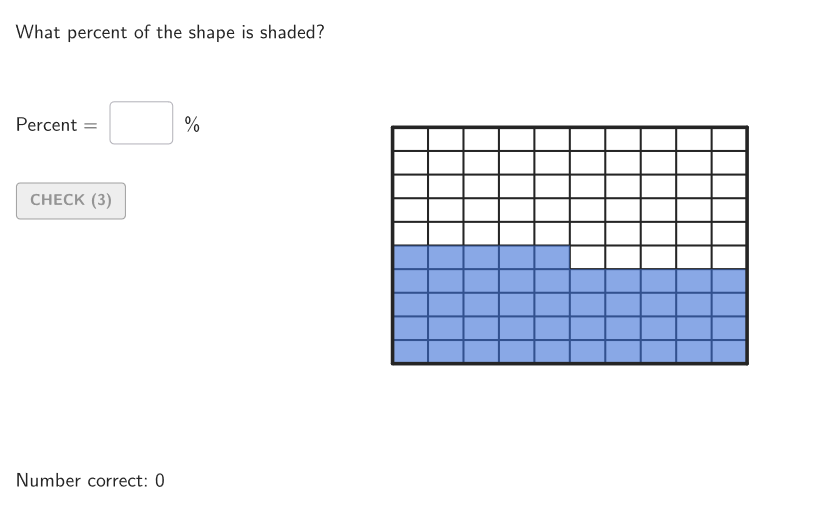
该范例演示如何从视觉分割模型中,将一个分数等价地表示成对应的百分数。核心数学概念包括百分数的含义(每百为基准)、分数与百分数的等价关系,以及把分数转换为“分母为100的分数”。作图与交互要点是:通过随机选择案例数量与分子分母(使用 Element、Sequence、Take、Shuffle、Textfield 等对输入与题目参数进行生成与呈现),再用几何分割的方式构造表示基准的圆形扇区/分块(涉及 Circle、Sector、Polygon、Angle、Segment、Intersect、Div、Mod 等用于确定分割与对应区域)。模型中会用 Div/Mod 决定列与编号并显示文本结果(Textfield、Element),同时提供校验流程与答案显示(If、showanswer、showsolution、btnValidate、tries、countCorrect、validate)。适合中学(GR.6-8)用于理解百分数与分数的联系,也可作为数字感与建模类练习的课堂/自学材料。
GeoGebra 命令及参数
Element(allCaseNum, Mod[countQuestion, Length[allCaseNum]] + 1) → caseNumShuffle(Sequence[Point[{(r * cos(((k * 2) * pi / 10))), (r * sin(((k * 2) * pi / 10)))}], k, 0, 9]) → allStartVertCircle, {(-6.472135954999579, 4.702282018339786), (2.472135954999578, -7.608452130361229), (-6.47213595499958, -4.702282018339784), (6.472135954999579, -4.702282018339787), (-2.4721359549995805, -7.608452130361228), (2.4721359549995796, 7.608452130361228), (-2.4721359549995787, 7.608452130361229), (6.47213595499958, 4.702282018339785), (8, 0), (-8, 0)}Element(allStartVertCircle, Mod[countQuestion, Length[allStartVertCircle]] + 1) → V1Element(allEndVertCircle, Mod[countQuestion, Length[allEndVertCircle]] + 1) → V2Shuffle({1, 2, 4, 5, 10}) → allDivOr, {10, 1, 2, 4, 5}Element(allDivOr, Mod[countQuestion, Length[allDivOr]] + 1) → divOrIf(divOr ≟ 1, Shuffle[{1, 2, 4, 5, 10}], divOr ≟ 2, Shuffle[{1, 2, 5, 10}], divOr ≟ 4, Shuffle[{1, 5}], divOr ≟ 5, Shuffle[{1, 2, 5, 10}], divOr ≟ 10, Shuffle[{1, 5, 10}]) → allDivVertElement(allDivVert, Mod[countQuestion, Length[allDivVert]] + 1) → divVertShuffle(Sequence[k, k, 1, (divVert * divOr), 1]) → allNCol, {45, 2, 99, 66, 58, 90, 48, 50, 41, 83, 31, 80, 25, 3, 30, 42, 87, 12, 40, 51, 64, 38, 54, 20, 100, 46, 63, 85, 73, 91, 44, 39, 17, 16, 67, 22, 88, 52, 98, 95, 37, 92, 78, 89, 10, 28, 81, 21, 34, 60, 70, 47, 71, 93, 13, 49, 79, 74, 68, 4, 56, 32, 59, 27, 11, 77, 82, 24, 55, 57, 5, 15, 6, 96, 94, 43, 86, 14, 26, 75, 35, 36, 97, 76, 72, 69, 29, 19, 1, 33, 7, 61, 8, 84, 9, 18, 65, 53, 23, 62}Element(allNCol, Mod[countQuestion, Length[allNCol]] + 1) → numColSequence(Random[0, 99] / 100, A, 1, 200) → allRandomSeeds, {0.28, 0.09, 0.53, 0.73, 0.98, 0.33, 0.54, 0.3, 0.72, 0.35, 0.46, 0.55, 0.25, 0.98, 0.03, 0.88, 0.52, 0.47, 0.56, 0.73, 0.52, 0.11, 0.98, 0.5, 0.06, 0.58, 0.26, 0.48, 0.87, 0.53, 0.1, 0.43, 0.32, 0.88, 0.68, 0.28, 0.06, 0.77, 0.79, 0.23, 0.15, 0.13, 0.32, 0.38, 0.07, 0.16, 0.16, 0.1, 0.11, 0.45, 0.49, 0.82, 0.22, 0.52, 0.58, 0.37, 0.18, 0.59, 0.41, 0.26, 0.22, 0.4, 0.76, 0.48, 0.22, 0.77, 0.53, 0.2, 0.75, 0.31, 0.75, 0.26, 0.14, 0.49, 0.69, 0.08, 0.51, 0.37, 0.86, 0.91, 0.91, 0.65, 0.81, 0.75, 0.79, 0.44, 0.48, 0.46, 0.32, 0.92, 0.37, 0.21, 0.13, 0.87, 0.34, 0.86, 0.12, 0.38, 0.98, 0.27, 0.06, 0.86, 0.04, 0.29, 0.72, 0.67, 0.52, 0.29, 0.34, 0.4, 0.12, 0.19, 0.96, 0.48, 0.57, 0.17, 0.56, 0.31, 0.88, 0.59, 0.92, 0.68, 0, 0.81, 0.89, 0.95, 0.58, 0.1, 0.69, 0.6, 0.93, 0.64, 0.34, 0.18, 0.79, 0.93, 0.11, 0.23, 0.09, 0.97, 0.6, 0.25, 0.79, 0.11, 0.85, 0.7, 0.72, 0.42, 0.64, 0.33, 0.45, 0.68, 0.34, 0.56, 0.44, 0.58, 0.53, 0.63, 0.73, 0.39, 0.4, 0.91, 0.8, 0.27, 0.47, 0.56, 0.79, 0.57, 0.37, 0.45, 0, 0.76, 0.92, 0.85, 0.34, 0.51, 0.88, 0.95, 0.45, 0.56, 0.36, 0.27, 0.36, 0.3, 0.94, 0.52, 0.35, 0.2, 0.74, 0.83, 0.7, 0.34, 0.43, 0.7, 0.77, 0.16, 0.7, 0.11, 0.26, 0.42}Take(allRandomSeeds, randIndex, randIndex + numRandoms - 1) → currentRandomSeedsTextfield(inputB) → InputBoxBAngle(V1, O, V2) → givenAngTextfield(inputA) → InputBoxAPolygon(Zip[PixelsToPoint[Corner[1], Corner[3], Corner[5], A], A, {(pixelsLeft, pixelsTop), (pixelsLeft, y(Corner[5]) - pixelsBottom), Corner[5] - (pixelsRight, pixelsBottom), (x(Corner[5]) - pixelsRight, pixelsTop)}]) → borderBoxCorner(5) → layoutAppSizeonboardingTextOffset(Corner[onboardingText, 1], Corner[onboardingText, 3], onboardingCase, Corner[1], Corner[3], Corner[5]) → OnboardingTextOffsetTextfield(inputC) → InputBoxCPolygon(PC, Mirror[PC, yAxis], Mirror[PC, (0, 0)], Mirror[PC, xAxis]) → peep, peepL4, peepL1, peepL2, peepL3Div(numCol, divOr) → quozMod(numCol, divOr) → resSegment(A, B) → segmABSegment(B, C) → segmBCSegment(C, D) → segmCDSegment(D, A) → segmADSequence(Segment[Point[segmBC, k / divOr], Point[segmAD, 1 - k / divOr]], k, 1, divOr, 1) → segmVertSequence(Segment[Point[segmAB, k / divVert], Point[segmCD, 1 - k / divVert]], k, 1, divVert, 1) → segmOrIntersect(vertEnd, segmBC) → GIntersect(orBottom, segmCD) → HIntersect(orTop, vertStart) → FPolygon({F, M, N, H, C, B}) → coloredPoliCircle(O, r) → cSequence(Point[{(r * cos(((k * 2) * pi / 10))), (r * sin(((k * 2) * pi / 10)))}], k, 0, 9) → divCircleMainZip(Segment[O, A], A, divCircleMain) → segmCircleSector(c, V1, V2) → coloredSect
AI 绘图提示语参考
绘制一个圆形,将其等分为若干扇形区域,其中一部分扇形用颜色填充以表示分数对应的百分比。圆外放置一个矩形网格,网格被水平和垂直分割成多个小格,部分小格用颜色填充,与扇形填充比例一致。图形下方显示一个输入框,用于输入答案,并配有验证按钮。整体布局包含标题和说明文字,强调分数与百分数的转换关系。
以上提示语为根据原始绘图命令整理而来,仅供参考。