
等边三角形与旋转变换
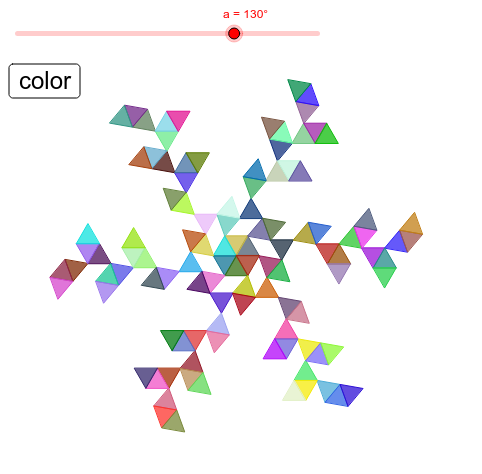
几何画板及绘图内容加载中,请稍等……
①本范例演示等边三角形在旋转变换下的几何图形变化现象;②涉及的核心数学概念包括旋转、等边三角形性质、几何变换、概率统计、勾股定理、外接圆;③作图要点——从下方『构造摘要』提炼用到了 Rotate(旋转)、Polygon(多边形)、Mirror(镜像)等 GeoGebra 命令及对象;④适合高中数学教学或几何变换学习,可用于理解旋转变换的规律与性质。
GeoGebra 命令及参数
Rotate(B1, 60°, A1) → C1Rotate(C1, (-a), B1) → D1Rotate(C1, -60° - a, B1) → E1Polygon({A1, B1, C1}) → F1Polygon({B1, D1, E1}) → G1Rotate(B1, a, E1) → A2Rotate(B1, 60° + a, E1) → B2Rotate(B2, 60°, A2) → C2Rotate(C2, (-a), B2) → D2Rotate(C2, -60° - a, B2) → E2Polygon({A2, B2, C2}) → F2Polygon({B2, D2, E2}) → G2Rotate(B2, a, E2) → A3Rotate(B2, 60° + a, E2) → B3Rotate(B3, 60°, A3) → C3Rotate(C3, (-a), B3) → D3Rotate(C3, -60° - a, B3) → E3Polygon({A3, B3, C3}) → F3Polygon({B3, D3, E3}) → G3Rotate(F1, 60°) → J1Rotate(G1, 60°) → K1Rotate(F2, 60°) → J2Rotate(G2, 60°) → K2Rotate(F3, 60°) → J3Rotate(G3, 60°) → K3Rotate(F1, 120°) → L1Rotate(G1, 120°) → M1Rotate(F1, 180°) → N1Rotate(G1, 180°) → O1Rotate(F1, 240°) → P1Rotate(G1, 240°) → Q1Rotate(F1, 300°) → R1Rotate(G1, 300°) → S1Rotate(F2, 120°) → L2Rotate(G2, 120°) → M2Rotate(F2, 180°) → N2Rotate(G2, 180°) → O2Rotate(F2, 240°) → P2Rotate(G2, 240°) → Q2Rotate(F2, 300°) → R2Rotate(G2, 300°) → S2Rotate(F3, 120°) → L3Rotate(G3, 120°) → M3Rotate(F3, 180°) → N3Rotate(G3, 180°) → O3Rotate(F3, 240°) → P3Rotate(G3, 240°) → Q3Rotate(F3, 300°) → R3Rotate(G3, 300°) → S3Rotate(B3, a, E3) → A4Rotate(B3, 60° + a, E3) → B4Rotate(B4, 60°, A4) → C4Rotate(C4, (-a), B4) → D4Rotate(C4, -60° - a, B4) → E4Polygon({A4, B4, C4}) → F4Polygon({B4, D4, E4}) → G4Rotate(F4, 60°) → J4Rotate(G4, 60°) → K4Rotate(F4, 120°) → L4Rotate(G4, 120°) → M4Rotate(F4, 180°) → N4Rotate(G4, 180°) → O4Rotate(F4, 240°) → P4Rotate(G4, 240°) → Q4Rotate(F4, 300°) → R4Rotate(G4, 300°) → S4Mirror(G1, Line[E1, D1]) → H1Mirror(G2, Line[E2, D2]) → H2Mirror(G3, Line[E3, D3]) → H3Mirror(G4, Line[E4, D4]) → H4Mirror(F3, Line[A3, B3]) → I3Mirror(F4, Line[A4, B4]) → I4Rotate(H1, 60°) → T1Rotate(H1, 120°) → U1Rotate(H1, 180°) → V1Rotate(H1, 240°) → W1Rotate(H1, 300°) → X1Rotate(H2, 60°) → T2Rotate(H2, 120°) → U2Rotate(H2, 180°) → V2Rotate(H2, 240°) → W2Rotate(H2, 300°) → X2Rotate(H3, 60°) → T3Rotate(H3, 120°) → U3Rotate(H3, 180°) → V3Rotate(H3, 240°) → W3Rotate(H3, 300°) → X3Rotate(H4, 60°) → T4Rotate(H4, 120°) → U4Rotate(H4, 180°) → V4Rotate(H4, 240°) → W4Rotate(H4, 300°) → X4Rotate(I3, 60°) → Y3Rotate(I3, 120°) → Z3Rotate(I3, 180°) → AA3Rotate(I3, 240°) → AB3Rotate(I3, 300°) → AC3Rotate(I4, 60°) → Y4Rotate(I4, 120°) → Z4Rotate(I4, 180°) → AA4Rotate(I4, 240°) → AB4Rotate(I4, 300°) → AC4Rotate(I3, -60°, A3) → I13Rotate(I13, 60°) → J13Rotate(I13, 120°) → K13Rotate(I13, 180°) → L13Rotate(I13, 2400°) → M13Rotate(I13, 300°) → N13Rotate(I4, -60°, A4) → I14Rotate(I14, 60°) → J14Rotate(I14, 120°) → K14Rotate(I14, 180°) → L14Rotate(I14, 2400°) → M14Rotate(I14, 300°) → N14Rotate(H3, 60°, D3) → I15Rotate(H4, 60°, D4) → I16Rotate(I15, 60°) → J15Rotate(I15, 120°) → K15Rotate(I15, 180°) → L15Rotate(I15, 2400°) → M15Rotate(I15, 300°) → N15Rotate(I16, 60°) → J16Rotate(I16, 120°) → K16Rotate(I16, 180°) → L16Rotate(I16, 2400°) → M16Rotate(I16, 300°) → N16