
等腰三角形与平行四边形的动态演示
几何画板及绘图内容加载中,请稍等……
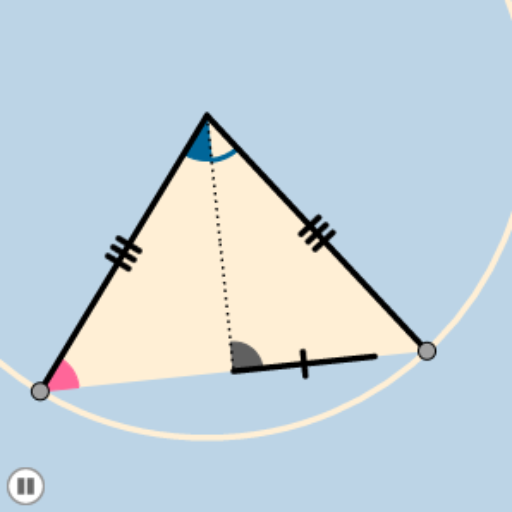
这个范例演示了等腰三角形和平行四边形的动态变化。核心数学概念包括等腰三角形的性质和平行四边形的性质。通过使用Circle, Intersect, CircleArc, Point, Dilate, Segment, Angle, Rotate, Midpoint, CircleSector, Polygon, Vector, Translate等GeoGebra命令,可以构造出动态的几何图形。适合初中和高中学生学习几何变换和动态几何。
GeoGebra 命令及参数
Circle(A, B) → cIntersect(c, q) → O, PCircleArc(A, O, P) → dPoint(d) → CCircleArc(A, C, P) → ePoint(e) → DDilate(A, If[0 < j ≤ 1, 1 - j, 0], C) → A'Segment(A, A') → aAngle(C, A, D) → αRotate(A, If[1 < j ≤ 2, ((j - 1) * α), α], A) → A'_1Rotate(A', If[1 < j ≤ 2, ((j - 1) * α), α], A) → A''Segment(A'_1, A'') → a'Segment(A, C) → bSegment(C, D) → fSegment(D, A) → gMidpoint(f) → ESegment(A, E) → hMidpoint(h) → FSegment(A, F) → iSegment(F, E) → kCircle(A, (0.35 * i)) → pCircle(E, (0.15 * Distance[D, E])) → rIntersect(r, f, 2) → GIntersect(r, h, 1) → HIntersect(r, f, 1) → IIntersect(p, b, 1) → JIntersect(p, h, 1) → KIntersect(p, g, 1) → LCircleSector(A, K, L) → sCircleSector(E, G, H) → tCircle(A, B) → c_1Dilate(C, If[2 < j ≤ 3, 3 - j, 0], D) → C'Segment(C, C') → lPolygon(C, D, A) → poly1, a_1, c_2, d_1Circle(C, (0.2 * Distance[D, E])) → e_1Intersect(e_1, b) → M,Intersect(e_1, f) → N,CircleSector(C, N, M) → f_1Dilate(A, If[3 < j ≤ 4, 4 - j, 0], F) → A'_2Segment(A, A'_2) → mRotate(s, If[4 < j ≤ 5, ((-(j - 4)) * α / 2), ((-α)) / 2], A) → s'Dilate(F, If[5 < j ≤ 6, 6 - j, 0], E) → F'Segment(F, F') → nCircleArc(A, K, L) → g_1Dilate(E, If[6 < j ≤ 7, 7 - j, 0], D) → E'Segment(E, E') → b_1Rotate(E, If[7 < j ≤ 8, ((j - 7) * π), 3.141592653589793], E) → E'_1Rotate(E', If[7 < j ≤ 8, ((j - 7) * π), 3.141592653589793], E) → E''Segment(E'_1, E'') → h_1Rotate(t, If[8 < j ≤ 9, ((j - 8) * π / 2), 1.5707963267948966], E) → t'CircleArc(E, G, H) → k_1Dilate(C, If[9 < j ≤ 10, 10 - j, 0], D) → C'_1Vector(C, C'_1) → uTranslate(f_1, u) → p_1CircleArc(C, N, M) → q_1Angle(E, C, A) → βRotate(p_1, If[10 < j ≤ 11, ((j - 10) * (π - β)), π - β], D) → r_1
AI 绘图提示语参考
绘制一个等腰三角形和一个平行四边形,通过拖动滑块改变它们的形状。首先画出等腰三角形ABC,然后通过点A、C、D构造平行四边形ACDE。接着,使用旋转和平移命令,动态地改变三角形和四边形的大小和位置,观察它们的性质变化。
以上提示语为根据原始绘图命令整理而来,仅供参考。