
双数轴
几何画板及绘图内容加载中,请稍等……
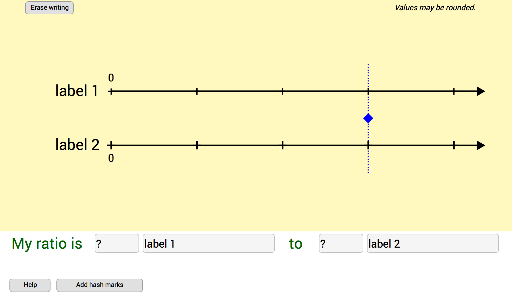
本范例通过使用比例创建双数轴。它演示了如何利用比例关系在数轴上表示和比较不同量。涉及的核心数学概念包括比例、百分比和相似变换。作图要点包括使用 GeoGebra 命令如 If、Point、Segment、Textfield、Sequence、Text、Vector、Mirror 等,以及对象如 q2、roundingFactorDNL2values、q2rnd、length、slidePt、q1、roundingFactorDNL1values、q1rnd、a、h、b、A、B、DNL2ArrowPt、DNL1ArrowPt、lineDNL1、lineDNL2、xOffSet、yOffSet、topxOffSet、q1labelForLengthAlwaysShow、q2labelForLengthAlwaysShow、q1blabelInput、q2blabelInput、E、F、G、H、q1avalueInput、q2avalueInput、myRatioIs、to、helpButton、helpCk、helpQ1value、helpQ1label、helpQ2label、helpQ2value、q2labelDNL。适合初中及以上数学教学,用于教授比例、百分比和相似变换等概念。
GeoGebra 命令及参数
If(q2 < 100, 100, If[q2 < 500, 10, 1]) → roundingFactorDNL2valuesIf((q2 ≥ 0) ∧ (q2 ≤ 0.1), 0.1, round((roundingFactorDNL2values * q2)) / roundingFactorDNL2values) → q2rndPoint(Segment[(0, 0.85), (4.3, 0.85)]) → slidePtIf(q1 < 100, 100, If[q1 < 500, 10, 1]) → roundingFactorDNL1valuesIf((q1 ≥ 0) ∧ (q1 ≤ 0.1), 0.1, If[q1 < 25, round((100 * q1)) / 100, If[q1 < 75, round((10 * q1)) / 10, If[q1 > 100, 100, round(q1)]]]) → q1rndSegment(A, DNL2ArrowPt) → lineDNL1Segment(B, DNL1ArrowPt) → lineDNL2Textfield(q1labelForLengthAlwaysShow) → q1blabelInputTextfield(q2labelForLengthAlwaysShow) → q2blabelInputTextfield(q1) → q1avalueInputTextfield(q2) → q2avalueInputSegment(slidePt + (0, 1.7), slidePt - (0, 1.75)) → slideSegSequence(((length * k), h), k, 0, 4) → hashMajorDNL2Sequence(((length * k), 0), k, 0, 4) → hashMajorDNL1Textfield(locationXq1) → locationXq1InputTextfield(locationXq2) → locationXq2InputSequence((k, 0), k, 0, 4.3, length / hatchMinor) → hashMinorDNL1Sequence((k, h), k, 0, 4.3, length / hatchMinor) → hashMinorDNL2Sequence(Text[(p * q2), ((length * p) + xOffSet, y(A) - (1.7 * yOffSet))], p, 2, 4) → hashMarkValuesTextDNL2Sequence(Text[(q * q1), ((length * q) + topxOffSet, y(B) + yOffSet)], q, 2, 4) → hashMarkValuesTextDNL1Text(0, (x(A) - 0.035, y(A) - (1.7 * yOffSet))) → zeroDNL2Text(0, (x(B) - 0.035, y(B) + yOffSet)) → zeroDNL1Vector(instructionsArrowsPt, (1.4187, -2.68926)) → instructionsArrow2_{legacy}Vector(instructionsArrowsPt, (0.28383, -2.65534)) → instructionsArrow1_{legacy}Mirror(instructionsArrow1_{legacy}, x = x(instructionsArrowsPt)) → instructionsArrow3_{legacy}Mirror(instructionsArrow2_{legacy}, x = x(instructionsArrowsPt)) → instructionsArrow4_{legacy}
AI 绘图提示语参考
画两条平行的数轴,分别表示不同的比率,并在数轴上用刻度标记数值,同时用文本标签显示数值和比率,最后用箭头指示方向和比例关系。
以上提示语为根据原始绘图命令整理而来,仅供参考。