
探索角的多种命名方式
几何画板及绘图内容加载中,请稍等……
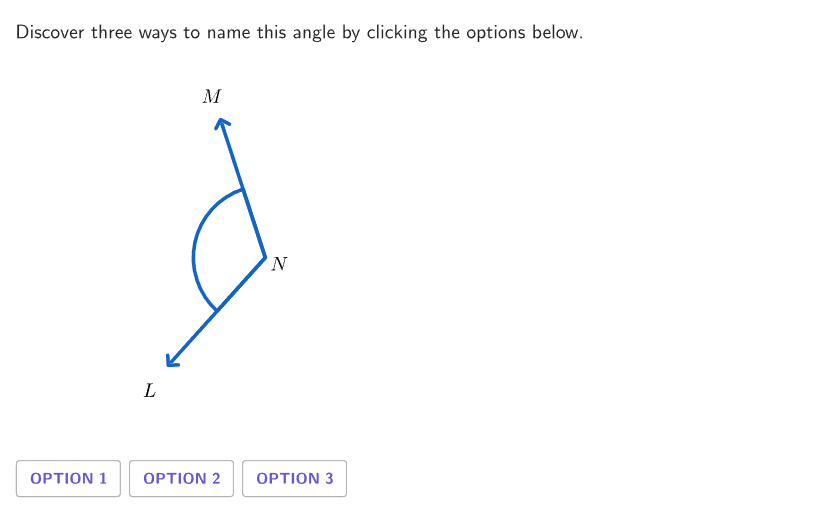
本范例是一个交互式几何探索活动,旨在帮助学生理解角的多种命名方法。它通过动态图形展示如何根据顶点、射线以及角的内部和外部区域来识别和标记角,并练习使用标准命名规则(如∠ABC、∠B、∠1等)来指代同一个角。核心数学概念包括角的定义、顶点、射线、角的内部与外部,以及角的符号表示。作图要点方面,该范例使用了GeoGebra的RandomUniform、Shuffle、Element等命令生成随机题目,通过Rotate、Angle、Segment等命令构造动态角,并利用Text、Button等对象实现交互反馈和动画控制。适合小学4-5年级学生进行几何入门学习,也可用于教师课堂演示或学生自主探索,帮助巩固角的命名规范。
GeoGebra 命令及参数
RandomUniform(0, 0.99, 100) → randomSeeds, {0.5364074778146228, 0.07293719234630995, 0.6558105856612284, 0.1879095103892114, 0.34696647036408573, 0.871710574919658, 0.8760713917568469, 0.6055467931776859, 0.054106328736049085, 0.7154553476847109, 0.4621152551122189, 0.03722658203278643, 0.6896185150674675, 0.9171371231045549, 0.9833455436648396, 0.000906524783188295, 0.08016242844575346, 0.09302027726869672, 0.15064252088226418, 0.6469643607057991, 0.9612231029893676, 0.15788668142104148, 0.807434653118208, 0.9314777293865618, 0.9710115536248342, 0.7075332675920692, 0.6086066778347011, 0.9846512507809203, 0.6217537512287657, 0.01209516617613843, 0.32015467744134884, 0.06914399465175639, 0.7454138466599244, 0.9867008932709131, 0.8081906501421221, 0.12585312533684054, 0.9101845711735207, 0.5561118566342889, 0.9662812798894622, 0.32969966496895725, 0.4630515681201741, 0.9773326958152545, 0.6751730468848088, 0.3351406876952174, 0.6024018261323624, 0.16870043519832237, 0.928711969541262, 0.18049631650005324, 0.3129945337345356, 0.8256696837003066, 0.26420978599233963, 0.06173392105240804, 0.8036509882704403, 0.3624069667492249, 0.7246387370133268, 0.020090997105848787, 0.10574405079973535, 0.32439183451532255, 0.33385639742375517, 0.783847080820788, 0.4179801706314279, 0.9404939144000288, 0.09456653162371063, 0.6826689647585056, 0.29006624639810163, 0.13345313770770562, 0.7519168398788593, 0.40325768798248945, 0.814641108760209, 0.5653384074782009, 0.06351382920160127, 0.05751467962906211, 0.8533257129967495, 0.5793924840936702, 0.3392047280298697, 0.5891230001985827, 0.8389083095465321, 0.25169305499968964, 0.5412311008633616, 0.0013046317021181142, 0.6615305924656102, 0.12526915455927146, 0.027303062728615622, 0.27756732308756554, 0.192277681949076, 0.6157078818766759, 0.9057732475498683, 0.32849504362827625, 0.04279978067534146, 0.800870970712629, 0.5634082947938219, 0.2510636015358086, 0.7445050975705944, 0.7881119540369537, 0.37226172950866254, 0.47257820031615017, 0.7554633368322298, 0.4103437492700415, 0.10284461567965787, 0.40913282310354027}Shuffle(Sequence[6]) → randomCase, {4, 2, 1, 6, 5, 3}Element({{"A", "B", "C"}, {"L", "M", "N"}, {"X", "Y", "Z"}}, indexLetter) → letterSetElement(randomCase, Mod[countQuestion, Length[randomCase]] + 1) → caseNumElement({pi / 2, pi / 3, pi / 4, (3 * pi / 5), (2 * pi / 5), (2 * pi / 3), pi / 6, (5 * pi / 6)}, indexRotation) → rotationAngleRotate(AnchorFigure + (armLength, 0), rotationAngle, AnchorFigure) → PtBElement({pi / 2, pi / 3, pi / 4, (3 * pi / 5), (2 * pi / 5), (2 * pi / 3), pi / 6, (5 * pi / 6)}, indexAngle) → currentAngleRotate(AnchorFigure + (armLength, 0), rotationAngle + currentAngle, AnchorFigure) → PtAElement({{PtA, AnchorFigure, AnchorFigure, PtB}, {PtB, AnchorFigure, AnchorFigure, PtA}, {AnchorFigure, PtA, AnchorFigure, PtB}}, displayCase) → displayPointsActualElement({{1, 2, 3}, {1, 3, 2}, {2, 1, 3}, {2, 3, 1}, {3, 1, 2}, {3, 2, 1}}, caseNum) → caseMapIf(Length[destinationOrder] ≟ 2, IndexOf[destinationOrder(2), caseMap], IndexOf[destinationOrder(3), caseMap]) → PointStudentCenterIf(Length[destinationOrder] ≟ 2, Mod[PointStudentCenter, 3] + 1, IndexOf[destinationOrder(2), caseMap]) → PointStudentFirstElement(Remove[{1, 2, 3}, {PointStudentCenter, PointStudentFirst}], 1) → PointStudentThirdElement({{PointStudentCenter, PointStudentFirst, PointStudentCenter, PointStudentThird}, {PointStudentFirst, PointStudentCenter, PointStudentFirst, PointStudentCenter}, {PointStudentFirst, PointStudentCenter, PointStudentCenter, PointStudentThird}}, Length[destinationOrder] - 1) → displayOrderStudentZip(Element[{PtA, AnchorFigure, PtB}, A], A, displayOrderStudent) → displayPointsStudentIf(displayCase ≟ 4, displayPointsStudent, displayPointsActual) → displayPointsAnimateZip(Element[{PtA, AnchorFigure, PtB}, B], B, {PointStudentFirst, PointStudentCenter, PointStudentThird}) → studentPointsAppend(letterSet, "\angle") → allTextCorner(5) → layoutAppSizeSequence(letterSet(caseMap(i)), i, 1, 3) → displayOrderAngle(PtB, AnchorFigure, PtA) → angleInteriorSegment(AnchorFigure, PtB) → rayBSegment(AnchorFigure, PtA) → rayAIf(displayPointsActual(1) ≠ displayPointsActual(3), If[animateControl < 1, animateControl, 1], animateControl / 2) → animate1If(displayPointsActual(1) ≠ displayPointsActual(3), If[animateControl < 1, 0, animateControl - 1], animateControl / 2) → animate2centerBox(7, 7, AnchorFigure) → coverBoxAngle(PtB, AnchorFigure, PtA) → angleSolnText(("" * displayOrder(1)), AnchorFigure + (1.2 * (PtA - AnchorFigure)), true, true, 0, 0) → lblAnimateFirstText(("" * displayOrder(2)), Midpoint[PtA, PtB] + (1.2 * (AnchorFigure - Midpoint[PtA, PtB])), true, true, 0, 0) → lblAnimateSecondText(("" * displayOrder(3)), AnchorFigure + (1.2 * (PtB - AnchorFigure)), true, true, 0, 0) → lblAnimateThirdSequence(animateControl ≥ Element[{0.1, 1, 2}, A] ∧ studentPoints(Element[{1, 2, 4}, A]) ≟ Element[{PtA, AnchorFigure, PtB}, A], A, 1, 3) → showStudentZip(animateControl > 0 ∧ displayPointsActual(1) ≟ A ∨ animateControl ≥ 1 ∧ displayPointsActual(2) ≟ A ∧ displayPointsActual(1) ≠ displayPointsActual(3) ∨ animateControl ≟ 2 ∧ displayPointsActual(4) ≟ A ∧ showFinalLabel, A, {PtA, AnchorFigure, PtB}) → highlightLabelsSegment(displayPointsActual(If[displayPointsActual(1) ≟ displayPointsActual(3), 2, 1]), displayPointsActual(If[displayPointsActual(1) ≟ displayPointsActual(3), 1, 2])) → animateRay1Segment(displayPointsActual(3), displayPointsActual(4)) → animateRay2Zip(displayOrder(IndexOf[A, {PtA, AnchorFigure, PtB}]), A, {displayPointsActual(1), displayPointsActual(2), displayPointsActual(4)}) → animatePointsSegment(displayPointsActual(1), displayPointsActual(1) + (animate1 * (displayPointsActual(2) - displayPointsActual(1)))) → animateBranch1ASegment(displayPointsActual(3), displayPointsActual(3) + (animate2 * (displayPointsActual(4) - displayPointsActual(3)))) → animateBranch1BText(("" * displayOrder(1)), AnchorFigure + (1.2 * (PtA - AnchorFigure)), true, true, 0, 0) → lblFirstText(("" * displayOrder(2)), Midpoint[PtA, PtB] + (1.2 * (AnchorFigure - Midpoint[PtA, PtB])), true, true, 0, 0) → lblSecondText(("" * displayOrder(3)), AnchorFigure + (1.2 * (PtB - AnchorFigure)), true, true, 0, 0) → lblThird
AI 绘图提示语参考
这是一个几何探索图形,展示如何命名角度。图形包含一个顶点,两条射线,以及它们所形成的角度内部区域。可以通过点击标签查看不同的命名方式,如∠ABC、∠B或∠1。图形是动态的,可以交互旋转射线和调整角度。构造顺序是:先确定顶点位置,然后随机生成角度值,旋转射线绘制角度,最后添加标签和交互控制。
以上提示语为根据原始绘图命令整理而来,仅供参考。