
同一分数的不同视角:分数可视化与几何构造
几何画板及绘图内容加载中,请稍等……
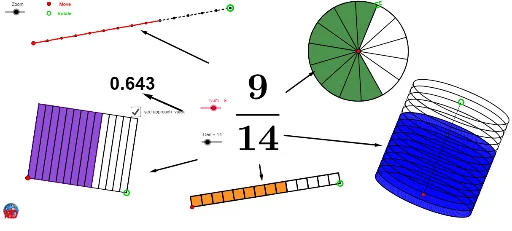
该范例通过GeoGebra展示了同一个分数在不同几何表示下的多种视角,例如用圆、线段、多边形和曲线等元素来呈现分数的数值关系。核心数学概念包括分数的等价表示、比例、几何与算术的关联,以及通过动态构造探索分数意义的可视化方法。作图要点涉及使用Circle、Point、Segment、Intersect、OrthogonalLine、Ellipse、Sequence、CurveCartesian、Line、Polygon、Element、CircleSector、Take、Vector等命令,并创建了Den、D、Zoom、d_1、t、p、M、l、Q、n、N、O、b、C、q、J、k、B、f、A、e、a、Num、Tour、pic1、E、F、liste1、liste2、K、b_1、liste3、c、d、liste5、G、j、liste3b、g、h等对象,通过序列和列表操作生成动态图形。适合小学高年级至初中阶段学习分数概念,也可用于教师制作分数教学的交互课件,帮助学生直观理解分数的不同表示形式及其等价性。
GeoGebra 命令及参数
Circle(D, Zoom) → d_1Circle(D, (0.25 * Zoom)) → tCircle(D, (2 * Zoom)) → pPoint(p) → MSegment(D, M) → lIntersect(t, l) → Q,OrthogonalLine(D, l) → nIntersect(d_1, n) → N, OEllipse(N, O, Q) → bCircle(C, (2 * Zoom)) → qCircle(J, (3 * Zoom)) → kCircle(B, (4 * Zoom)) → fCircle(A, Zoom) → ePoint(e) → EPoint(f) → FSequence(Rotate[E, i, A], i, 0, 6.283185307179586, (2 * π / Den)) → liste1Sequence(Translate[B, Vector[(i * Vector[B, F])]], i, 0, 1, 1 / Den) → liste2Point(k) → KCurveCartesian(x(D) + (Zoom * cos(i)), y(D) + ((0.25 * Zoom) * sin(i)), i, 0, 6.28319) → b_1Sequence(Translate[J, Vector[(i * Vector[J, K])]], i, 0, 1, 1 / Den) → liste3Segment(B, F) → cCircle(A, E) → dSequence(Translate[b, Vector[(i * Vector[D, M])]], i, 0, 1, 1 / Den) → liste5Point(q) → GSegment(J, K) → jSequence(Polygon[Element[liste3, i], Element[liste3, i + 1], 4], i, 1, Length[liste3]) → liste3bSegment(C, G) → gOrthogonalLine(C, g) → hCircle(C, (1.5 * Zoom)) → sIntersect(s, h) → H, LLine(L, g) → iLine(G, h) → mIntersect(i, m) → IPolygon(C, G, I, L) → poly1, c_1, g_1, i_1, l_1Sequence(Translate[C, Vector[(i * Vector[C, G])]], i, 0, 1, 1 / Den) → liste4Sequence(Translate[L, Vector[(i * Vector[C, G])]], i, 0, 1, 1 / Den) → liste6Sequence(Segment[A, Element[liste1, i]], i, 1, Length[liste1]) → liste7Sequence(Segment[Element[liste4, i], Element[liste6, i]], i, 1, Length[liste6]) → liste8Element(liste1, Num + 1) → AACircleSector(A, E, AA) → e_1Element(liste2, Num + 1) → BBSegment(B, BB) → a_1Take(liste5, 1, Num + 1) → liste9Element(liste4, Num + 1) → CCElement(liste6, Num + 1) → LLPolygon(C, CC, LL, L) → poly2, c_2, cc, ll, l_2Take(liste3b, 1, Num) → liste10Line(M, n) → f_1Intersect(b, n) → P, RLine(R, l) → h_1Line(P, h_1) → j_1Intersect(f_1, h_1) → SIntersect(f_1, j_1) → TSegment(S, R) → k_1Segment(T, P) → m_1Vector(V, W) → uVector(Z, A_1) → vVector(B_1, C_1) → wVector(D_1, E_1) → zVector(F_1, G_1) → rCircle(D, pp) → p_1Intersect(p_1, l) → J_1,Sequence(Translate[b, Vector[(i * Vector[D, J_1])]], i, 0, 1, 0.01) → liste11Vector(K_1, L_1) → u_1
AI 绘图提示语参考
画一个中心圆和两个同心圆,其中一个半径是中心圆的四分之一,另一个是两倍。从中心圆引出一条线段到外圆,与四分之一圆相交得到一个点。以交点和中心圆上的点为焦点画一个椭圆。再画出多个圆和椭圆,通过旋转和平移形成动态效果,展示不同几何形状如何表示相同的分数。最后将部分图形组合成多边形,并用线段连接形成复杂结构。
以上提示语为根据原始绘图命令整理而来,仅供参考。