
掷骰求和与平均的模拟:从序列统计到柱状图
几何画板及绘图内容加载中,请稍等……
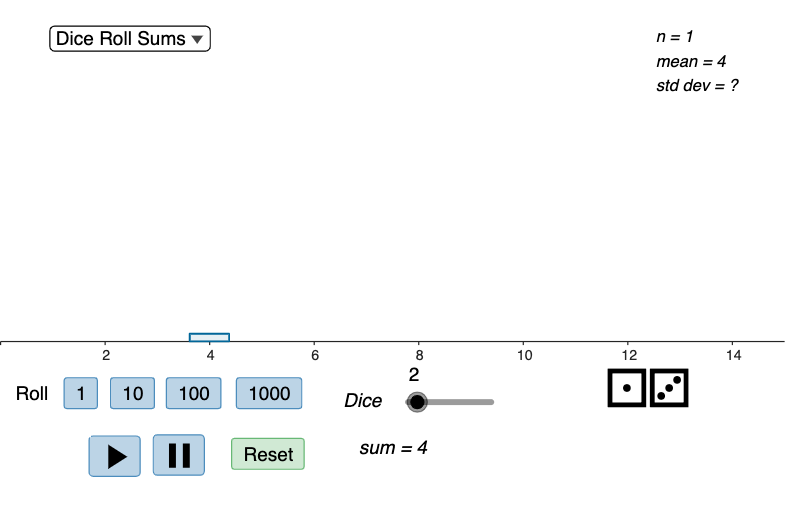
该范例通过反复掷骰的随机模拟,展示当掷1到10个骰时,得到的“总和”和“平均数”的分布如何随样本变化并在图表中呈现。核心数学概念包括概率分布的经验观察、算术平均数(Arithmetic Mean)、序列数据统计,以及对同一随机过程进行多次重复实验的可视化对比。作图要点:利用 Sequence 生成掷骰结果序列;用 Dice Roll 的结果列表 xList、diceRollList、freqList 组织数据;用 Max 与 Sum 计算取值范围与频数汇总;借助 mean 计算当前样本的平均(xListMean、freqListMean、currentMean),并通过 If 与 calcType 控制展示“和/平均”两种计算方式;最终使用 BarChart 绘制柱状分布,并用 Element 选取关键数据点、Text/VerticalText 标注数值与坐标。对象层面包含 roller 按次数滚动、按钮 button1~button5 等交互控件,以及 chart、barWidth、totalRolls、actualRolls 用于统计与显示。适合中学到大学基础概率统计入门,亦可用于课堂演示实验数据如何收敛、如何用图表理解随机变量的分布与均值概念。
GeoGebra 命令及参数
Max(freqList) → freqMaxSum(freqList) → totalRollsSequence(Element[diceRollList, k], k, 1, numDice) → actualRollsSum(actualRolls) → currentSumIf(useSum, xList, xListMean) → selectedXListIf(useSum, freqList, freqListMean) → selectedFreqListIf(useSum, Max[xList], Max[xListMean]) → xListMaxIf(useSum, Min[xList], Min[xListMean]) → xListMinmean(actualRolls) → currentMeanBarChart(selectedXList, selectedFreqList, barWidth) → chartElement(unicodeDice, Element[diceRollList, 1]) → die1Element(unicodeDice, Element[diceRollList, 2]) → die2Element(unicodeDice, Element[diceRollList, 3]) → die3Element(unicodeDice, Element[diceRollList, 4]) → die4Element(unicodeDice, Element[diceRollList, 5]) → die5Element(unicodeDice, Element[diceRollList, 6]) → die6Element(unicodeDice, Element[diceRollList, 7]) → die7Element(unicodeDice, Element[diceRollList, 8]) → die8Element(unicodeDice, Element[diceRollList, 9]) → die9Element(unicodeDice, Element[diceRollList, 10]) → die10Text(die6 + die7 + die8 + die9 + die10) → dice6to10Text(die1 + die2 + die3 + die4 + die5) → dice1to5VerticalText(VerticalText[dice1to5]) → dice1to5AdjustedVerticalText(VerticalText[dice6to10]) → dice6to10Adjustedmean(actualRolls) → averageSum(actualRolls) → sumIf(useSum, sum, average) → diceCalculationIf(useSum, Text["sum = " + sum], "average= " + average) → diceCalculationTextIf(useSum, stdev[xList, freqList], stdev[xListMean, freqListMean]) → sigmaIf(useSum, mean[xList, freqList], mean[xListMean, freqListMean]) → muText("n = " + totalRolls + "\\n" + muText + "\\n" + sigmaText) → statText
AI 绘图提示语参考
绘制一个模拟掷骰子实验的统计图表。界面包含十个骰子图标,分别显示每次投掷的结果,并分为两组展示。下方有一个条形图,横轴表示可能的点数总和或平均值,纵轴表示出现频率。图表上方显示当前实验的统计信息,包括总投掷次数、平均值和标准差。提供按钮和滑块,用于控制投掷次数、切换显示总和或平均值,以及逐步进行实验。图形应清晰展示频率分布随骰子数量增加而变化的过程。
以上提示语为根据原始绘图命令整理而来,仅供参考。