
梯形的对角线
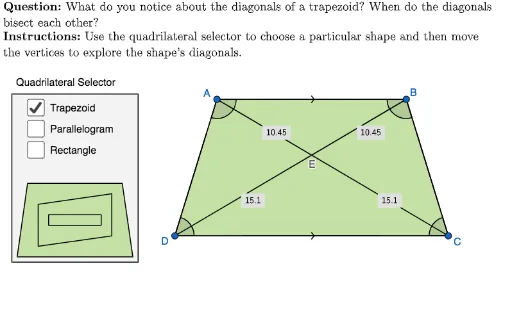
几何画板及绘图内容加载中,请稍等……
这个范例演示梯形的对角线性质。核心数学概念包括梯形的定义、面积计算和对角线的性质。通过使用GeoGebra命令如Polygon、PointIn、Intersect等,可以构造梯形并观察其对角线的交点。适合初中和高中学生学习几何作图和相关性质。
GeoGebra 命令及参数
Polygon({(-6, 19), (26, 19), (26, 0), (-6, 0)}) → viewBoxPointIn(viewBox) → recBPointIn(viewBox) → paraBPointIn(viewBox) → trapBPointIn(viewBox) → recAPointIn(viewBox) → paraAPointIn(viewBox) → trapAPointIn(viewBox) → trapCPoint(Ray[trapC, Vector[trapB, trapA]]) → trapDPointIn(viewBox) → paraCIf(showTrapezoid, trapB, If[showParallelogram, paraB, recB]) → BIf(showTrapezoid, trapA, If[showParallelogram, paraA, recA]) → ALine(A, B) → lineTopPoint(OrthogonalLine[recB, lineTop]) → recCIf(showTrapezoid, trapC, If[showParallelogram, paraC, recC]) → CLine(B, C) → lineRightIntersect(Line[recA, lineRight], Line[recC, lineTop]) → recDIntersect(Line[paraA, lineRight], Line[paraC, lineTop]) → paraDLaTeX((((("\text{" * QUESTION) * "\\") * INSTRUCTIONS) * "}")) → TEXTPolygon({(-19.5, 19.5), (-7.5, 19.5), (-7.5, 3.5), (-19.5, 3.5)}) → selectorBoxQuadrilateralPolygon({(-18, 11), (-9, 11), (-8, 4), (-19, 4)}) → selectorShapeTrapezoidPolygon({(-17, 9), (-10, 10), (-10, 6), (-17, 5)}) → selectorShapeParallelogramPolygon({(-16, 8), (-16, 7), (-11, 7), (-11, 8)}) → selectorShapeRectanglePolygon({Vertex[selectorShapeParallelogram]}) → selectorBorderParallelogramPolygon({Vertex[selectorShapeTrapezoid]}) → selectorBorderTrapezoidIf(showTrapezoid, trapD, If[showParallelogram, paraD, recD]) → DPolygon({Vertex[selectorShapeRectangle]}) → selectorBorderRectangleSegment(A, B) → ABSegment(A, C) → ACSegment(A, D) → ADSegment(B, C) → BCSegment(D, B) → DBSegment(D, C) → DCMidpoint(AB) → midABMidpoint(AD) → midADMidpoint(BC) → midBCMidpoint(D, C) → midDCSegment(A, Midpoint[Segment[midAB, B]]) → AB_1Segment(Midpoint[Segment[midAB, A]], B) → AB_2Segment(Midpoint[Segment[midAD, D]], A) → AD_1Segment(Midpoint[Segment[midAD, A]], D) → AD_2Segment(Midpoint[Segment[midBC, C]], B) → BC_1Segment(Midpoint[Segment[midBC, B]], C) → BC_2Segment(D, Midpoint[Segment[midDC, C]]) → DC_1Segment(Midpoint[Segment[midDC, D]], C) → DC_2Polygon({A, B, C, D}) → quadrilateralIntersect(AC, DB) → EAngle(A, B, C) → ABCAngle(B, C, D) → BCDAngle(C, D, A) → CDAAngle(D, A, B) → DABLine(A, D) → lineLeftLine(D, C) → lineBottomAreParallel(lineLeft, lineRight) → parallelLeftRightAreParallel(lineTop, lineBottom) → parallelTopBottomLaTeX(UnicodeToLetter[10003]) → cmarkLaTeX(UnicodeToLetter[10007]) → xmarkLaTeX(Distance[A, E]) → labelAELaTeX(Distance[B, E]) → labelBELaTeX(Distance[C, E]) → labelCELaTeX(Distance[D, E]) → labelDE
AI 绘图提示语参考
绘制一个梯形,包含四个顶点A、B、C、D。首先绘制一个平行四边形,然后在平行四边形内随机选取四个点作为梯形的顶点。接着画出梯形的两条对角线,观察它们的交点E。最后,画出梯形的两条中位线,即连接每条边的中点。
以上提示语为根据原始绘图命令整理而来,仅供参考。