
棱柱的圆柱透视
几何画板及绘图内容加载中,请稍等……
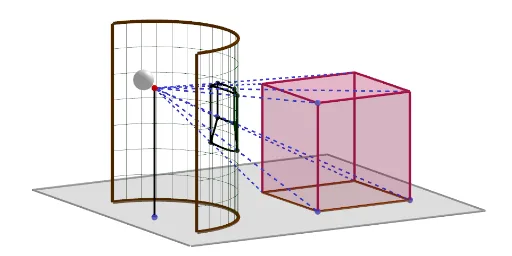
①本范例演示棱柱的圆柱透视效果,直观展示三维几何体的二维投影;②涉及的核心数学概念包括立体几何、相似三角形、圆与多边形构造;③作图要点运用了Line, Circle, Cylinder, Segment, Point, Sequence, CircumcircleArc, Element, Polygon, Prism, Midpoint, Ray, Intersect, Centroid, Sphere等GeoGebra命令与对象;④适合高中立体几何教学,用于理解空间几何体的投影与变换规律。
GeoGebra 命令及参数
Line(A, zAxis) → fCircle(A, R, f) → cCylinder(c, h) → a, d, bSegment(B, A) → gPoint(g) → CSequence(Rotate[T, i, f], i, 0, π, π / oo) → l1Sequence(Segment[Element[l1, i], Element[l1, i] + (0, 0, h)], i, 1, Length[l1]) → l2CircumcircleArc(T, B_1, U) → e_2Sequence(Translate[e_2, Vector[(i * Vector[A, A + (0, 0, 1)])]], i, 1, h) → l3Segment(C, A) → m_1Segment(U, U + (0, 0, h)) → n_1Segment(T, T + (0, 0, h)) → a_1Element(l3, Length[l3]) → f_2Polygon(D, E, 4, xOyPlane) → poly1, i, j, k, l, G, HLine(D, m_1) → mPoint(m) → JPrism(poly1, Distance[D, J]) → e, M, arêteDM, arêteEN, arêteGO, arêteHP, arêteMN, arêteNO, arêteOP, arêteMP, N, O, P, faceDENM, faceEGON, faceGHPO, faceDHPM, faceMNOPMidpoint(arêteMN) → QMidpoint(i) → SMidpoint(l) → VMidpoint(j) → WMidpoint(arêteMP) → ZMidpoint(k) → A_1Midpoint(arêteDM) → C_1Midpoint(arêteEN) → D_1Midpoint(arêteGO) → E_1Midpoint(arêteNO) → F_1Midpoint(arêteOP) → G_1Midpoint(arêteHP) → H_1Ray(E, C) → nRay(G, C) → pRay(W, C) → qIntersect(n, b) → I_1, J_1Intersect(q, b) → K_1, L_1Intersect(p, b) → M_1, N_1CircumcircleArc(M_1, K_1, I_1) → rRay(P, C) → sRay(Z, C) → tRay(J, C) → f_1Intersect(s, d) → O_1,Intersect(t, d) → P_1,Intersect(f_1, d) → Q_1,Intersect(f_1, b) → R_1, S_1Intersect(t, b) → T_1, U_1Intersect(s, b) → V_1, W_1Ray(C_1, C) → g_1Ray(H_1, C) → h_1Intersect(g_1, b) → Z_1, A_2Intersect(h_1, c) → B_2,Intersect(h_1, b) → C_2, D_2CircumcircleArc(V_1, T_1, R_1) → c_1Ray(N, C) → i_1Ray(O, C) → j_1Ray(F_1, C) → k_1Intersect(j_1, b) → E_2, F_2Intersect(k_1, c) → G_2,Intersect(k_1, b) → H_2, I_2Intersect(i_1, b) → J_2, K_2Ray(E, C) → l_1Ray(W, C) → p_1Ray(G, C) → q_1Intersect(q_1, b) → L_2, M_2Intersect(p_1, b) → N_2, O_2Intersect(l_1, c) → P_2,Intersect(l_1, b) → Q_2, R_2CircumcircleArc(L_2, N_2, Q_2) → r_1CircumcircleArc(E_2, H_2, J_2) → s_1Ray(D_1, C) → t_1Intersect(t_1, b) → S_2, T_2CircumcircleArc(J_2, S_2, Q_2) → c_2Ray(E_1, C) → b_1Intersect(b_1, b) → U_2, V_2CircumcircleArc(E_2, U_2, L_2) → d_2Point(f_2) → W_2Ray(G_1, C) → i_2Intersect(i_2, b) → B_3, C_3CircumcircleArc(V_1, B_3, E_2) → k_2Ray(Q, C) → j_2Intersect(j_2, b) → D_3, E_3CircumcircleArc(R_1, D_3, J_2) → g_2Ray(H, C) → d_1Intersect(d_1, b) → Z_2, A_3Ray(D, C) → e_1Intersect(e_1, b) → F_3, G_3Ray(V, C) → h_2Intersect(h_2, b) → H_3, I_3CircumcircleArc(Z_2, H_3, F_3) → p_2Ray(A_1, C) → l_2Intersect(arêteHP, b) → J_3,Intersect(l_2, b) → K_3, L_3CircumcircleArc(L_2, K_3, Z_2) → q_2CircumcircleArc(V_1, C_2, Z_2) → r_2Ray(S, C) → m_2Intersect(m_2, b) → M_3, N_3CircumcircleArc(F_3, M_3, Q_2) → s_2Ray(C_1, C) → n_2Intersect(n_2, b) → O_3, P_3CircumcircleArc(F_3, O_3, R_1) → t_2Polygon(I, K, L, F) → q1, i_3, k_3, l_3, f_3Segment(C, G) → a_2Segment(C, E) → b_2Segment(C, N) → g_3Segment(C, O) → h_3Segment(C, P) → j_3Segment(C, J) → m_3Segment(C, H) → n_3Segment(C, D) → p_3Centroid(poly1) → Q_3Ray(Q_3, C) → q_3Point(q_3) → R_3Midpoint(R_3, C) → S_3Sphere(R_3 - (0, 0.13, -0.05), 0.4) → uSphere(Midpoint[T_3, R_3] - (0, 0.1, 0), 0.3) → v
AI 绘图提示语参考
画一个棱柱的圆柱透视投影,展示其二维投影。首先绘制一个圆和圆柱,然后从圆心向圆柱侧面引线,形成棱柱的侧面。接着在圆柱底面绘制一个正方形,并延伸出棱柱的顶面。最后,从顶面和底面的顶点引出射线,与侧面相交,形成透视效果。
以上提示语为根据原始绘图命令整理而来,仅供参考。