
球面立方体图案构造
几何画板及绘图内容加载中,请稍等……
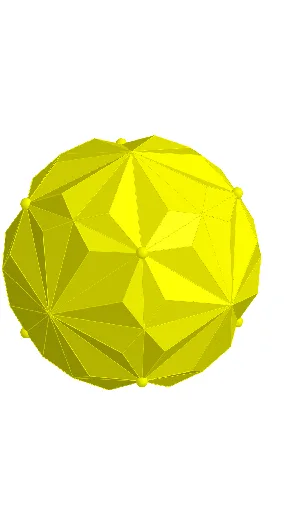
本范例演示如何在球面上构造和展示立方体图案。通过Point、Polygon、Cube命令创建立方体网格,利用Rotate旋转和Mirror镜像命令实现空间变换,借助Sphere命令生成球面背景,最后使用Intersect、Midpoint、Segment等命令完成点线面关系的精确构建。涉及的核心数学概念包括立体几何中的空间坐标系、球面投影、立方体展开图以及空间旋转与对称变换。该范例适合高中及大学阶段学生学习立体几何、空间想象力和GeoGebra动态几何软件操作,可用于理解球面与立方体的空间关系、掌握空间变换方法。
GeoGebra 命令及参数
Point(yAxis) → EPolygon(B, C, D, A) → q1, b, c, d, aCube(q1, true) → e, F, edgeBF, edgeAI, edgeFI, edgeFG, edgeCG, edgeGH, edgeDH, edgeHI, G, H, I, faceABFI, faceBCGF, faceCDHG, faceADHI, faceFGHICentroid(faceCDHG) → JSegment(C, H) → fSegment(D, G) → gMidpoint(C, D) → KMidpoint(C, G) → LMidpoint(G, H) → MMidpoint(H, D) → NSegment(K, M) → hSegment(L, N) → iLine(E, J) → jRotate(C, 22.5°, j) → C'Rotate(H, 22.5°, j) → H'Segment(C', H') → f'Segment(C, D) → kSegment(G, H) → lSegment(K, L) → mIntersect(m, f') → OSegment(C, O) → nSegment(O, J) → pMirror(O, f) → O'Segment(C, O') → qSegment(O', J) → rSegment(O, K) → sSegment(L, O') → tRotate(O', 90°, j) → O''Rotate(J, 90°, j) → J'Segment(O'', J') → r'Rotate(O, 90°, j) → O'_{1}Rotate(J, 90°, j) → J'_{1}Segment(O'_{1}, J'_{1}) → p'Rotate(C, 90°, j) → C'_{1}Rotate(O', 90°, j) → O''_{1}Segment(C'_{1}, O''_{1}) → q'Rotate(C, 90°, j) → C'_{2}Rotate(O, 90°, j) → O'_{2}Segment(C'_{2}, O'_{2}) → n'Rotate(L, 90°, j) → L'Rotate(O', 90°, j) → O''_{2}Segment(L', O''_{2}) → t'Rotate(O, 90°, j) → O'_{3}Rotate(K, 90°, j) → K'Segment(O'_{3}, K') → s'Mirror(O, J'_{1}) → O'_{4}Mirror(O', J'_{1}) → O''_{3}Mirror(O, J'_{1}) → O'_{5}Mirror(J, J'_{1}) → J'_{2}Segment(O'_{5}, J'_{2}) → p'_{1}Mirror(O', J'_{2}) → O''_{4}Mirror(J, J'_{2}) → J'_{3}Segment(O''_{4}, J'_{3}) → r'_{1}Mirror(C, J'_{3}) → C'_{3}Mirror(O', J'_{3}) → O''_{5}Segment(C'_{3}, O''_{5}) → q'_{1}Mirror(C, J'_{3}) → C'_{4}Mirror(O, J'_{3}) → O'_{6}Segment(C'_{4}, O'_{6}) → n'_{1}Mirror(L, J'_{3}) → L'_{1}Mirror(O', J'_{3}) → O''_{6}Segment(L'_{1}, O''_{6}) → t'_{1}Mirror(O, J'_{3}) → O'_{7}Mirror(K, J'_{3}) → K'_{1}Segment(O'_{7}, K'_{1}) → s'_{1}Mirror(O''_{2}, J'_{3}) → PMirror(L', J'_{3}) → L''Mirror(O''_{2}, J'_{3}) → QSegment(L'', Q) → t''Mirror(O'', J'_{3}) → O'''Mirror(J', J'_{3}) → J''Segment(O''', J'') → r''Mirror(C'_{1}, J'') → RMirror(O''_{1}, J'') → SSegment(R, S) → q''Mirror(C'_{2}, J'') → TMirror(O'_{2}, J'') → USegment(T, U) → n''Mirror(O'_{3}, J'') → VMirror(O'_{1}, J'') → WMirror(J'_{1}, J'') → ZSegment(W, Z) → p''Mirror(O'_{3}, Z) → A_1Mirror(K', Z) → K''Segment(A_1, K'') → s''Segment(C'_{2}, C'_{4}) → f_1Segment(C, T) → g_1Ray(E, L') → h_1Ray(E, O) → i_1Ray(E, C) → j_1Ray(E, O') → k_1Ray(E, K'') → l_1Sphere(E, C) → oIntersect(k_1, o) → B_1,Intersect(l_1, o) → C_1,Intersect(i_1, o) → D_1,Intersect(h_1, o) → E_1,Intersect(j, o) → F_1, G_1Polygon(C, G_1, D_1) → t1, d_1, c_1, m_1Polygon(C, B_1, G_1) → t2, n_1, c_2, b_1Polygon(C, D_1, E_1) → t3, e_1, c_3, p_1Polygon(C, C_1, B_1) → t4, q_1, c_4, r_1Intersect(j, p'_{1}) → H_1Polygon(C_1, G_1, B_1) → t5, s_1, t_1, a_1Polygon(G_1, E_1, D_1) → t6, f_2, g_2, h_2Rotate(l1, 90°, j) → l1'Rotate(l1, 180°, j) → l1'_{1}Rotate(l1, 270°, j) → l1'_{2}Rotate(l1, 0°, j) → l1'_{3}Line(E, C) → i_2Rotate(l2, 120°, i_2) → l2'Rotate(l2, (-(120°)), i_2) → l2'_{1}Rotate(l2, 0°, i_2) → l2'_{2}Line(E, B) → j_2Rotate(l2', 120°, j_2) → l2''Rotate(l2'', (-(120°)), i_2) → l2'''Rotate(l2'', 120°, i_2) → l2'''_{1}
AI 绘图提示语参考
在球面上构造一个立方体图案。首先确定球面上的点,然后创建立方体网格。接着通过旋转和镜像命令对立方体进行空间变换。最后连接关键点并绘制线段,形成对称的立方体图案。
以上提示语为根据原始绘图命令整理而来,仅供参考。