
用数据制作柱状图: popcorn 活动示例
几何画板及绘图内容加载中,请稍等……
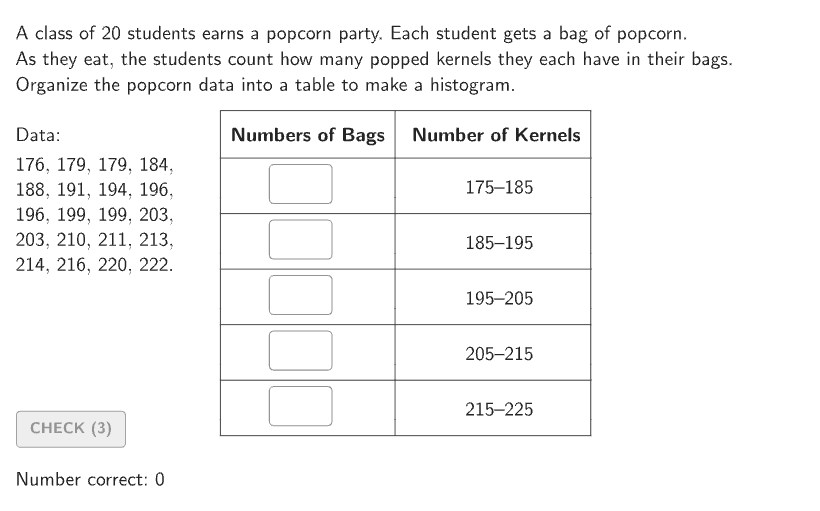
这个活动演示如何从 popcorn 数据中创建柱状图。核心数学概念包括数据整理、频率统计和柱状图绘制。作图要点包括使用 Shuffle、Sort、CountIf 等 GeoGebra 命令来组织数据,并用 Bar 命令绘制柱状图。适合 6-8 年级学生用于统计学习实践。
GeoGebra 命令及参数
Shuffle(Join[{Sequence[176, 224], Sequence[176, 224], Sequence[176, 224], Sequence[176, 224], Sequence[176, 224]}]) → randomList1, {196, 191, 222, 188, 179, 196, 176, 213, 216, 179, 210, 199, 203, 211, 214, 203, 194, 184, 199, 220, 185, 221, 177, 218, 221, 179, 197, 217, 189, 180, 223, 201, 177, 195, 220, 200, 213, 212, 178, 193, 218, 200, 191, 217, 216, 184, 207, 176, 220, 178, 181, 214, 196, 192, 210, 183, 215, 207, 210, 217, 176, 189, 219, 203, 213, 182, 206, 216, 222, 193, 206, 191, 194, 202, 197, 181, 176, 209, 214, 181, 223, 217, 187, 214, 196, 204, 191, 208, 201, 195, 220, 203, 194, 185, 197, 202, 222, 184, 212, 187, 186, 201, 207, 211, 189, 222, 223, 211, 188, 223, 206, 179, 208, 198, 197, 218, 200, 184, 221, 185, 209, 180, 198, 208, 195, 190, 221, 190, 213, 209, 205, 200, 219, 224, 204, 186, 220, 215, 205, 218, 202, 204, 204, 177, 180, 182, 195, 213, 223, 207, 192, 187, 218, 193, 208, 185, 202, 201, 205, 192, 210, 206, 188, 186, 219, 189, 199, 201, 183, 186, 212, 211, 177, 193, 215, 180, 187, 224, 188, 186, 204, 182, 187, 224, 198, 205, 217, 183, 219, 190, 178, 183, 196, 219, 200, 215, 185, 209, 192, 183, 191, 214, 178, 207, 178, 202, 193, 212, 177, 208, 224, 216, 221, 182, 179, 195, 216, 198, 199, 190, 192, 203, 222, 184, 194, 224, 181, 181, 176, 189, 206, 188, 182, 215, 210, 199, 212, 197, 180, 190, 205, 198, 211, 194, 209}Sort(Take[randomList1, 1 + (20 * Mod[countQuestion, 12]), 20 + (20 * Mod[countQuestion, 12])]) → dataCountIf(x > 215, data) → ansBar5CountIf(x > 205 ∧ x ≤ 215, data) → ansBar4CountIf(x > 195 ∧ x ≤ 205, data) → ansBar3CountIf(x > 185 ∧ x ≤ 195, data) → ansBar2CountIf(x ≤ 185, data) → ansBar1If(showsolution, Max[{ansBar1, ansBar2, ansBar3, ansBar4, ansBar5}], Max[{input1, input2, input3, input4, input5}]) → highestBarBar((4, 0), (5, ((tt * ansBar5) * heightUnit))) → barSln5Bar((3, 0), (4, ((tt * ansBar4) * heightUnit))) → barSln4Bar((2, 0), (3, ((tt * ansBar3) * heightUnit))) → barSln3Bar((1, 0), (2, ((tt * ansBar2) * heightUnit))) → barSln2Bar((0, 0), (1, ((tt * ansBar1) * heightUnit))) → barSln1CountIf(x ≥ 215, data) → ansBar5xCountIf(x ≥ 205 ∧ x < 215, data) → ansBar4xCountIf(x ≥ 195 ∧ x < 205, data) → ansBar3xCountIf(x ≥ 185 ∧ x < 195, data) → ansBar2xCountIf(x < 185, data) → ansBar1xShuffle(Sequence[15]) → randomList2, {6, 3, 12, 9, 1, 10, 11, 7, 4, 15, 14, 8, 13, 2, 5}Element(randomList2, Mod[countQuestion, 15] + 1) → randomNum2Element(randomList1, Mod[countQuestion, 20] + 1) → randomNum1Textfield(input1) → InputBox1Textfield(input2) → InputBox2Polygon(Zip[PixelsToPoint[Corner[1], Corner[3], Corner[5], A], A, {(pixelsLeft, pixelsTop), (pixelsLeft, y(Corner[5]) - pixelsBottom), Corner[5] - (pixelsRight, pixelsBottom), (x(Corner[5]) - pixelsRight, pixelsTop)}]) → borderBoxTextfield(input3) → InputBox3Textfield(input4) → InputBox4Textfield(input5) → InputBox5Bar((0, 0), (1, (input1 * heightUnit))) → barSt1Bar((1, 0), (2, (input2 * heightUnit))) → barSt2Bar((2, 0), (3, (input3 * heightUnit))) → barSt3Bar((3, 0), (4, (input4 * heightUnit))) → barSt4Bar((4, 0), (5, (input5 * heightUnit))) → barSt5PolyLine({(5.3, 0), (0, 0), (0, ((1.05 * highestBar) * heightUnit))}) → AxesBar((0, 0), (1, (input1 * heightUnit))) → barSt1BorderBar((1, 0), (2, (input2 * heightUnit))) → barSt2BorderBar((2, 0), (3, (input3 * heightUnit))) → barSt3BorderBar((3, 0), (4, (input4 * heightUnit))) → barSt4BorderBar((4, 0), (5, (input5 * heightUnit))) → barSt5BorderSequence(Segment[(0, (n * heightUnit)), (5.3, (n * heightUnit))], n, 1, highestBar) → gridStSequence(Segment[(n, 0), (n, -2)], n, 0, 5) → ticksStHSequence(Segment[(0, n), (-0.05, n)], n, heightUnit, (heightUnit * highestBar), heightUnit) → ticksStVVerticalText("Numbers of Bags") → LabelStVIf(showsolution, -11, -6) → MinXIf(showsolution, 5, 11.5) → MaxXBar((0, 0), (1, ((tt * ansBar1) * heightUnit))) → barSln1BorderBar((1, 0), (2, ((tt * ansBar2) * heightUnit))) → barSln2BorderBar((2, 0), (3, ((tt * ansBar3) * heightUnit))) → barSln3BorderBar((3, 0), (4, ((tt * ansBar4) * heightUnit))) → barSln4BorderBar((4, 0), (5, ((tt * ansBar5) * heightUnit))) → barSln5BorderCorner(5) → AppSizeZip(Text[A, B, true, true, 0], A, Sequence[175, 225, 10], B, Sequence[(n, -15), n, 0, 5]) → ticksLblStXZip(Text[If[Mod[A, ticksLblStYStep] ≟ 0, ("" * A), ""], B, true, true, -1, 0], A, Sequence[1, highestBar], B, Sequence[(0, (n * heightUnit) + 1), n, 1, highestBar]) → ticksLblStY
AI 绘图提示语参考
请绘制一个柱状图,包含五个柱子,分别对应数据区间:x大于215、205到215、195到205、185到195以及小于等于185。柱子高度由统计计数决定。同时绘制五个输入框,以及一个使用输入框数值绘制的柱状图,并添加坐标轴、刻度、网格和垂直文本“Numbers of Bags”。
以上提示语为根据原始绘图命令整理而来,仅供参考。