
余弦定理演示:三角形角度与边长关系的动态作图
几何画板及绘图内容加载中,请稍等……
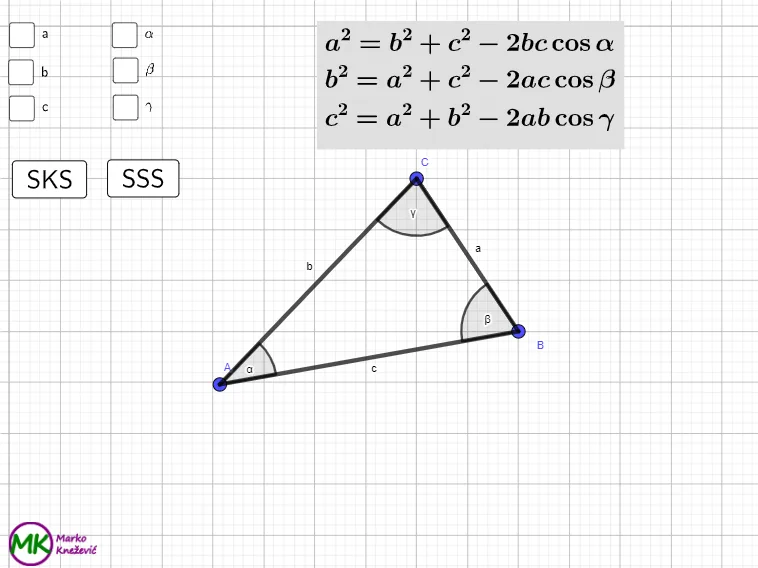
本范例用 GeoGebra 交互演示“余弦定理”如何把三角形三边与夹角联系起来,并通过参数变化观察量的联动。核心数学概念包括:余弦定理、三角函数、三角形中角与边的几何关系,以及由作图生成的几何度量关系(如边长与角度的对应)。作图要点:利用 Polygon 构造三角形顶点与边;Angle 标注/计算夹角;Line、OrthogonalLine 进行辅助线与垂线构造以确定必要的度量几何;Point 与 Intersect 确定交点与关键点;Random 与相关参数/列表(如 listAngle、listSide)用于生成随机边长或角度并驱动动态更新;Text/LaTeX 用于显示公式与数值结果;按钮与计数变量用于控制演示流程。适合中学到大学基础阶段用于三角函数与几何综合教学,也适合自学者用来直观理解余弦定理的几何含义。
GeoGebra 命令及参数
Polygon(A, B, C) → t1, c, a, bAngle(B, A, C) → αAngle(C, B, A) → βAngle(A, C, B) → γRandom(1, 3) → randSideRandom(1, 3) → randAngleLaTeX(a, true, true) → text1LaTeX(b, true, true) → text2LaTeX(c, true, true) → text3LaTeX(α, true, true) → text4LaTeX(β, true, true) → text5LaTeX(γ, true, true) → text6Line(I, J) → pOrthogonalLine(Q, p) → qOrthogonalLine(R, p) → rLine(H, I) → sPoint(s) → SOrthogonalLine(S, s) → tPoint(s) → TOrthogonalLine(T, s) → f_1Point(s) → UOrthogonalLine(U, s) → g_1Point(s) → VOrthogonalLine(V, s) → h_1Point(s) → WOrthogonalLine(W, s) → i_1Point(s) → B_1OrthogonalLine(B_1, s) → j_1Point(s) → C_1OrthogonalLine(C_1, s) → k_1Point(s) → D_1OrthogonalLine(D_1, s) → l_1Line(J, K) → m_1Intersect(q, t) → E_1Intersect(r, t) → F_1Intersect(t, m_1) → G_1Intersect(q, f_1) → H_1Intersect(q, g_1) → I_1Intersect(q, h_1) → J_1Intersect(q, i_1) → K_1Intersect(q, j_1) → L_1Intersect(q, k_1) → M_1Intersect(q, l_1) → N_1Intersect(p, q) → O_1Intersect(r, f_1) → P_1Intersect(r, g_1) → Q_1Intersect(r, h_1) → R_1Intersect(r, i_1) → S_1Intersect(r, j_1) → T_1Intersect(r, k_1) → U_1Intersect(r, l_1) → V_1Intersect(f_1, m_1) → W_1Intersect(g_1, m_1) → Z_1Intersect(h_1, m_1) → A_2Intersect(i_1, m_1) → B_2Intersect(j_1, m_1) → C_2Intersect(k_1, m_1) → D_2Intersect(l_1, m_1) → E_2Intersect(p, r) → F_2Polygon(H, S, E_1, Q) → squareA_{1}, h_2, s_1, e_1, q_1Polygon(H_1, I_1, Q_1, P_1) → squareA_{2}, n_1, p_1, r_1, t_1Polygon(P_1, Q_1, Z_1, W_1) → squareA_{3}, a_1, b_1, z_1, w_1Polygon(T, U, I_1, H_1) → squareB_{1}, t_2, u, c_1, d_1Polygon(B_1, C_1, M_1, L_1) → squareB_{2}, f_2, g_2, i_2, j_2Polygon(Q, E_1, F_1, R) → squareB_{3}, q_2, k_2, l_2, r_2Polygon(R_1, S_1, B_2, A_2) → squareB_{4}, m_2, n_2, b_2, a_2Polygon(L_1, M_1, U_1, T_1) → squareA_{4}, p_2, s_2, u_1, c_2Polygon(V, W, K_1, J_1) → squareC_{1}, v, w, d_2, e_2Polygon(C_1, D_1, N_1, M_1) → squareC_{2}, f_3, g_3, h_3, i_3Polygon(J_1, K_1, S_1, R_1) → squareC_{3}, j_3, k_3, l_3, m_3Polygon(R, F_1, G_1, K) → squareC_{4}, r_3, n_3, p_3, k_4Polygon(D_1, I, O_1, N_1) → squareAlpha, q_3, i_4, o_1, s_3Polygon(N_1, O_1, F_2, V_1) → squareBeta, t_3, a_3, b_3, v_1Polygon(V_1, F_2, J, E_2) → squareGamma, c_3, d_3, j_4, e_3Polygon(T_1, U_1, D_2, C_2) → squareA, f_4, g_4, h_4, l_4Polygon(U_1, V_1, E_2, D_2) → squareB, m_4, n_4, p_4, q_4Polygon(M_1, N_1, V_1, U_1) → squareC, r_4, s_4, t_4, a_4
AI 绘图提示语参考
绘制一个三角形,由三个顶点构成,并标注三内角:以顶点A为中点方向给出∠BAC为α、∠CBA为β、∠ACB为γ。再在同一张图上随机生成三条边长对应的数值文本与三角对应的角度文本。取三角形中由两条边确定的直线作为基准,再作一条与该基准直线正交的方向线;在多条正交边方向与基准线的交点处依次标出若干辅助点。将部分辅助点连接成新的直线,并继续用这些直线与已作的正交线求交,获得更多辅助点,以形成用于观察角与边关系的动态几何构型。
以上提示语为根据原始绘图命令整理而来,仅供参考。