
使用数据集构建直方图
几何画板及绘图内容加载中,请稍等……
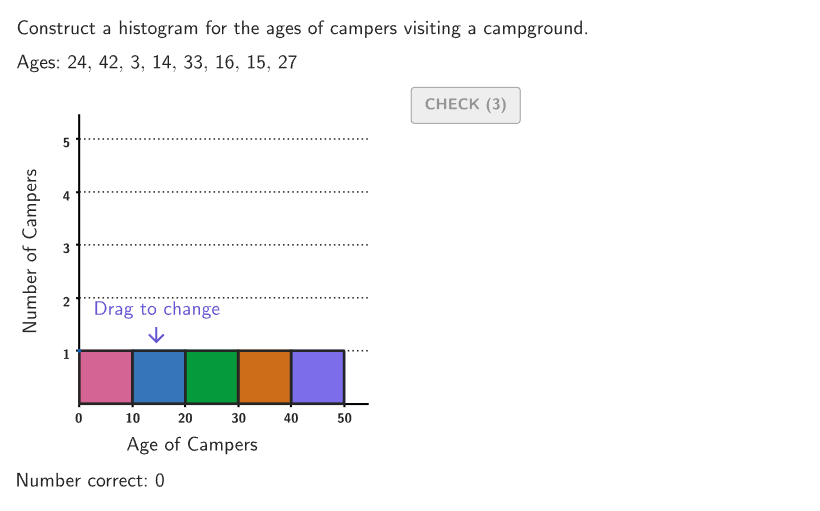
本交互式活动演示如何使用数据集构建直方图。涉及的核心数学概念是概率统计中的直方图绘制方法。作图要点包括使用 GeoGebra 命令 Shuffle(随机排序)、If(条件判断)、Take(取值)、CountIf(计数)、Sum(求和)、Zip(组合)、Element(元素)、twoPointBox(两点框选)、Polygon(多边形)、Mod(取模)、VerticalText(垂直文本)、Sequence(序列)、Segment(线段)、onboardingTextOffset(引导文本偏移)等。适合 6-8 年级学生学习如何组织和比较一组信息在直方图和条形图中的表示。
GeoGebra 命令及参数
Shuffle(Sequence[15]) → randomList2, {12, 3, 1, 2, 10, 11, 6, 9, 5, 4, 15, 13, 8, 14, 7}Shuffle({1, 2, 3, 4}) → ansOrder, {4, 1, 3, 2}Shuffle(Sequence[1, 5]) → shuffleOrder, {5, 4, 1, 3, 2}Shuffle(Remove[Sequence[1, 49], {10, 20, 30, 40}]) → randomAges, {24, 42, 3, 14, 33, 16, 15, 27, 9, 25, 49, 23, 37, 45, 38, 4, 41, 32, 22, 44, 28, 6, 34, 13, 17, 12, 39, 36, 48, 46, 35, 29, 7, 8, 43, 21, 18, 1, 26, 5, 19, 31, 47, 2, 11}If((2 * countQuestion) + 9 < 45, (2 * countQuestion) + 1, 1) → startIndexTake(randomAges, startIndex, startIndex + 7) → agesCountIf(40 < A < 50, A, ages) → ans5CountIf(30 < A < 40, A, ages) → ans4CountIf(20 < A < 30, A, ages) → ans3CountIf(A < 10, A, ages) → ans1CountIf(10 < A < 20, A, ages) → ans2Sum(Zip[(("" * A) * B), A, Sort[ages], B, {", ", ", ", ", ", ", ", ", ", ",\\", ", ", ""}]) → textAgesSortedZip(If[A ≟ 0, "no one", If[A ≟ 1, "one person", (("" * A) * " people")]], A, {ans1, ans2, ans3, ans4, ans5}) → countsElement(randomList2, Mod[countQuestion, 15] + 1) → randomNum2twoPointBox(Bar1a, Bar1b) → bar1twoPointBox(Bar2a, Bar2b) → bar2twoPointBox(Bar3a, Bar3b) → bar3twoPointBox(Bar4a, Bar4b) → bar4twoPointBox(Bar5a, Bar5b) → bar5Polygon({(-10, -1), (-10, 5.5), (55, 5.5), (55, -1)}) → viewboxZip(twoPointBox[A, B], A, {Bar1a, Bar2a, Bar3a, Bar4a, Bar5a}, B, {Bar1b, Bar2b, Bar3b, Bar4b, Bar5b}) → barOutlinesMod(shuffleOrder(countQuestion + 1), 5) → ans3TempVerticalText("Number of Campers") → labelYSequence(Segment[(0, A), (55, A)], A, 1, 5) → horizGridsSum(Zip[("" * (A * B)), A, ages, B, {}]) → agesLatexSum(Zip[((("" * A) * B) * " "), A, ages, B, {",", ",", ",", ",", ",", ",", ",", ""}]) → agesTextZip(A + SolnAnchor, A, barPositions) → solnPositionsZip(SolnAnchor + (A, B), A, {0, 10, 20, 30, 40}, B, {ans1, ans2, ans3, ans4, ans5}) → solnPointsZip(twoPointBox[A, A + (10, 0)], A, solnPoints) → solnOutlinesZip(Text[("" * A), SolnAnchor + (0, A), true, true, -1, 0], A, {1, 2, 3, 4, 5}) → solnNumbersYSequence(Segment[SolnAnchor + (-1, i), SolnAnchor + (0, i)], i, 1, 5) → solnTicksYSequence(Segment[SolnAnchor + (i, -0.1), SolnAnchor + (i, 0)], i, 10, 50, 10) → solnTicksXSequence(Text[("" * A), SolnAnchor + (A, 0), true, true, 0, -1], A, 0, 50, 10) → solnNumbersXtwoPointBox(solnPoints(1), solnPoints(1) + (10, 0)) → soln1twoPointBox(solnPoints(2), solnPoints(2) + (10, 0)) → soln2twoPointBox(solnPoints(3), solnPoints(3) + (10, 0)) → soln3twoPointBox(solnPoints(4), solnPoints(4) + (10, 0)) → soln4twoPointBox(solnPoints(5), solnPoints(5) + (10, 0)) → soln5VerticalText("\text{Number of Campers\\\vspace{245px}\\Number of Campers}") → lblSolnYSequence(Segment[SolnAnchor + (0, A), SolnAnchor + (55, A)], A, 1, 5) → solnGridsIf(showsolution, 200, 140) → maxXIf(showsolution, -20, -15) → minXSequence(Text[("" * A), (0, 0) + (A, 0), true, true, 0, -1], A, 0, 50, 10) → questionNumbersXZip(Text[("" * A), (0, 0) + (0, A), true, true, -1, 0], A, {1, 2, 3, 4, 5}) → questionNumbersYSegment(Bar1a, Bar1a) → startBar1onboardingTextOffset(Corner[onboardingText, 1], Corner[onboardingText, 3], onboardingCase, Corner[1], Corner[3], Corner[5]) → OnboardingTextOffsettwoPointBox(Bar2a, Bar2b) → pulsingQuadSegment(Bar1a, Bar1b) → StartMarker1Segment(Bar2a, Bar2b) → StartMarker2Segment(Bar3a, Bar3b) → StartMarker3Segment(Bar4a, Bar4b) → StartMarker4Segment(Bar5a, Bar5b) → StartMarker5
AI 绘图提示语参考
绘制一个直方图,表示一组年龄数据的分布情况。首先,将年龄数据随机打乱并分组,然后根据年龄范围(0-9,10-19,20-29,30-39,40-49)统计每个年龄段的人数。接着,使用这些数据在直角坐标系中绘制直方图,横轴表示年龄范围,纵轴表示人数。每个直方图条形的高度对应于相应年龄段的人数,条形之间不留空隙。最后,添加Y轴标签和X轴标签,以及X轴和Y轴的刻度线。
以上提示语为根据原始绘图命令整理而来,仅供参考。