
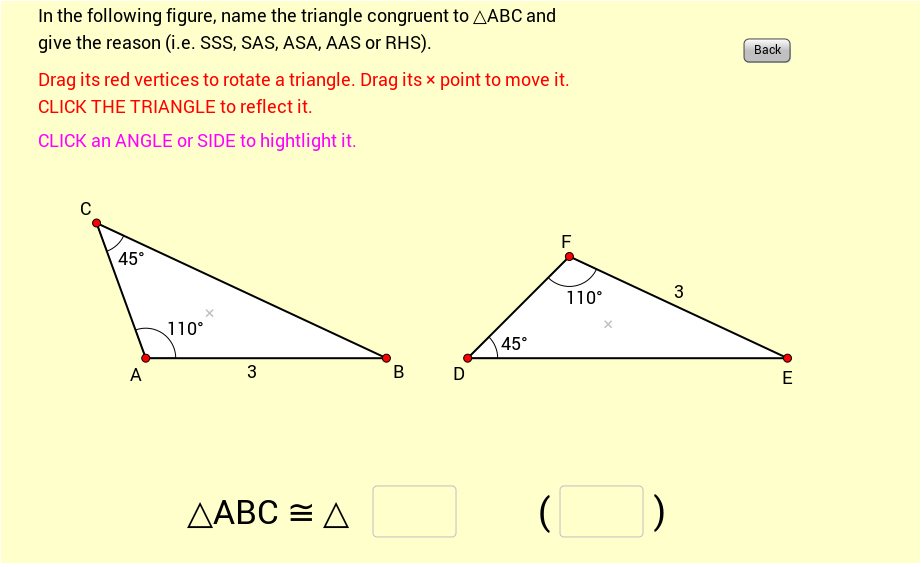
全等三角形命名与判断练习(Exercise 1)
几何画板及绘图内容加载中,请稍等……
① 本练习通过 GeoGebra 动态图形,展示如何在三角形可移动、旋转和反射的情况下,判断并命名全等三角形的合理依据。② 核心数学概念包括三角形全等条件(如 SSS、SAS、ASA)和几何变换。③ 作图要点提取自构造摘要:使用 Polygon、Vector、Angle、Intersect、Rotate、Segment、Midpoint 等命令,涉及顶点 A、B、C、边长 a/b/c、角度 α/β/γ 以及多边形对象的构建与交点计算。④ 适合初中至高中几何课程,帮助学生直观理解全等性在变换下的不变性。
GeoGebra 命令及参数
Polygon(A, B, C) → poly1, c, a, bVector(P, A) → uVector(P, B) → vVector(P, C) → wPolygon(A_1, B_1, C_1) → poly1_1, c_1, a_1, b_1Vector(P_1, A_1) → u_1Vector(P_1, B_1) → v_1Vector(P_1, C_1) → w_1Angle(B, A, C) → αAngle(A, C, B) → βAngle(A_1, C_1, B_1) → γAngle(B_1, A_1, C_1) → δIntersect(Line[X_0, Rotate[Y_0, Ang_A, X_0]], Line[Y_0, Rotate[X_0, -(180° - Ang_C - Ang_A), Y_0]]) → Z_0Polygon(X_0, Y_0, Z_0) → poly2, z_0, x_0, y_0Rotate(Translate[Mirror[X_0, x = 0], (11, 0)], 155*°, (8, 0)) → X_1Textfield(text13) → Ans1Textfield(text14) → Ans2Segment(D, E) → rMidpoint(Segment[Intersect[Circle[A, r], b], Intersect[Circle[A, r], c]]) → FMidpoint(Segment[Intersect[Circle[C, r], a], Intersect[Circle[C, r], b]]) → GMidpoint(Segment[Intersect[Circle[A_1, r], b_1], Intersect[Circle[A_1, r], c_1]]) → HMidpoint(Segment[Intersect[Circle[C_1, r], a_1], Intersect[Circle[C_1, r], b_1]]) → IRotate(Translate[Mirror[Y_0, x = 0], translate], 155*°, (8, 0)) → Y_1Rotate(Translate[Mirror[Z_0, x = 0], translate], 155*°, (8, 0)) → Z_1Angle(A_1, B_1, C_1) → εAngle(C, B, A) → ζMidpoint(Segment[Intersect[Circle[B, r], a], Intersect[Circle[B, r], c]]) → JMidpoint(Segment[Intersect[Circle[B_1, r], a_1], Intersect[Circle[B_1, r], c_1]]) → K