
全等三角形练习2 by Anthony OR 柯志明
几何画板及绘图内容加载中,请稍等……
所属专题
Congruence (Vol 1)
Unit 5: Triangle Congruence
Naming Congruent Triangles with Reasons
Naming Congruent Triangles with Reasons
Congruence cases
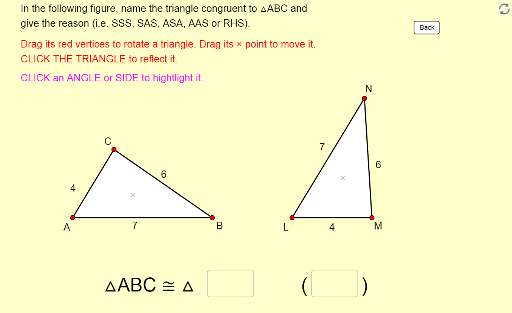
本范例演示如何通过移动、旋转和反射来命名全等三角形及其原因。通过使用GeoGebra命令如Polygon、Vector、Angle等,可以动态地探索三角形的性质。适合初中及以上学生学习全等三角形的相关概念。
GeoGebra 命令及参数
Polygon(A, B, C) → poly1, c, a, bVector(P, A) → uVector(P, B) → vVector(P, C) → wPolygon(A_1, B_1, C_1) → poly1_1, c_1, a_1, b_1Vector(P_1, A_1) → u_1Vector(P_1, B_1) → v_1Vector(P_1, C_1) → w_1Angle(B, A, C) → αAngle(A, C, B) → βAngle(A_1, C_1, B_1) → γAngle(B_1, A_1, C_1) → δIntersect(Circle[X_0, Side_b], Circle[Y_0, Side_a]) → Z_0, L, ,Polygon(X_0, Y_0, Z_0) → poly2, z_0, x_0, y_0Textfield(text13) → Ans1Textfield(text14) → Ans2Segment(D, E) → rMidpoint(Segment[Intersect[Circle[A, r], b], Intersect[Circle[A, r], c]]) → FMidpoint(Segment[Intersect[Circle[C, r], a], Intersect[Circle[C, r], b]]) → GMidpoint(Segment[Intersect[Circle[A_1, r], b_1], Intersect[Circle[A_1, r], c_1]]) → HMidpoint(Segment[Intersect[Circle[C_1, r], a_1], Intersect[Circle[C_1, r], b_1]]) → IAngle(A_1, B_1, C_1) → εAngle(C, B, A) → ζMidpoint(Segment[Intersect[Circle[B, r], a], Intersect[Circle[B, r], c]]) → JMidpoint(Segment[Intersect[Circle[B_1, r], a_1], Intersect[Circle[B_1, r], c_1]]) → KRotate(Translate[Mirror[X_0, x = 0], translate], (-(180° - Angle[Y_0, X_0, Z_0])), (11, 0)) → X_1Rotate(Translate[Mirror[Y_0, x = 0], translate], (-(180° - Angle[Y_0, X_0, Z_0])), (11, 0)) → Y_1Rotate(Translate[Mirror[Z_0, x = 0], translate], (-(180° - Angle[Y_0, X_0, Z_0])), (11, 0)) → Z_1
AI 绘图提示语参考
绘制两个全等三角形ABC和A_1B_1C_1,通过点P和P_1分别作向量u、v、w和u_1、v_1、w_1,测量角α、β、γ、δ,构造三角形X_0Y_0Z_0,通过点A、B、C和A_1、B_1、C_1构造中点F、G、H、I,旋转、平移和镜像操作生成X_1、Y_1、Z_1。
以上提示语为根据原始绘图命令整理而来,仅供参考。