
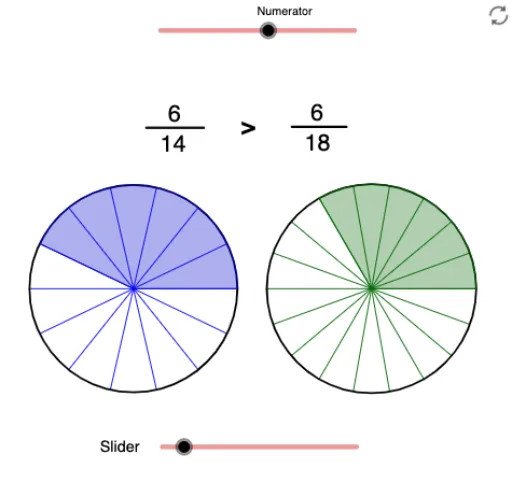
比较相同分子的分数
几何画板及绘图内容加载中,请稍等……
①本范例演示如何比较具有相同分子的分数的大小;②涉及的核心数学概念包括分数比较、几何直观和数形结合;③作图要点——从下方『构造摘要』提炼用到了RandomElement, If, Point, Circle, Sequence, Sector, Textfield, Segment, AttachCopyToView等GeoGebra命令/对象;④适合初中数学教学,用于帮助学生理解分数比较的几何意义。
GeoGebra 命令及参数
RandomElement({11, 12, 13, 14, 15}) → D1If(D2 ≟ 1, D1, D1 + D2) → bPoint(xAxis) → CPoint(xAxis) → DCircle(C, D) → ePoint(xAxis) → EPoint(xAxis) → FCircle(E, F) → fSequence(Rotate[D, (360° * i / D1), C], i, 1, D1) → list1Sequence(Segment[C, Element[list1, i]], i, 1, D1 + 1) → list2Sector(e, D, Element[list1, N1]) → gSequence(Rotate[F, (360° * i / b), E], i, 1, b) → list3Sequence(Segment[E, Element[list3, i]], i, 1, b) → list4Circle(E, 1.3) → kSector(f, F, Element[list3, New]) → hTextfield(D1) → InputBox1Textfield(N1) → InputBox2Textfield(Mul) → InputBox3Segment(Q, R) → jSegment(Q, R) → lSegment(S, T) → mAttachCopyToView(PolyLine[(12.2205876488494,-5.88921046287111), (NaN,NaN), (12.2205876488494,-5.88921046287111), true], 1, (-3.6253531256903755, -5.8892104628711035), (8.613381618872829, 4.292598364169786), (0, 948), (1140, 0)) → stroke1