
比较苹果与橙子的比率活动:通过图形理解比例关系
几何画板及绘图内容加载中,请稍等……
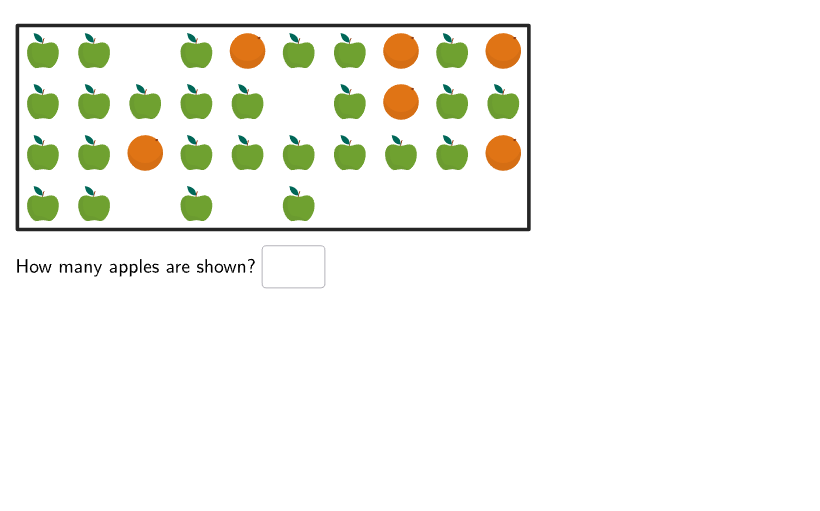
这个活动通过GeoGebra工具帮助学生理解比率的概念。演示内容包括绘制苹果和橙子的图形,并比较它们的数量关系。核心数学概念是比率和比例。作图要点包括使用Shuffle、Element、Sample等命令创建图形,以及通过InputBox输入数值。适合6-8年级学生用于数学教学和课堂互动。
GeoGebra 命令及参数
Shuffle(Sequence[35]) → applesNums, {26, 19, 13, 33, 22, 2, 21, 15, 30, 7, 4, 23, 11, 24, 31, 32, 12, 1, 34, 9, 10, 18, 6, 28, 3, 8, 17, 5, 27, 20, 25, 14, 16, 35, 29}Element(applesNums, Mod[questionCount, Length[applesNums]] + 1) → applesShownShuffle(Sequence[36 - applesShown]) → orangesNums, {6, 1, 5, 4, 7, 3, 8, 9, 10, 2}Sample(Sequence[36], applesShown, false) → applesPos, {20, 17, 32, 36, 2, 4, 14, 24, 28, 25, 6, 1, 21, 22, 9, 19, 11, 31, 27, 12, 15, 13, 7, 29, 34, 26}Element(orangesNums, 1) → orangesShownSample(Sequence[36] \ applesPos, orangesShown, false) → orangesPos, {30, 23, 5, 8, 10, 18}Corner(5) → AppSizePolygon({(0, 0), (10, 0), (10, 4), (0, 4)}) → boxFlatten(Sequence[Sequence[(0.5 + kk, 4 - (0.5 + jj)), kk, 0, 9], jj, 0, 4]) → positionsSequence(Circle[Element[positions, Element[applesPos, kk]], 0.25], kk, 1, Length[positions]) → apples_{2}Sequence(Circle[Element[positions, Element[orangesPos, kk]], 0.25], kk, 1, Length[orangesPos]) → oranges_{2}Textfield(appsNum) → InputBox1Textfield(orangesNum) → InputBox2Textfield(totalNum) → InputBox3If(correct1, "✓", "✘") → textFeedback1If(correct2, "✓", "✘") → textFeedback2If(correct3, "✓", "✘") → textFeedback3Translate(hGL, Vector[(Vector[Corner[4], Corner[1]] / 500 * 16)]) → hGL'Translate(vGL, Vector[(Vector[Corner[1], Corner[2]] / 800 * 16)]) → vGL'Translate(vGL, Vector[(Vector[Corner[1], Corner[2]] / 800 * 64)]) → vGL'_{1}If(A1 ≟ 1, "Apple", "Apples") → B1If(A2 ≟ 1, "Orange", "Oranges") → B2Sequence((11.2, 4 - (0.5 + jj)), jj, 0, 2) → legendPosTranslate(legendPos, (1, 0)) → departureSequence((0.5, -2.6 + (kk * 0.75)), kk, 0, 1) → legendPos2Sequence((8.5, -2.7 + (kk * 0.75)), kk, 0, 1) → legendPos3Flatten(Translate[{legendPos2, legendPos3}, (If[stage ≟ 2, 4, 4.3], 0)]) → arrivalSemicircle(departure(1), arrival(4)) → c1Semicircle(departure(1), arrival(1)) → c2Point(c1, 1 - Min[SlideToAnim - 1, 1]) → Panim2Point(c2, 1 - Min[SlideToAnim, 1]) → Panim1Text(Text[applesShown], Panim1, true, true, 0, 0) → textanim1Text(Text[applesShown], Panim2, true, true, 0, 0) → textanim2Semicircle(departure(2), arrival(2)) → c3Semicircle(departure(2), arrival(3)) → c4Point(c3, 3 - Min[SlideToAnim, 3]) → Panim3Point(c4, 4 - Min[SlideToAnim, 4]) → Panim4Text(Text[orangesShown], Panim3, true, true, 0, 0) → textanim3Text(Text[orangesShown], Panim4, true, true, 0, 0) → textanim4Point(c1, 1 - Min[SlideToAnim, 1]) → Panim5Point(c3, 2 - Min[SlideToAnim, 2]) → Panim6Semicircle(departure(3), arrival(1)) → c7Semicircle(departure(3), arrival(3)) → c8Point(c7, 3 - Min[SlideToAnim, 3]) → Panim7Point(c8, 4 - Min[SlideToAnim, 4]) → Panim8Text(Text[applesShown], Panim5, true, true, 0, 0) → textanim5Text(Text[totalNum], Panim7, true, true, 0, 0) → textanim7Text(Text[totalNum], Panim8, true, true, 0, 0) → textanim8Text(Text[orangesShown], Panim6, true, true, 0, 0) → textanim6Dilate(pic1, 0.1) → pic1'Zip(Translate[pic1', Vector[positions(kk)]], kk, applesPos) → l1Translate(pic1', Vector[legendPos(1)]) → pic1''Translate(pic1', Vector[legendPos(3) - (sep, 0)]) → pic1''_{1}Translate(pic1', Vector[legendPos2(1)]) → pic1''_{2}Translate(pic1', Vector[legendPos3(2)]) → pic1''_{3}Dilate(pic2, 0.1) → pic2'Zip(Translate[pic2', Vector[positions(kk)]], kk, orangesPos) → l2Translate(pic2', Vector[legendPos(2)]) → pic2''Translate(pic2', Vector[legendPos(3) + (sep, 0)]) → pic2''_{1}Translate(pic2', Vector[legendPos2(2)]) → pic2''_{2}Translate(pic2', Vector[legendPos3(1)]) → pic2''_{3}Translate(pic2', Vector[legendPos2(2) + (0, 0.2)]) → pic2''_{4}Translate(pic1', Vector[legendPos2(1)] + ((-sep), 0.15)) → pic1''_{5}Translate(pic2', Vector[legendPos2(1)] + (sep, 0.1)) → pic2''_{5}Translate(pic1''_{5}, (8, 0)) → pic4Translate(pic2''_{5}, (8, 0)) → pic3TableText({((("\bold\color{" * colorApple) * "}") * Text[applesShown]), "Apples\\\\\\"}, {((("\bold\color{" * colorOrange) * "}") * Text[orangesShown]), "Oranges\\\\\\"}, {((("\bold\color{" * colorTotal) * "}") * Text[totalNum]), "Fruit"}, "l") → text5Translate(pic1', Vector[legendPos3(2) + (0, 0.3)]) → pic1''_{4}
AI 绘图提示语参考
绘制一个包含苹果和橙子的图形,通过坐标几何展示比例关系。首先随机生成苹果的数量,然后随机生成橙子的数量,接着在坐标系中绘制苹果和橙子的位置,每个位置画一个半径为0.25的圆。最后在图形下方添加苹果和橙子的数量显示,以及比例关系的反馈信息。
以上提示语为根据原始绘图命令整理而来,仅供参考。