
四则运算与分数结合的几何作图示例
几何画板及绘图内容加载中,请稍等……
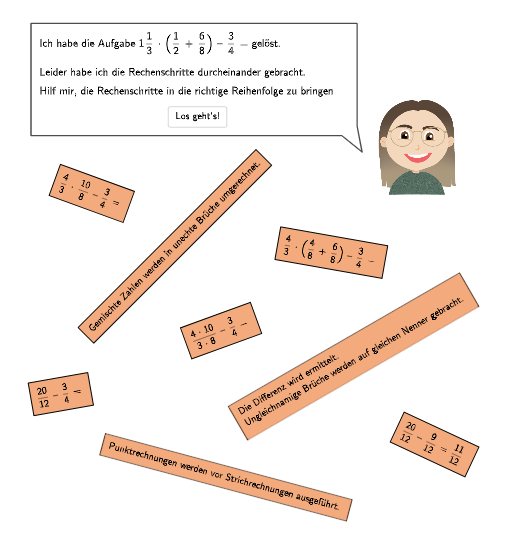
该范例演示了如何将四则运算与分数结合进行几何作图。核心数学概念包括运算顺序、分数运算和几何构造。作图要点涉及使用GeoGebra命令如Point、Translate、Midpoint等进行图形绘制。适合小学5-6年级学生,用于学习运算规则和几何作图技能。
GeoGebra 命令及参数
Point(Line[P0, xAxis]) → P1Point(Line[P0, xAxis]) → P2Translate(Polygon[(0, 0), (tablesizex2, 0), (tablesizex2, tablesizey), (0, tablesizey)], P2 - ((0.2 * tablespace), (-2 * tablesizey) - (2 * tablespace))) → vrechts3Translate(Polygon[(0, 0), (tablesizex2, 0), (tablesizex2, tablesizey), (0, tablesizey)], P2 - ((0.2 * tablespace), (-tablesizey) - tablespace)) → vrechts2Translate(Polygon[(0, 0), (tablesizex3, 0), (tablesizex3, tablesizey), (0, tablesizey)], P1 - (0, (-3 * tablesizey) - (3 * tablespace))) → vlinks4Translate(Polygon[(0, 0), (tablesizex3, 0), (tablesizex3, tablesizey), (0, tablesizey)], P1 - (0, (-5 * tablesizey) - (5 * tablespace))) → vlinks6Translate(Polygon[(0, 0), (tablesizex2, 0), (tablesizex2, tablesizey), (0, tablesizey)], P2 - ((0.2 * tablespace), (-3 * tablesizey) - (3 * tablespace))) → vrechts4Translate(Polygon[(0, 0), (tablesizex2, 0), (tablesizex2, tablesizey), (0, tablesizey)], P2 - ((0.2 * tablespace), (-5 * tablesizey) - (5 * tablespace))) → vrechts6Translate(Polygon[(0, 0), (tablesizex2, 0), (tablesizex2, tablesizey), (0, tablesizey)], P2 - ((0.2 * tablespace), (-4 * tablesizey) - (4 * tablespace))) → vrechts5Translate(Polygon[(0, 0), (tablesizex3, 0), (tablesizex3, tablesizey), (0, tablesizey)], P1 - (0, 0)) → vlinks1Midpoint(Corner[TextLinks1, 1], Corner[TextLinks1, 3]) → M1Midpoint(Corner[TextRechts2, 1], Corner[TextRechts2, 3]) → M2Midpoint(Corner[TextRechts4, 1], Corner[TextRechts4, 3]) → M41Midpoint(Corner[TextRechts5, 1], Corner[TextRechts5, 3]) → M5Midpoint(Corner[TextRechts6, 1], Corner[TextRechts6, 3]) → M61Midpoint(Corner[TextLinks6, 1], Corner[TextLinks6, 3]) → M62Midpoint(Corner[TextLinks4, 1], Corner[TextLinks4, 3]) → M42Midpoint(Corner[TextRechts3, 1], Corner[TextRechts3, 3]) → M3Textfield(input1) → Eingabefeld1Textfield(input2) → Eingabefeld2CountIf(m ∈ vrechts2, m, {M1, M2, M3, M41, M42, M5, M61, M62}) → count2CountIf(m ∈ vrechts4, m, {M1, M2, M3, M41, M42, M5, M61, M62}) → count41CountIf(m ∈ vlinks4, m, {M1, M2, M3, M41, M42, M5, M61, M62}) → count42CountIf(m ∈ vrechts6, m, {M1, M2, M3, M41, M42, M5, M61, M62}) → count61CountIf(m ∈ vrechts5, m, {M1, M2, M3, M41, M42, M5, M61, M62}) → count5CountIf(m ∈ vlinks6, m, {M1, M2, M3, M41, M42, M5, M61, M62}) → count62CountIf(m ∈ vlinks1, m, {M1, M2, M3, M41, M42, M5, M61, M62}) → count1Sequence(P1 + ((-0.3 * tablespace) + textposx, (m * tablesizey) + (m * tablespace) - 0.2), m, 0, 5) → listPosAPoint(Line[A, xAxis]) → BSpeechBubbleLeft(C, 8.4, 1.1) → Vieleck1Point(Line[D, xAxis]) → EPoint(Line[F, xAxis]) → GSpeechBubbleRight(H, 12, 3.97) → Vieleck2RotateText((("\textsf{\small\fcolorbox{000000}{" * colour) * "}{\frac{20}{12} -- \frac{9}{12} = \frac{11}{12}"), -25°) → TextStartRechts6RotateText("\textsf{Rechenschritt}", 90°) → Text28Zip(Segment[P + (tablespace, (-tablespace)), P + (tablespace, tablesizey - tablespace)], P, listPosA) → listLinesTranslate(Polygon[(0, 0), (tablesizex3, 0), (tablesizex3, tablesizey), (0, tablesizey)], P1 - (0, (-tablesizey) - tablespace)) → vlinks2Translate(Polygon[(0, 0), (tablesizex3, 0), (tablesizex3, tablesizey), (0, tablesizey)], P1 - (0, (-4 * tablesizey) - (4 * tablespace))) → vlinks5Translate(Polygon[(0, 0), (tablesizex3, 0), (tablesizex3, tablesizey), (0, tablesizey)], P1 - (0, (-2 * tablesizey) - (2 * tablespace))) → vlinks3CountIf(m ∈ vrechts3, m, {M1, M2, M3, M41, M42, M5, M61, M62}) → count3Sequence(P2 + (0, (m * tablesizey) + (m * tablespace) - (0.5 * textposx)), m, 0, 5) → listPosBTranslate(Polygon[(0, 0), (tablesizex2, 0), (tablesizex2, tablesizey), (0, tablesizey)], P2 - ((0.2 * tablespace), 0)) → vrechts1RotateText((("\textsf{\small\fcolorbox{000000}{" * colour) * "}{Gemischte Zahlen werden in unechte Brüche umgerechnet.}"), 45°) → TextStartLinks1RotateText((("\textsf{\small\fcolorbox{000000}{" * colour) * "}{Punktrechnungen werden vor Strichrechnungen ausgeführt."), -15°) → TextStartLinks4RotateText((("\textsf{\small\fcolorbox{000000}{" * colour) * "}{Die Differenz wird ermittelt.\vphantom{g}\\Ungleichnamige Brüche werden auf gleichen Nenner gebracht."), 30°) → TextStartLinks6RotateText((("\textsf{\small\fcolorbox{000000}{" * colour) * "}{\frac{4}{3} \cdot \Big(\frac{4}{8} + \frac{6}{8}\Big) -- \frac{3}{4} ="), -10°) → TextStartRechts2RotateText((("\textsf{\small\fcolorbox{000000}{" * colour) * "}{\frac{4}{3} \cdot \frac{10}{8} -- \frac{3}{4} ="), -20°) → TextStartRechts3RotateText((("\textsf{\small\fcolorbox{000000}{" * colour) * "}{\frac{4 \cdot 10}{3 \cdot 8} -- \frac{3}{4} ="), 20°) → TextStartRechts4RotateText((("\textsf{\small\fcolorbox{000000}{" * colour) * "}{\frac{20}{12} -- \frac{3}{4} ="), 10°) → TextStartRechts5Point(Line[J, yAxis]) → L
AI 绘图提示语参考
绘制一个用于分数运算教学的几何构造图。左侧和右侧各有一列矩形框,分别表示不同的运算步骤。左侧框内显示带分数转换为假分数、乘除优先于加减、通分与求差等文字说明,右侧框内显示具体分数算式,如三分之四乘以(八分之四加八分之六)减四分之三,并逐步化简。每个矩形框中央有标记点,用于统计各步骤。底部有输入框和提示气泡。整体布局整齐,矩形框按垂直方向排列,间距均匀。
以上提示语为根据原始绘图命令整理而来,仅供参考。