
体积公式之卡瓦列里原理演示
几何画板及绘图内容加载中,请稍等……
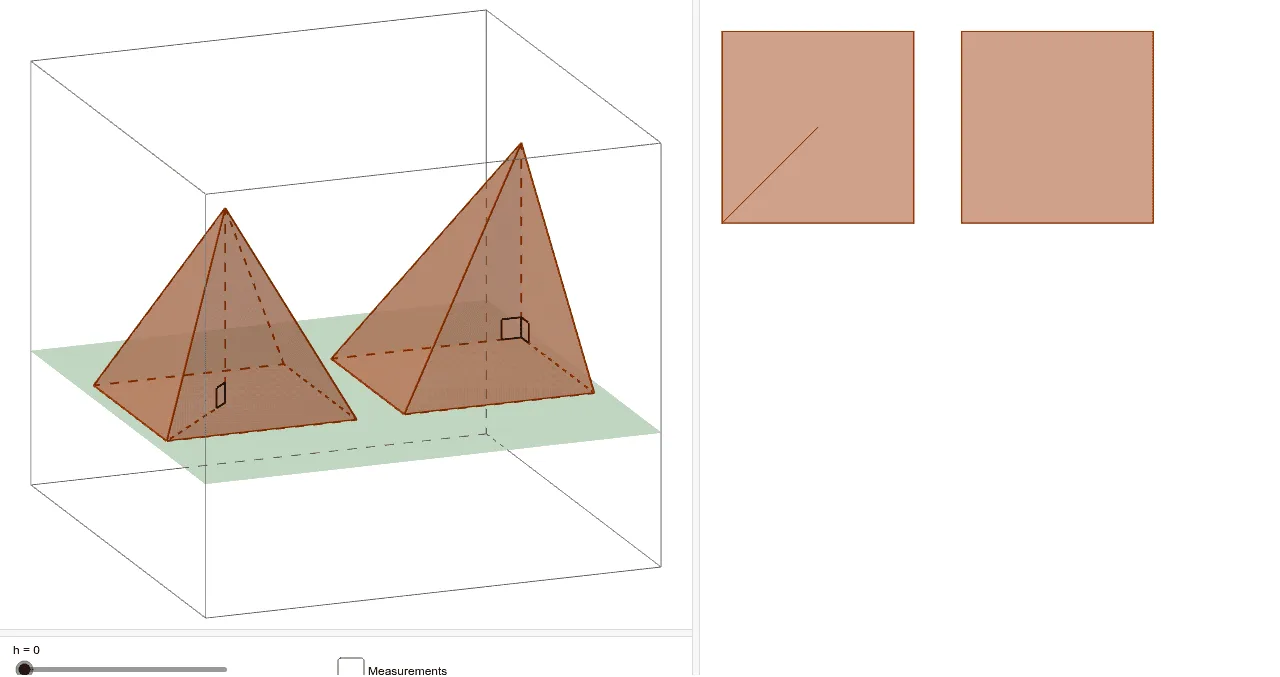
①本范例演示了卡瓦列里原理在两个底面积相等且高相等的金字塔体积计算中的应用;②涉及的核心数学概念为体积计算、几何直观和卡瓦列里原理;③作图要点——从下方『构造摘要』提炼用到了GeoGebra命令/对象:Pyramid(金字塔)、Plane(平面)、Segment(线段)、Angle(角度)、Intersect(交点)、Polygon(多边形);④适合高中阶段学习立体几何和微积分的学生,用于理解体积公式的推导和几何原理的应用。
GeoGebra 命令及参数
Pyramid((-10, 0, 0), (-2, 0, 0), (-2, 8, 0), (-10, 8, 0), (-10, 0, 8)) → e, face1, edge5, edge6, edge7, edge8, face2, face3, face4, face5, edge1, edge2, edge3, edge4Pyramid((0, 0, 0), (8, 0, 0), (8, 8, 0), (0, 8, 0), (4, 4, 8)) → a, face6, edge13, edge14, edge15, edge16, face7, face8, face9, face10, edge9, edge10, edge11, edge12Plane((0, 0, h), (5, 5, h), (5, (-5), h)) → dSegment((4, 4, 0), (4, 4, 8)) → bSegment((4, 4, 0), (8, 8, 0)) → cAngle((-2, 0, 0), (-10, 0, 0), (-10, 0, 8)) → αAngle((-10, 8, 0), (-10, 0, 0), (-10, 0, 8)) → βAngle((8, 8, 0), (4, 4, 0), (4, 4, 8)) → γIntersect(edge14, d) → AIntersect(edge15, d) → BIntersect(edge16, d) → CIntersect(edge13, d) → DIntersect(edge6, d) → EIntersect(edge7, d) → FIntersect(edge8, d) → GIntersect(edge5, d) → HPolygon(A, B, C, D) → poly1, a_1, b_1, c_1, d_1Polygon(E, F, G, H) → poly2, e_1, f, g, h_1
AI 绘图提示语参考
画两个具有相同底面和高度的锥体,展示如何应用卡瓦列里原理计算它们的体积。锥体一位于左侧,底面在z=0平面上,顶点在z=8处;锥体二位于右侧,底面同样在z=0平面上,顶点在z=8处。在锥体之间画一个垂直于底面的平面,与锥体边缘相交于八个点,连接这些交点形成两个四边形。分别用不同颜色标示这两个锥体和两个四边形,并画出锥体底面的边和顶点,以及锥体之间的平面和交点连接线,清晰展示卡瓦列里原理的应用过程。
以上提示语为根据原始绘图命令整理而来,仅供参考。