
纸牌游戏与分数比较
几何画板及绘图内容加载中,请稍等……
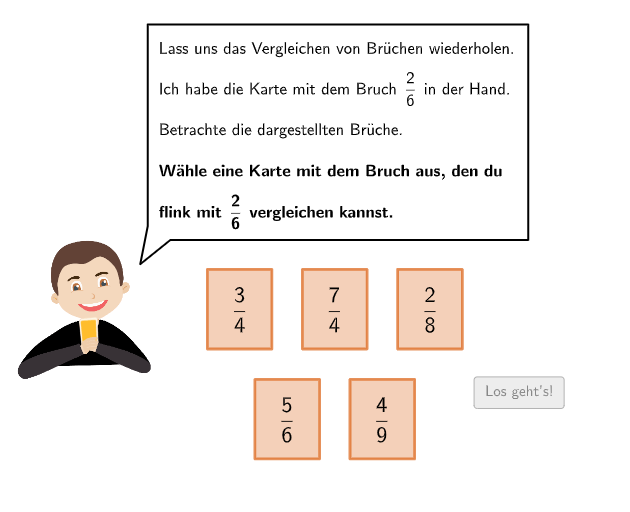
本范例通过纸牌游戏演示分数的比较。涉及的核心数学概念是分数的大小比较。作图要点包括使用SelectedIndex, Element, If, Textfield, Flatten, Translate, Zip, Point, CountIf等GeoGebra命令。适合小学高年级或初中学生学习分数比较。
GeoGebra 命令及参数
SelectedIndex(DropDown4c) → input4cSelectedIndex(DropDown3c) → input3cSelectedIndex(DropDown3b) → input3bSelectedIndex(DropDown1a) → input1aSelectedIndex(DropDown1b) → input1bSelectedIndex(DropDown4a) → input4aSelectedIndex(DropDown4b) → input4bSelectedIndex(DropDown2a) → input2aSelectedIndex(DropDown3a) → input3aElement(listselected, runde) → selectedSelectedIndex(DropDown2b) → input2bSelectedIndex(DropDownB) → inputBIf(selected ≟ 2, 4, 5.2) → fracsizexIf(selected ≟ 2, (1.33948, 1), (1.8, 1)) → C1Element({correct1, correct2a ∧ correct2b, correct3a ∧ correct3b ∧ correct3c, correct4a ∧ correct4b ∧ correct4c, true}, selected) → correctATextfield(inputB) → Eingabefeld2If(runde ≟ 1, A1, A2) → AFlatten(Sequence[Sequence[A + (m * (vsizex / 2 + 0.4, 0)) + (j * (0, vsizey - 0.8)), m, 0, 5], j, 0, 1]) → listAllPointsTranslate(Polygon[(0, 0), (vsizex, 0), (vsizex, vsizey), (0, vsizey)], listAllPoints(1)) → v1Translate(Polygon[(0, 0), (vsizex, 0), (vsizex, vsizey), (0, vsizey)], listAllPoints(3)) → v2Translate(Polygon[(0, 0), (vsizex, 0), (vsizex, vsizey), (0, vsizey)], listAllPoints(5)) → v3Translate(Polygon[(0, 0), (vsizex, 0), (vsizex, vsizey), (0, vsizey)], listAllPoints(8)) → v4Translate(Polygon[(0, 0), (vsizex, 0), (vsizex, vsizey), (0, vsizey)], listAllPoints(10)) → v5Zip(Translate[Polygon[(0, 0), (vsizex, 0), (vsizex, vsizey), (0, vsizey)], P], P, listP) → listWhiteVPoint(Line[B1, xAxis]) → B2Translate(Polygon[(0, 0), (vsizex, 0), (vsizex, vsizey), (0, vsizey)], B1) → w1Translate(Polygon[(0, 0), (vsizex, 0), (vsizex, vsizey), (0, vsizey)], B2) → w2Flatten(Sequence[Sequence[C1 + (m * (fracsizex / 6, 0)) + (j * (0, fracsizey)), m, 0, 5], j, 0, 0]) → listPointsLZip(Translate[Polygon[(0, 0), (fracsizex / 6, 0), (fracsizex / 6, fracsizey), (0, fracsizey)], P], P, listPointsL) → listVLFlatten(Sequence[Sequence[C2 + (m * (fracsizex / numN, 0)) + (j * (0, fracsizey)), m, 0, numN - 1], j, 0, 0]) → listPointsRZip(Translate[Polygon[(0, 0), (fracsizex / 6, 0), (fracsizex / 6, fracsizey), (0, fracsizey)], P], P, {listPointsL(1), listPointsL(2)}) → listVLZFlatten(Sequence[Sequence[C2 + (m * (fracsizex / numN, 0)) + (j * (0, fracsizey)), m, 0, numZ - 1], j, 0, 0]) → listPointsRZTextfield(inputB) → Eingabefeld1Translate(Segment[(fracsizex / 2, 0), (fracsizex / 2, fracsizey)], C1) → f1Translate(Segment[(fracsizex / 2, 0), (fracsizex / 2, fracsizey)], C2) → f2Translate(Polygon[((-padding), padding), (vsizex + padding, padding), (vsizex + padding, vsizey - padding), ((-padding), vsizey - padding)], listP(selected)) → vselectedFlatten(Sequence[Sequence[C2 + (m * (fracsizex / numN, 0)) + (j * (0, fracsizey)), m, 0, (2 * numN) - 1], j, 0, 0]) → listPointsR2Translate(Segment[(fracsizex, 0), (fracsizex, fracsizey)], C1) → f3Translate(Segment[(fracsizex, 0), (fracsizex, fracsizey)], C2) → f4CountIf(m ≟ 0, m, listselected) → selectedtogoSpeechBubbleLeft(B, 9.4, 5.3) → Vieleck1SpeechBubbleLeft(E, 12, 2.9) → Vieleck2SpeechBubbleLeft(H, 8.5, 1.6) → Vieleck3Zip(Translate[Polygon[(0, 0), (fracsizex / numN, 0), (fracsizex / numN, fracsizey), (0, fracsizey)], P], P, listPointsR) → listVRSpeechBubbleLeft(M, 9, 1.23) → Vieleck4Zip(Translate[Polygon[(0, 0), (fracsizex / numN, 0), (fracsizex / numN, fracsizey), (0, fracsizey)], P], P, listPointsR2) → listVR2Zip(Translate[Polygon[(0, 0), (fracsizex / numN, 0), (fracsizex / numN, fracsizey), (0, fracsizey)], P], P, listPointsRZ) → listVRZ
AI 绘图提示语参考
绘制一个用于比较分数的卡牌式排版。先画出一个外框矩形区域,并在其中按网格放置左右两组由小矩形构成的分格条形单元;将若干组板块向右平移形成多列分区,再在其中放置两处可变化的分格区域作为“答案/选项”位置。用竖向的细分格线与水平分层把分数单位切分成等高的小格,在分割条的左右两侧分别生成对应的分数形状。最后在合适位置加入对输入与提示的文字框或短说明气泡,用于显示当前选择的分数信息与正确性判定。
以上提示语为根据原始绘图命令整理而来,仅供参考。