
自动拖拉机割草机模型
几何画板及绘图内容加载中,请稍等……
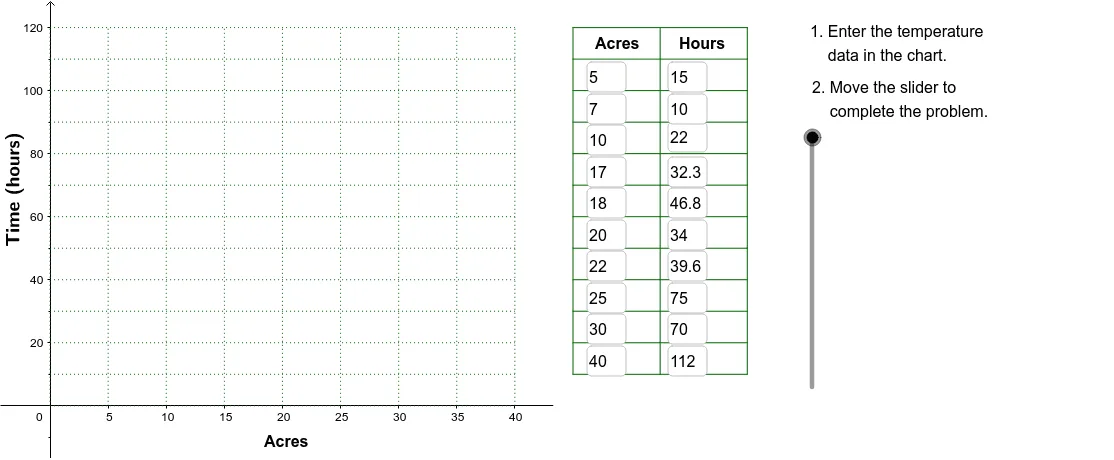
①本范例演示了如何使用 GeoGebra 构建不同大小草坪的自动割草机模型;②涉及的核心数学概念包括面积计算、极限、乘法、中位数线、箱线图;③作图要点提炼自构造摘要,使用了 Corner, Polygon, Textfield, Line, Sequence, VerticalText 等命令和对象;④适合高中数学教学,用于演示统计与几何结合的应用实例。
GeoGebra 命令及参数
Corner(2) → Corn2Corner(3) → Corn3Polygon(Corn1, Corn2, Corn3, Corn4) → poly1, corn1, corn2, corn3, corn4Textfield(A2) → InA2Textfield(A3) → InA3Textfield(A4) → InA4Textfield(A5) → InA5Textfield(A6) → InA6Textfield(A7) → InA7Textfield(A8) → InA8Textfield(A9) → InA9Textfield(B9) → InB9Textfield(B8) → InB8Textfield(B7) → InB7Textfield(B6) → InB6Textfield(B5) → InB5Textfield(B4) → InB4Textfield(B3) → InB3Textfield(B2) → InB2Line(Pt1, Pt2) → FitLineSequence(Segment[(45, 10 + (10 * j)), (60, 10 + (10 * j))], j, 0, 11) → LnListSequence(Segment[(45 + (7.5 * j), 10), (45 + (7.5 * j), 120)], j, 0, 2) → LnList2Textfield(A10) → InA10Textfield(A11) → InA11Textfield(B10) → InB10Textfield(B11) → InB11VerticalText("\text{Time (hours)}") → DownLegendSequence(Segment[((5 * i), 0), ((5 * i), 120)], i, 0, 8) → GridxSequence(Segment[(0, (10 * i)), (40, (10 * i))], i, 0, 12) → Gridy
AI 绘图提示语参考
画一个自动割草机模型,包含一个四边形草坪,用点标记四个角,并计算其面积。添加多个文本框输入数据,绘制一条拟合线,并用序列生成多条水平和垂直线段作为网格,最后标注时间轴和网格线。
以上提示语为根据原始绘图命令整理而来,仅供参考。