
梯形面积的倍增构造——动态演示与几何验证
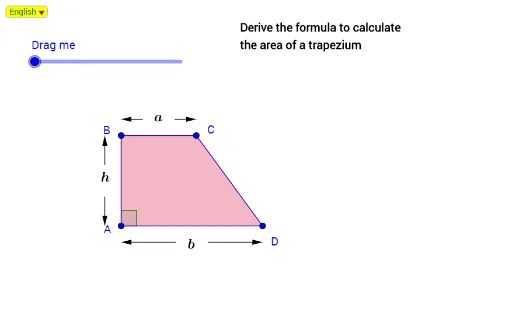
几何画板及绘图内容加载中,请稍等……
所属专题
Mathematics Form 1
该范例通过动态几何构造直观演示梯形面积与其倍增图形之间的关系,核心是展示如何利用旋转、平移和复制操作,将原梯形变换为面积为其两倍的平行四边形或其他等价图形,从而验证梯形面积公式。涉及的核心数学概念包括梯形、平行四边形、面积守恒、旋转变换、中点与内切圆等。作图要点包括:使用GeoGebra的Line、Point、Polygon等基础命令绘制梯形及其顶点;通过DynamicCoordinates和SelectedIndex实现动态参数控制;利用Midpoint、Circle、Angle构造辅助元素;通过旋转(Putar)和复制(如poly1'、poly1'')生成倍增图形,并借助Intersect求交点以完善图形。该范例适合中学几何教学,用于帮助学生直观理解面积公式的推导过程,也可作为动态几何课件设计的参考案例。
GeoGebra 命令及参数
Line(A, xAxis) → aPoint(a) → DIf(abs(x(H) - x(A)) < 0.2, (x(A), y(H)), H) → PmDynamicCoordinates(H, x(Pm), y(Pm)) → BLine(B, a) → cPoint(c) → CIf(p ≟ true, C, D) → PutarPolygon(A, B, C, D) → poly1, a_1, b_1, c_1, dLine(A, yAxis) → bIntersect(c, b) → EIf(e ≤ 1, Rotate[B, (180° * e), Putar], Rotate[B, 180°, Putar]) → B'If(e ≤ 1, Rotate[C, (180° * e), Putar], Rotate[C, 180°, Putar]) → C'If(e ≤ 1, Rotate[D, (180° * e), Putar], Rotate[D, 180°, Putar]) → D'If(e ≤ 1, Rotate[A, (180° * e), Putar], Rotate[A, 180°, Putar]) → A'If(p ≟ true, Vector[C, D], Vector[D, C]) → uPolygon(A', B', C', D') → poly1', a', b', c', d'If(e > 1, Translate[A', Vector[((e - 1) * u)]]) → A''If(e > 1, Translate[B', Vector[((e - 1) * u)]]) → B''If(e > 1, Translate[C', Vector[((e - 1) * u)]]) → C''If(e > 1, Translate[D', Vector[((e - 1) * u)]]) → D''Polygon(A'', B'', C'', D'') → poly1'', a'', b'', c'', d''Midpoint(B, C) → FMidpoint(A, D) → GCircle(F, ja) → fIntersect(f, c) → I_2, I_1Circle(I_1, ja) → kCircle(I_2, ja) → p_2Line(I_1, b) → jLine(I_2, b) → gIntersect(p_2, g, 2) → I_3Intersect(k, j, 2) → I_4Circle(C, ja) → qLine(C, b) → iIntersect(q, i, 2) → LCircle(B, ja) → rLine(B, b) → lIntersect(r, l, 2) → MCircle(G, ja) → sIntersect(s, a) → P_4, P_3Circle(P_3, ja) → tCircle(P_4, ja) → d_1Line(P_3, b) → hLine(P_4, b) → mIntersect(d_1, m, 1) → P_1Intersect(t, h, 1) → P_2Circle(D, ja) → e_1Circle(A, ja) → f_1Intersect(f_1, b, 1) → RLine(D, b) → nIntersect(e_1, n, 1) → SCircle(E, ja) → g_1Intersect(a, i) → TIntersect(g_1, c, 1) → UIntersect(f_1, a, 1) → VMidpoint(E, A) → WCircle(W, ja) → h_1Intersect(h_1, b, 2) → ZIntersect(h_1, b, 1) → A_1Circle(Z, ja) → k_1Circle(A_1, ja) → p_1Line(Z, c) → i_1Line(A_1, c) → j_1Intersect(k_1, i_1, 1) → B_1Intersect(p_1, j_1, 1) → C_1Intersect(l, i_1) → D_1Intersect(l, j_1) → E_1Intersect(a, l) → F_1Circle(D_1, ja) → q_1Circle(E_1, ja) → r_1Midpoint(F_1, B) → G_1Intersect(r, c, 1) → H_1Intersect(q_1, i_1, 1) → I_5Intersect(r_1, j_1, 1) → J_1Circle(F_1, ja) → s_1Intersect(s_1, a, 1) → K_1Intersect(r_1, j_1, 2) → IIntersect(q_1, i_1, 2) → JIntersect(s_1, a, 2) → KIntersect(r, c, 2) → NIntersect(k, j, 1) → OIntersect(q, i, 1) → PIntersect(p_2, g, 1) → QIntersect(r, l, 1) → L_1If(p ≟ true, Vector[I_3, M], Vector[Q, L_1]) → vIf(p ≟ true, Vector[I_4, L], Vector[O, P]) → wIntersect(f_1, b, 2) → M_1Intersect(d_1, m, 2) → N_1Intersect(t, h, 2) → O_1Intersect(e_1, n, 2) → Q_1If(p ≟ true, Vector[P_1, R], Vector[N_1, M_1]) → u_1If(p ≟ true, Vector[P_2, S], Vector[O_1, Q_1]) → v_1If(p ≟ true, Vector[B_1, V], Vector[C_1, V]) → w_1If(p ≟ true, Vector[C_1, U], Vector[B_1, U]) → l_1If(p ≟ true, Vector[J, K], Vector[I, K]) → m_1If(p ≟ true, Vector[I, N], Vector[J, N]) → n_1Angle(D, A, B) → αAngle(C, B, A) → βAngle(C, D, A) → γAngle(D, C, B) → δSelectedIndex(Bahasa) → nnIf(nn ≟ 1, "Derive the formula to calculate", "Menerbit rumus untuk menghitungkan") → Tex1If(nn ≟ 1, "the area of a trapezium", "luas bentuk trapezium") → Tex2
AI 绘图提示语参考
绘制一个梯形及其通过旋转和复制形成的面积加倍图形。先画一条水平底边,在其上取两点作为下底端点,再在上方画一条平行线,取两点作为上底端点,连接四点构成梯形。然后以梯形一个顶点为旋转中心,将整个梯形旋转180度,得到旋转后的梯形,再沿底边方向平移该旋转梯形,使其与原梯形拼成一个平行四边形。最后在梯形内部画出两条对角线,并标出中点,用虚线连接中点,形成辅助线,以展示面积关系。
以上提示语为根据原始绘图命令整理而来,仅供参考。